Trip.com Flight Check In: Complete Guide for Online Check-In

By Trip.com
April 16, 2026
Step 1: To Log in to Trip.com: Open the Trip.com App to Check in for Your Flight
- Log in to your Trip.com account and tap "My Trips" (or "Upcoming Trips") to find your flight booking. From there, just tap it to enjoy a smart check-in experience with Trip.com.
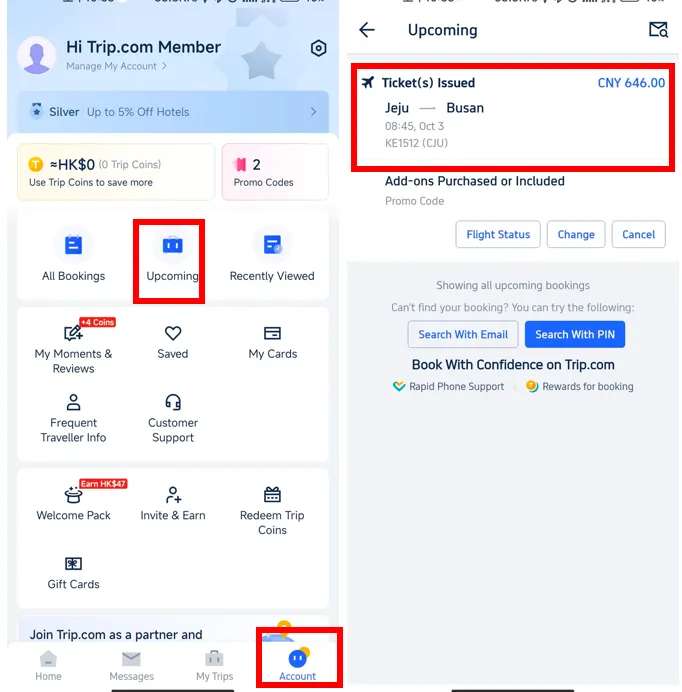
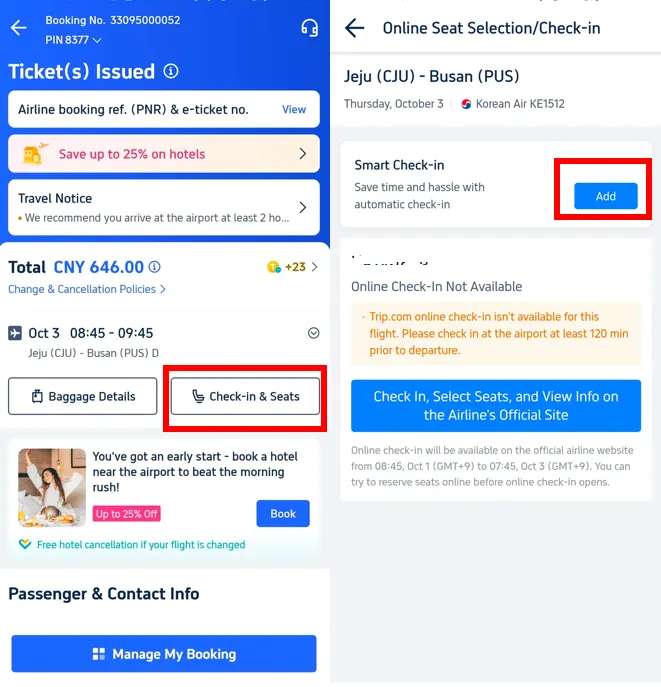
Step 2:for Checking in on Trip.com: Retrieve Your Flight Booking to Enjoy a Smart Check-in Experience
- Tap "Check-in & Seats" (or "Check-in/Select Seats") to access the details page, then tap "Add" (or "Action") to complete your check-in via Trip.com.
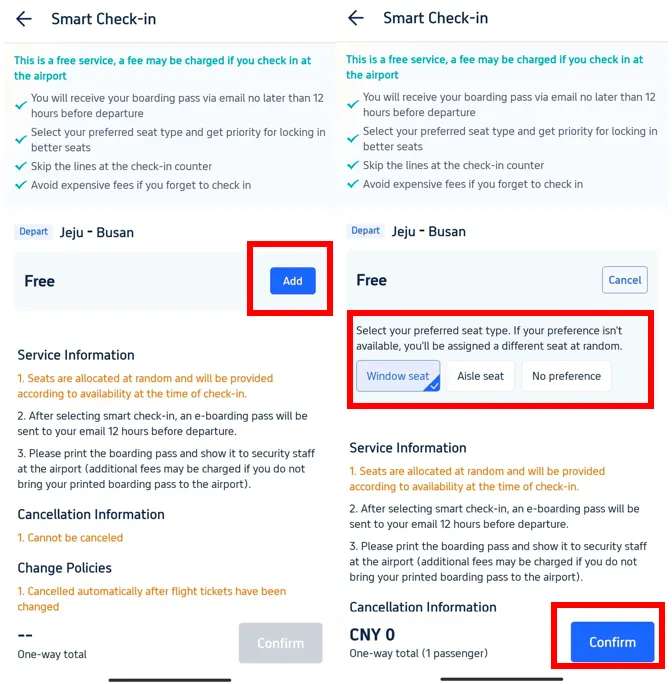
Step 3:for Logging into Trip.com: Choose and Confirm Your Preferred Seat Type
- Tap "Add" (or "Select") to choose your preferred seat type, then tap "Confirm" to complete your Trip.com booking.
Why is Trip.com Your Top Choice for Travel?
Listen, my friend, choosing the right booking site makes a huge difference in your entire travel experience, and Trip.com has got the highlights covered for you in just a few points:
- Everything you need in one place: Looking for a flight? We've got it. Need a hotel? It's right here. Searching for tours or activities at your destination? We have those, too. Trip.com brings all your travel services together on one platform, so you don't have to jump between sites and waste your time. You can book your entire trip right here, saving you all the hassle and endless searching.
- 24/7 Multilingual Customer Service: Imagine you're traveling and something urgent comes up in the middle of the night, or you have a pressing question? Trip.com offers 24/7 customer support, all week long, and best of all, they speak multiple languages. No matter what happens, you'll find someone who can help and understand you, giving you total peace of mind while you travel.
- Effortless Booking: Our website and app are designed to make booking a breeze, not a headache. You can quickly search for your trip, compare prices, and choose exactly what suits you without any stress. It’s a game-changer for anyone looking to book fast and hassle-free.
- Exclusive Member Perks & Discounts: If you’re a Platinum or Diamond member on Trip.com, you’re in for a real treat! You get free access to airport lounges to kick back and relax before your flight, earn extra Trip Coins to use as discounts on future bookings, and save even more on hotels. Basically, the more you travel with us, the more perks you unlock and the more you save!
- Competitive Prices: While we love talking about services and perks, prices matter too. Trip.com always compares airline and hotel rates for you to ensure you get the best deal on the market, so you can book with peace of mind knowing you haven't paid more than you should.
FAQs About Logging into Trip.com
Travelers often have so many questions about logging in, so this time we’ve gathered the most important ones along with their answers to put your mind at ease and ensure your journey is smooth sailing.
1. What are the benefits of checking in online early?
Hey there! Checking in online has so many perks and saves you a whole lot of hassle:
- Save your time: No need to wait in long lines at airport counters, especially if you don't have any bags to check.
- Choose your seat: You can pick the seat you want—whether it's by the window, the aisle, or anywhere else you prefer—before the best spots are taken.
- Peace of mind: Get everything sorted early so you can arrive at the airport relaxed, knowing you’re fully prepared.
2. When can I check in for my flight on Trip.com?
Typically, you can check in online anywhere from 24 to 48 hours before your flight's departure. However, this timing varies from one airline to another, so it's always a good idea to double-check with the specific airline you've booked with. Some airlines open check-in earlier, while others might open it a bit later.
3. If I have bags to check in (luggage), what should I do after checking in online?
After checking in online, you'll need to head to the airline's dedicated bag drop counter at the airport to hand over your luggage. There are often special lines for online check-in passengers to help you get through quickly.
4. I have a special request (e.g., traveling with an infant, using a wheelchair, or an unaccompanied minor), can I still check in online?
In most cases, if you have special circumstances or need specific assistance, it's best to contact the airline directly or arrive at the airport early to check in at the counter. Some special services require arrangements that cannot be made through online check-in.
5. What should I do if I can't sign in to Trip.com?
It happens, don't worry! If you run into any trouble and can't sign in to Trip.com:
- Try the airline's website: Head over to the official airline website and try logging in using your booking reference number (PNR).
- Connect with Trip.com: Reach out to our 24/7 customer service team—we're here to help you whenever you need us.
- Head to the airport early: If all else fails, just head to the airport well before your flight and check in at the airline counter.
6. How do I get my boarding pass after checking in?
Once you've checked in online, you can get your boarding pass as:
- Mobile Boarding Pass: Get it sent straight to your phone or email. Just be sure to check that your airport and airline support this feature.
- Printing: You can print it yourself at home, use the self-service printing kiosks at the airport, or visit the airline counter.
Start Your Journey with Trip.com!
Trip.com is a global online travel agency that offers 24/7 customer service in multiple languages. We make booking flights, hotels, tours, and activities a breeze. Plus, our Platinum and Diamond members enjoy exclusive perks like free airport lounge access, extra Trip Coins, deeper hotel discounts, reduced train booking refund fees, and so much more!
Save 10% OFF on Hotel Booking on Trip.com
Best Offer to Asia: Up to 50% OFF on Trip.com

Learn more about our mission.
*This content is written by the Trip.com team. We have 15 years of experience in travel. All information comes from real traveler stories and real data. We are experts in helping you find the best hotels.
Popular Searches
-
Top flight destinations
-
Top flight routes
-
Most booked airlines
-
Popular eSIM/SIM card
-
Top Car Rental Picks
-
Popular Hotel Destinations
- Flights to Manila
- Flights to Mumbai
- Flights to Kochi
- Flights to Chennai
- Flights to Kozhikode
- Flights to Delhi
- Flights to Thiruvananthapuram
- Flights to Hyderabad
- Flights to Cairo
- Flights to Islamabad
- Flights to Jeddah
- Flights to Lahore
- Flights to London
- Flights to Dubai
- Flights to Mangalore
- Flights to Karachi
- Flights to Abu Dhabi
- Flights to Riyadh
- Flights to Colombo
- Flights to Amman
- Flights to Bengaluru
- Flights to Dhaka
- Flights to Tiruchirapalli
- Flights to Kathmandu
- Flights to Kannur
- Flights from Dubai to Manila
- Flights from Dubai to Mumbai
- Flights from Dubai to Kochi
- Flights from Dubai to Chennai
- Flights from Abu Dhabi to Kochi
- Flights from Dubai to Kozhikode
- Flights from Dubai to Delhi
- Flights from Abu Dhabi to Kozhikode
- Flights from Abu Dhabi to Thiruvananthapuram
- Flights from Dubai to Hyderabad
- Flights from Abu Dhabi to Cairo
- Flights from Dubai to Islamabad
- Flights from Dubai to Jeddah
- Flights from Dubai to Lahore
- Flights from Abu Dhabi to Mumbai
- Flights from Abu Dhabi to Chennai
- Flights from Dubai to London
- Flights from Dubai to Thiruvananthapuram
- Flights from Mumbai to Dubai
- Flights from Dubai to Cairo
- Flights from Kochi to Dubai
- Flights from Dubai to Mangalore
- Flights from Sharjah to Cairo
- Flights from Dubai to Karachi
- Flights from Kochi to Abu Dhabi
- Car rentals in Kashiwa Station
- Car rentals in Lille
- Car rentals in Edmonton
- Robert L. Bradshaw International Airport Car rental
- Car rentals in Devils Lake
- Ruidoso Car rental
- Car rentals in Yuli Station
- Car rentals in Leuven NMBS Station
- Car rentals in Kartal
- Car rentals in Maharashtra
- Car rentals in Andhra Pradesh
- Monroe Regional Airport Car rental
- Car rentals in Oneonta
- Car rentals in Oslo County
- Niagara Falls International Airport Car rental
- Montlucon Car rental
- real rental car car rentals in Osaka
- Car rentals in Solingen Main Station
- Car rentals in Wangaratta
- Luvdrive Car Rent car rentals
- BUDGET car rentals in Akita City
- Car rentals in Zilina
- Car rentals in Gendoji Station
- Car rentals in Saga Station
- Jamestown Regional Airport Car rental
- Car rentals in Stanton Township
- Car rentals in Tàrrega
- Grande Prairie Airport Car rental
- Car rentals in Marino Laziale
- FAMILY CAR RENT car rentals
- Hotels in Dubai
- Hotels in Sharjah
- Hotels in Abu Dhabi
- Hotels in London
- Hotels in Riyadh
- Hotels in Jeddah
- Hotels in Cairo
- Hotels in Medina
- Hotels in Makkah
- Hotels in Paris
- Hotels in Milan
- Hotels in Bangkok
- Hotels in Istanbul
- Hotels in Manila
- Hotels in Mumbai
- Hotels in Karachi
- Hotels in Tokyo
- Hotels in New York
- Hotels in Rome