Trip.com Hotel Refunds: Policy, Time & Status Guide

By Trip.com
March 26, 2026
Not sure how to cancel a Trip.com hotel booking or whether you’ll get a refund? This complete guide breaks down the Trip.com hotel cancellation process—from step-by-step instructions to cancel your reservation, to refund eligibility and timelines—so even first-timers can breeze through a hotel booking refund.
Top Hotels in Dubai
Top Hotels in Makkah
Top Hotels in Jeddah
Top Hotels in Istanbul
Top Hotels in London
See All Hotels
 NO.1
NO.1
























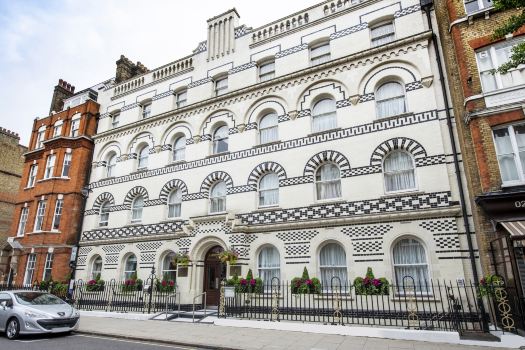





Cancel your hotel reservation on Trip.com
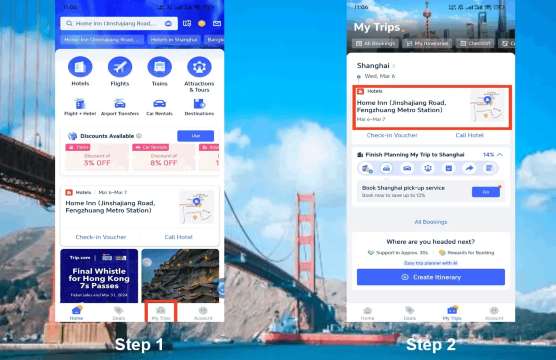
Trip.com Hotel Booking Cancellation #1 Go to Trip.com and sign in to your account
Log in to your Trip.com account and click "My Trips" to find all your bookings there.
Trip.com Hotel Cancellation #2: Find the hotel booking you’d like to cancel
Find the hotel reservation you want to cancel and select it to open the reservation details.
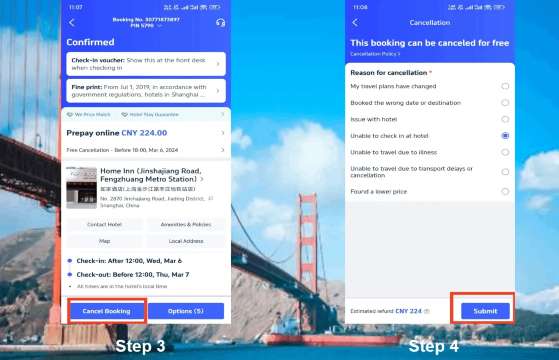
Trip.com Hotel Reservation Cancellation #3: Apply for a Hotel Refund
Click the "Cancel Order" button to view the hotel's cancellation and change policies as they applied when you booked.
Trip.com Hotel Cancellation #4: Provide Your Reason for Cancellation
Click the "Cancellation Reason" button, select your reason for canceling this booking, and click Confirm to submit.
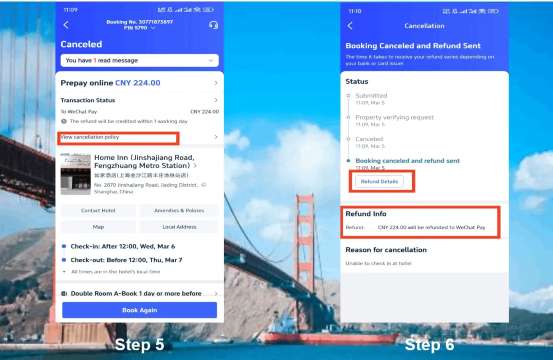
Trip.com Hotel Refunds #5: Confirm Your Hotel Refund
After you submit your hotel cancellation request, tap "View Cancellation Policy" to see your refund details.
Follow the steps above to successfully cancel your hotel booking and receive your refund. Please note that the time it takes for the refund to post depends on your credit card issuer.
Latest Trip.com Flight Deals
Cheap Flights to Jeddah
Cheap Flights to Riyadh
Cheap Flights to Istanbul
Cheap Flights to Phuket
Cheap Flights to Bangkok
Cheap Flights to Cairo
See all flights


Stay Connected with Trip.com eSIM

Saudi Arabia 5G eSIM
- CoverageSaudi Arabia
- DataDaily/Total Data Package
- Validity1 to 30 Days
- PriceFrom AED 1.72

Europe 5G/4G eSIM
- CoverageEurope
- Data500MB/day-total 50GB
- Validity1 to 30 Days
- PriceFrom AED 0.34

Global 4G/5G eSIM
- CoverageGlobal (100 countries)
- DataTotal|500MB/day - 30GB Total Data
- Validity1 to 30 Days
- PriceFrom AED 4.05
Save More on Car Rental with 8% OFF
Car Rentals
Car Rental Promo Code - 8% Off
TRIPCAR8
Trip.com Hotel Refund FAQs
-
Can I always get a refund for a restaurant on Trip.com?
-
Do I need to pay a processing fee when canceling a hotel reservation on Trip.com?
-
How long does it take for a Trip.com restaurant refund to be credited to my account?
-
The free cancellation period has expired, can I still get a refund for the hotel reservation?
Disclaimer: This article has been provided by an individual contributor or third party platform. If there is any discrepancy regarding the copyright, please contact us directly and we will delete the content immediately.