Food Delivery Apps in China: A Complete Guide for Foreigners

Have you ever traveled in China, only to find yourself exhausted and starving after a long day of sightseeing, stuck in your hotel room with no idea how to order food delivery? Well, these apps are total lifesavers! With just a few taps on your phone, you can have delicious meals delivered right to your hotel door. Plus, food delivery in China is often faster than you’d expect—and sometimes even cheaper than dining in! (There are tons of huge discount coupons available!)
In this guide, we’ll walk you through the best food delivery apps in China for foreigners, how to set them up, and how to place an order, so you can enjoy delicious meals even while you're traveling!
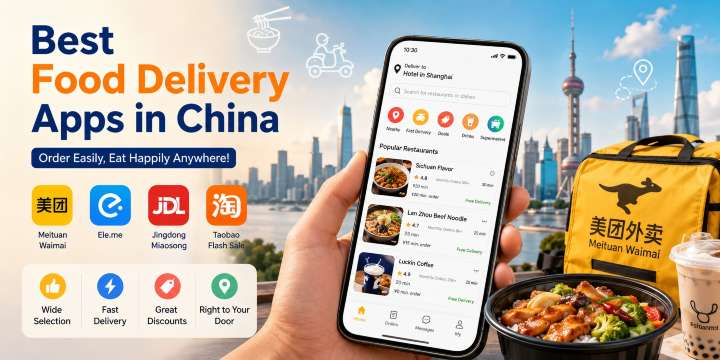
Best Food Delivery Apps in China for Foreigners
Finished shopping and exploring all day, but don't know what to eat? Here are the 4 most popular food delivery apps in China:
App | Key Features | Great for |
Meituan Waimai (美团外卖) | The largest food delivery platform, covering both local restaurants and chain brands | Everyday dining, street food, quick takeaways |
Ele.me (饿了么) | A wide selection, frequent discounts, and part of the Alibaba Group | Great prices, different flavors of cuisine |
Jingdong Miaosong (京东秒送) | JD's instant delivery service for food and supermarket goods | Food, beverages, and daily necessities |
Taobao Flash Sale (淘宝闪购) | Food delivery services within the Taobao shopping app | People who are already shopping on Taobao |
Looking for a China food delivery app in English? While most apps are primarily in Chinese, tools like Google Translate or your phone's live translation feature make them much easier to use.
Tip: If you're traveling from the UAE to China, it's best to set up your internet connection before arrival by purchasing a China eSIM or a local SIM card. Apps like WeChat, Alipay, and food delivery platforms rely on a stable internet connection to work properly.
China eSIM Recommendations
See all attractions
 905651 booked


Chinese Food Delivery App: Meituan Waimai(美团外卖)

What is Meituan Waimai (美团外卖)?
Meituan is one of China's largest lifestyle service platforms, primarily offering food delivery, movie tickets, and ride-hailing. Meituan Waimai focuses on food delivery.
It offers affordable prices, a wide variety of options, and features clear pricing, photos, and reviews.
Ready to plan your trip? Don't forget to check out the latest flights to China and hotel deals on Trip.com.
How to Download and Set up the Meituan Waimai (美团外卖) App?
1. Download the App
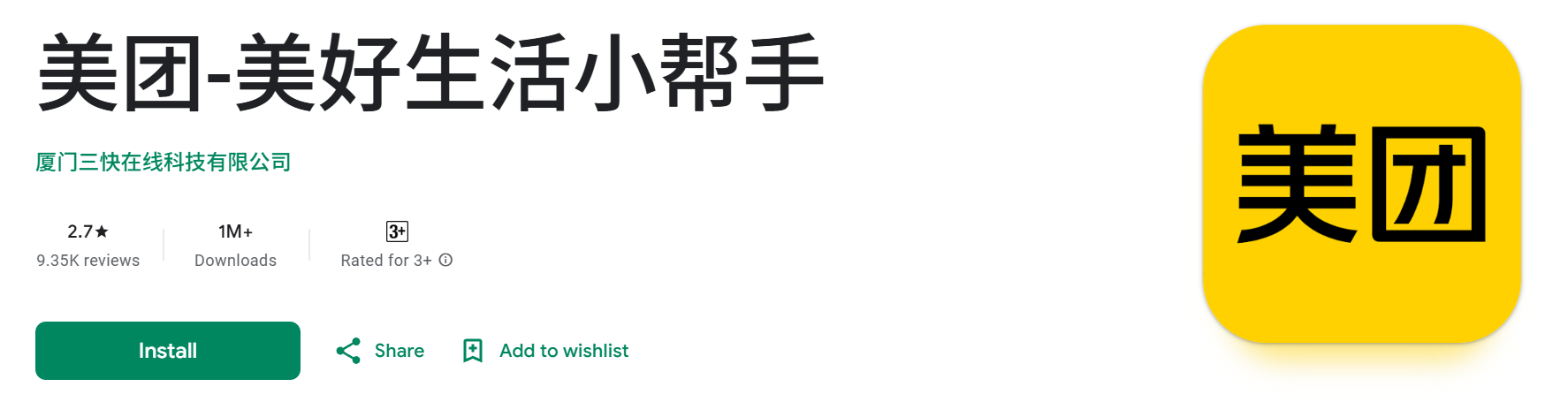
iPhone: You may need to switch your App Store region to China, then search for "Meituan" or "Meituan Waimai" to install it.
Android: You can find Meituan on Google Play, or download it via the official Meituan website or trusted domestic app stores.
Tip: Even with the Chinese interface, many icons and images are quite intuitive. If you don't understand Chinese, you can use a translation app to help you understand.
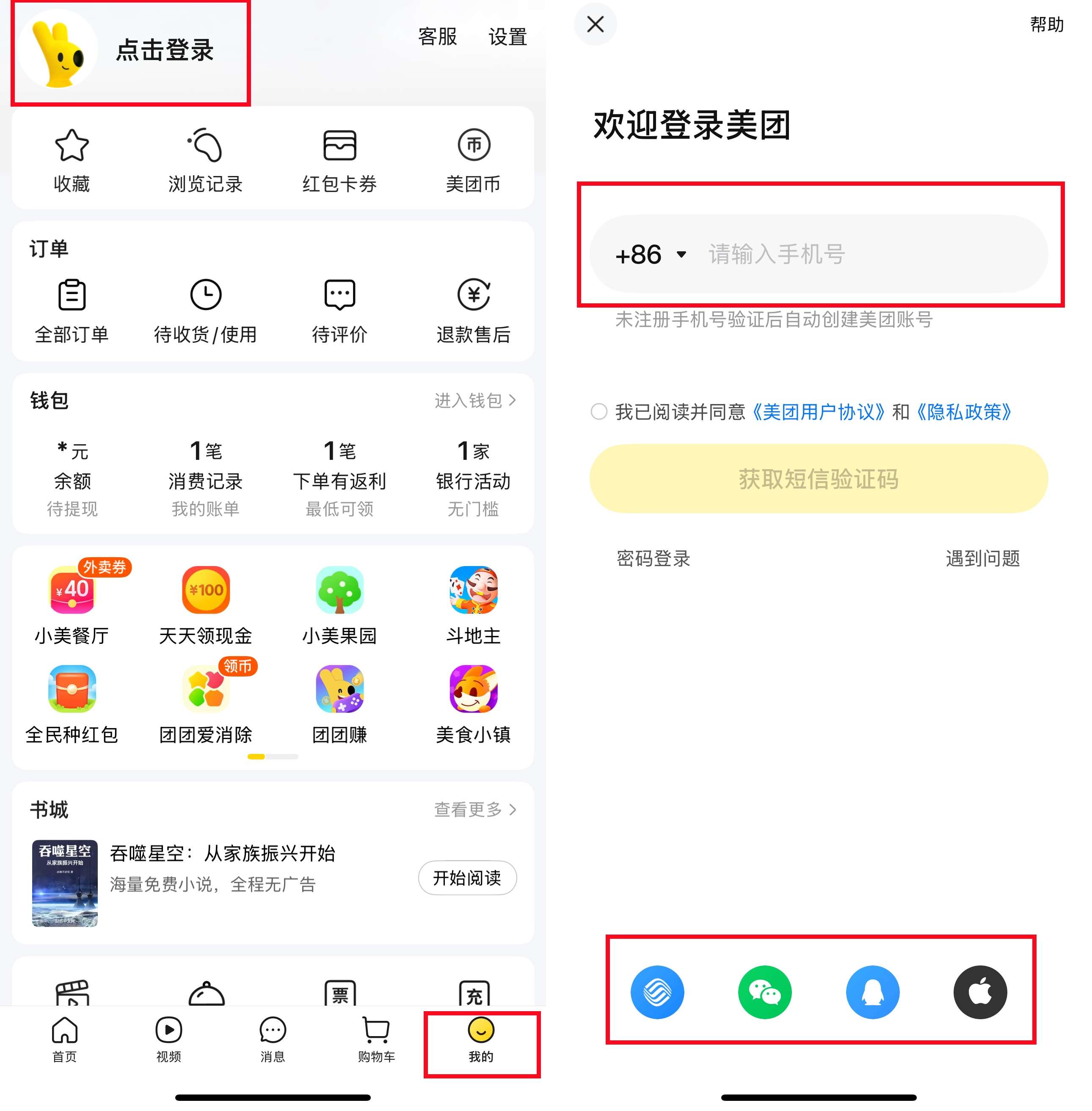
2. Register and log in
Register using an international mobile number and verify via SMS code. You can also log in using WeChat or Alipay.
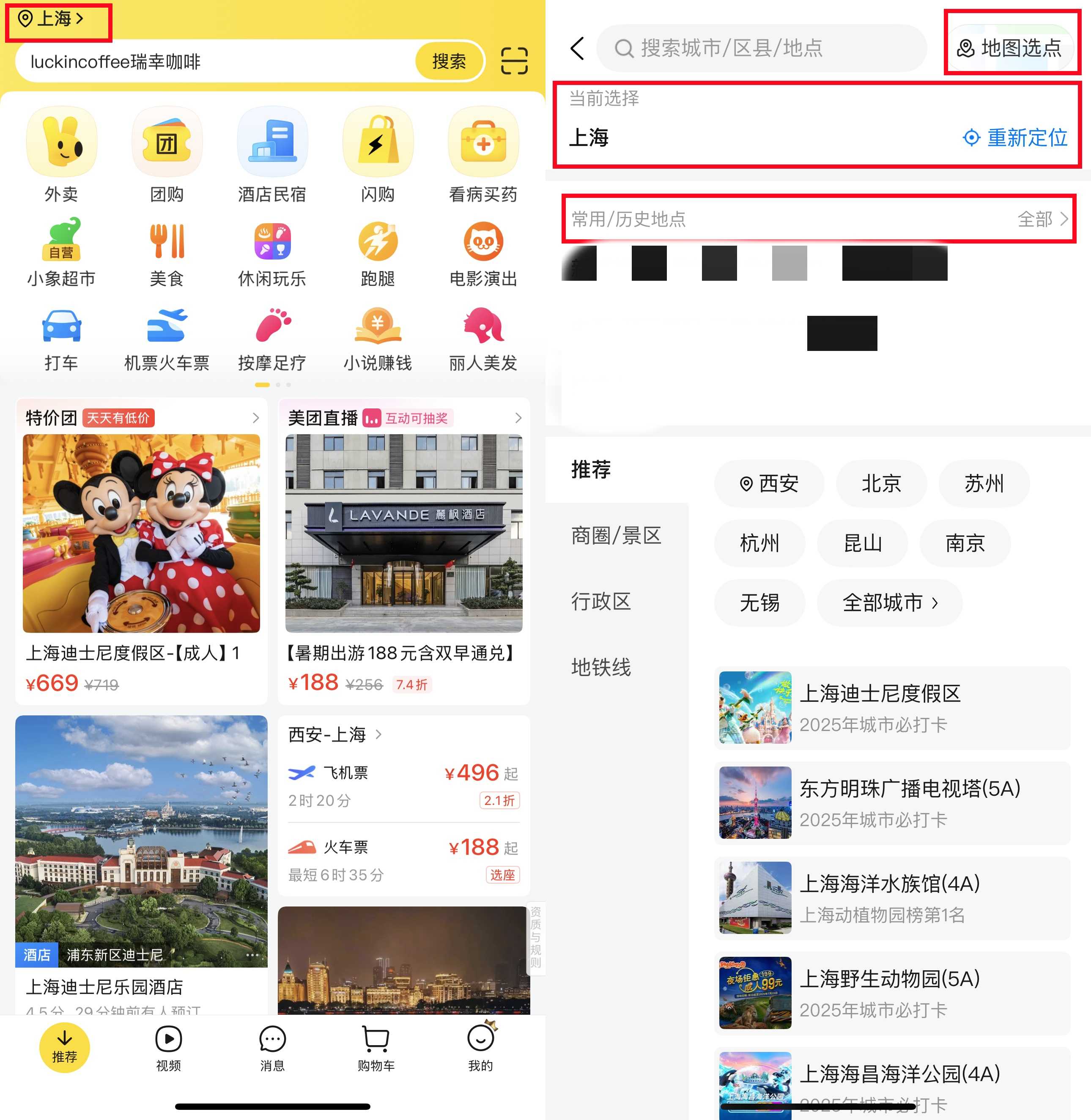
3. Set location and address
Allow Meituan to access your location, or enter your address manually.
4. Link payment method
Meituan supports WeChat Pay and Alipay, so make sure your payment app is linked to a credit or debit card for a smooth checkout experience.
How Do I Order Food on Meituan Waimai?
1. Select food delivery service
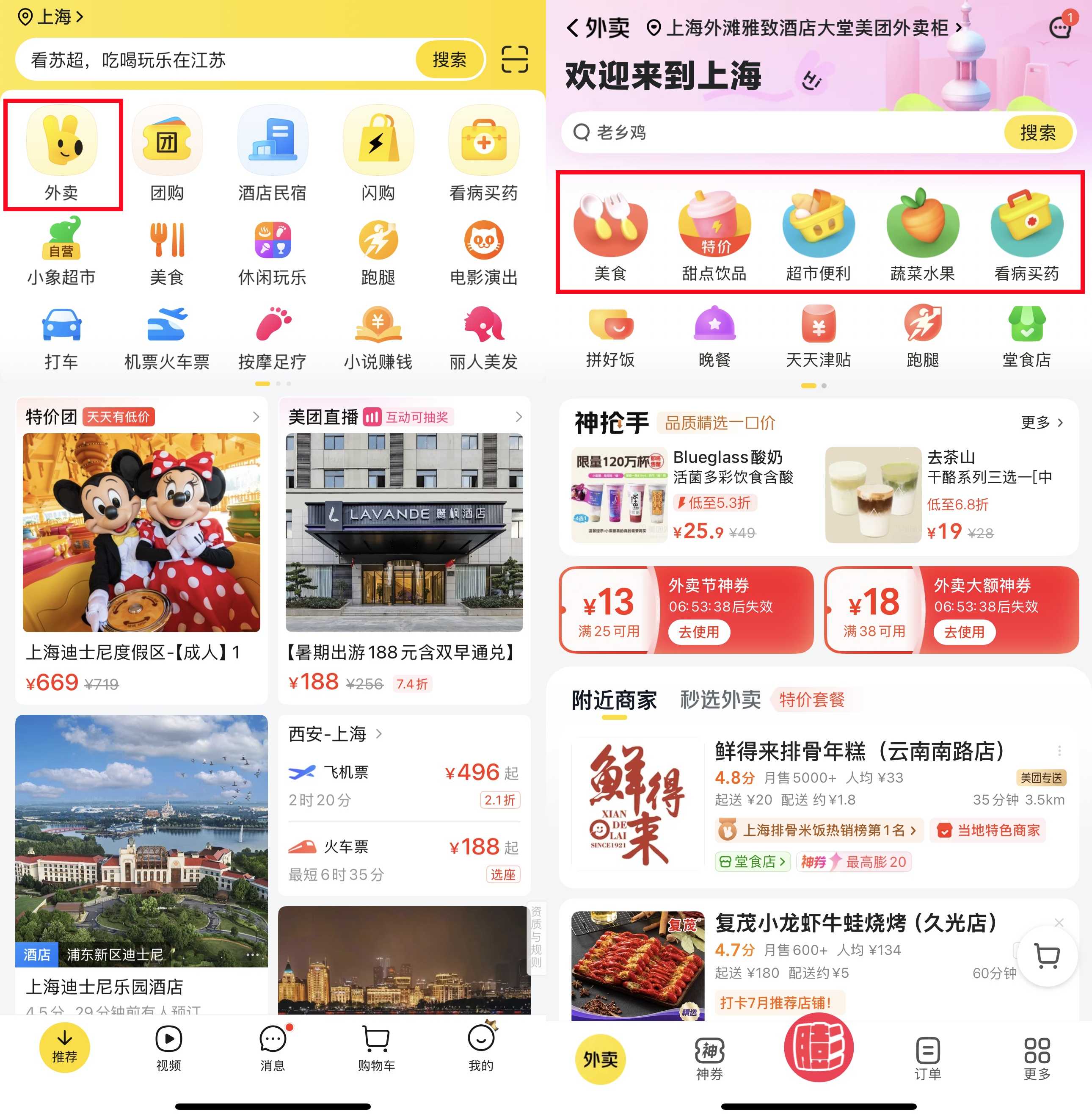
Click the "Food Delivery" icon (usually the first one).
2. Browse or search
You can browse nearby restaurants or search directly for the food you're craving.
Tip: Choose restaurants with high ratings (yellow stars) and delivery times of less than 45 minutes.
3. Check delivery fees and minimum spend
Some restaurants charge a small delivery fee (¥3–¥6), and many have a minimum spend requirement, but it's usually easy to meet by adding a drink or a main dish.
4. Place Order
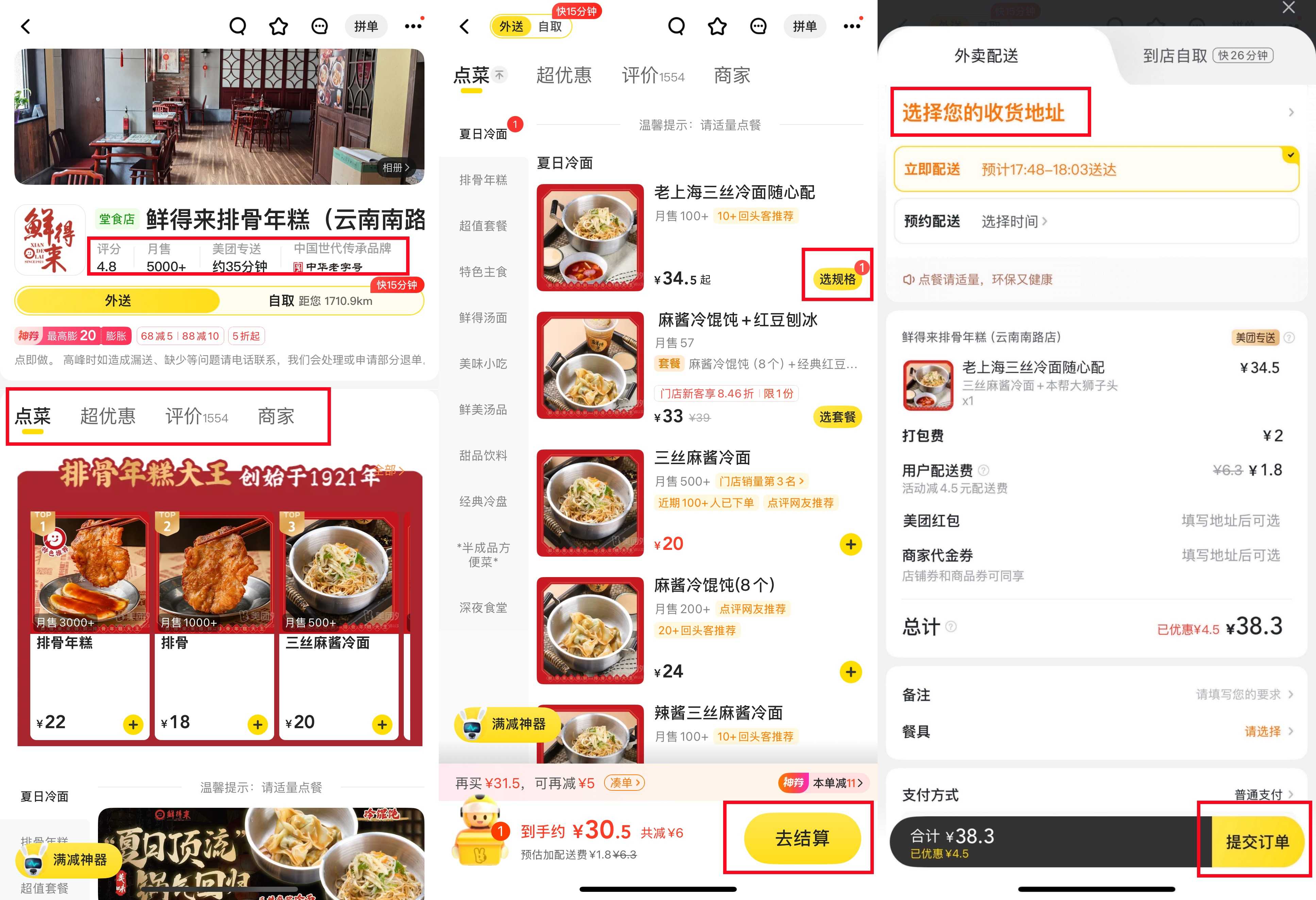
Select the dishes you want and click "Select Options" to confirm. After reviewing your cart, click "Proceed to Checkout" to pay. If you have any coupons, the system will apply them automatically, or you can select them manually.
5. Payment
Pay using WeChat Pay or Alipay, and you will receive a confirmation message upon success.
6. Track Order
You can track the delivery person's real-time progress on the map. Many delivery drivers will call you when they arrive; if you don't speak Chinese, you can ask hotel staff for help, or simply message the delivery person: "I am in the lobby."
7. Reviews
Once your meal arrives, you can rate it and leave a quick review. This not only helps other users but also keeps your Meituan account active, unlocking future discounts.
Flights to Shanghai
Flights to Shenzhen
Flights to Xiamen
Flights to Chongqing
Flights to Guangzhou
See all flights


Top Shanghai Hotels
Top Beijing Hotels
Top Guangzhou Hotels
See All Hotels























Chinese Food Delivery Apps: Ele.me(饿了么)

What is Ele.me (饿了么)?
Ele.me (饿了么) is another major food delivery platform in China. Owned by Alibaba, it connects you with nearby restaurants, cafes, bubble tea shops, and even supermarkets.
Beyond food delivery, Ele.me also offers delivery services for daily necessities and convenience store items, making it perfect for those who want to enjoy a late-night snack or shop without leaving the house.
Compared to Meituan, Ele.me frequently offers various discounts and coupons, which can help you save even more money while traveling in China.
How to Download and Set up Ele.me (饿了么)?
1. Download the App
iPhone users: Switch your App Store region to China, then search for "Ele.me" to install it.
Android users: You can find Ele.me on Google Play, download it from domestic app stores, or get it via the official Ele.me website.

2. Register and log in
Register and verify using an international mobile number. You can also log in quickly via Alipay or WeChat.
3. Set delivery address
Allow the use of location services, or enter the address manually, ensuring you enter the correct Chinese address.

4. Link payment method
Ele.me supports Alipay and WeChat Pay, so please ensure your linked payment app has a sufficient balance or a credit card attached.
How to Order Food on Ele.me?
1. Browse or search for dining
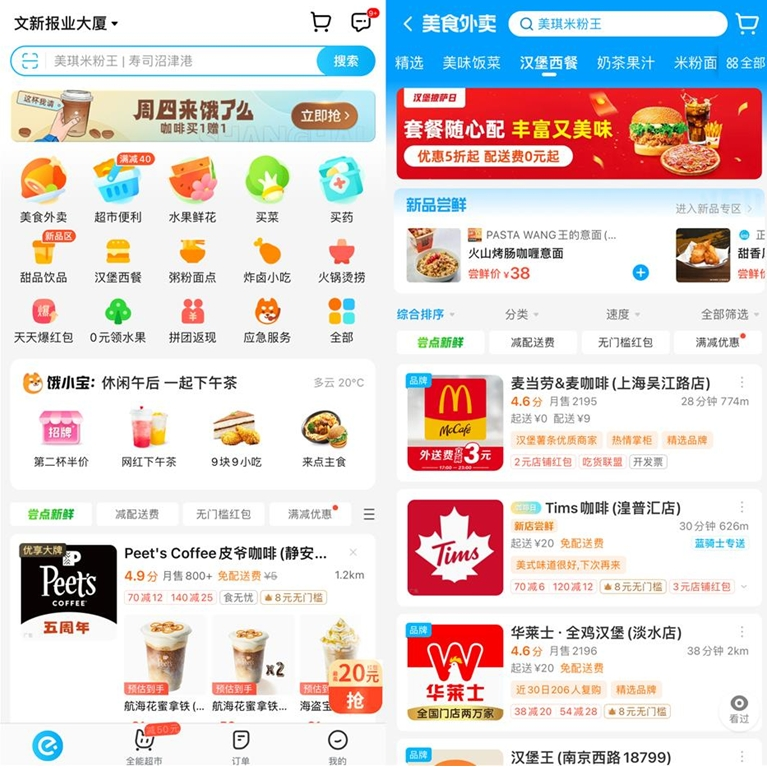
Scroll through popular restaurants, or use filters to select eateries, view ratings and delivery times, or search directly for the food you're craving.
2. View promotional offers
Keep an eye out for items with discounts, free delivery, or combo deals; these will be highlighted with tags or banners.
3. Add to cart
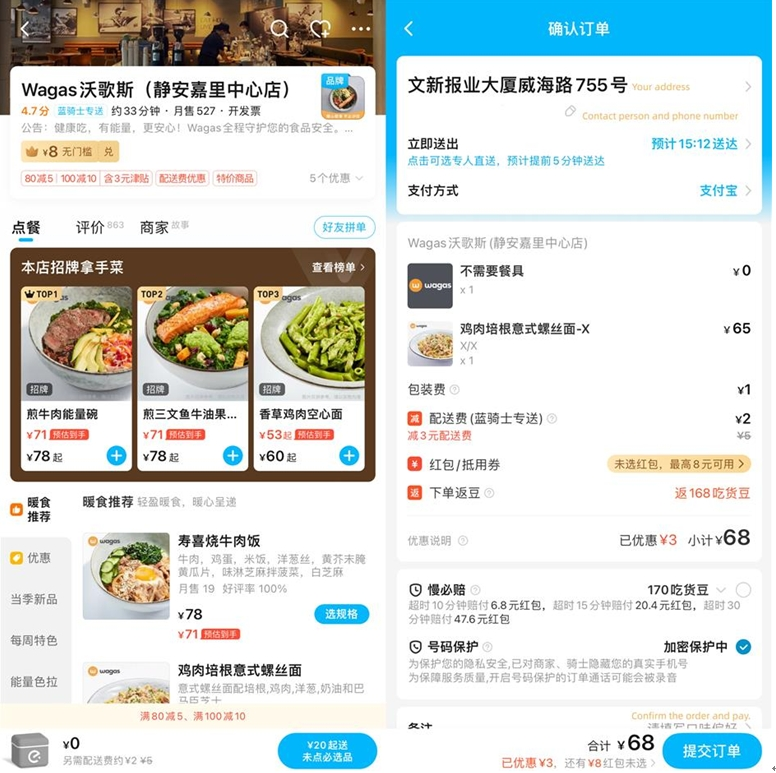
Click the "Add" or "+" button to select the dishes you want, view images and prices, and customize your preferences (e.g., spice level, add-ons, etc.).
4. Confirm order and make payment
View your cart and select the appropriate coupon, then confirm and pay for your order. You will see the order summary and estimated delivery time.
5. Real-time Delivery Tracking
You can track the delivery person's location in real-time, and if needed, you can call or contact them through the app.
6. Reviews
Once your meal arrives, enjoy! Don't forget to leave a star rating or a quick review.
Top Shanghai Hotels
Top Beijing Hotels
Top Guangzhou Hotels
See All Hotels
Chinese Food Delivery App: JD.com

What is JD.com?
JD.com is one of China's largest e-commerce platforms, similar to Amazon. It’s renowned for its fast delivery of electronics, clothing, and daily essentials.
Beyond shopping, JD offers an instant delivery feature called Jingdong Miaosong (京东秒送) (JD Instant Delivery). It allows you to have cooked food, groceries, snacks, drinks, and daily essentials delivered to your doorstep within 30 to 60 minutes in many cities.
Unlike Meituan and Ele.me, which focus primarily on food and beverage, Jingdong Miaosong combines supermarket delivery with hot meals from nearby restaurants.
How to Download and Set up JD.com?
1. Download the App
iPhone users: Switch your App Store region to China, then search for “JD” or “JD” and install!
Android users: You can find it on Google Play or download it from an app store.
Note: This app is primarily in Chinese, but the icons and images are clear. If needed, use a mobile translation tool or an overlay translation app to help identify key parts.
2. Register or log in
Register using your international mobile number and verify via SMS. If you already have a JD account, you can also log in.
3. Enter delivery address
Allow the app to access your location, or enter the address manually. Paste your location in Chinese to avoid errors.

4. Link payment
JD Daojia supports JD Pay, WeChat Pay, and Alipay. Make sure your chosen payment app is set up in advance and linked to your card or topped up so you can breeze through checkout.
How Do I Order Food on JD.com?
1. Choose JD Instant Delivery
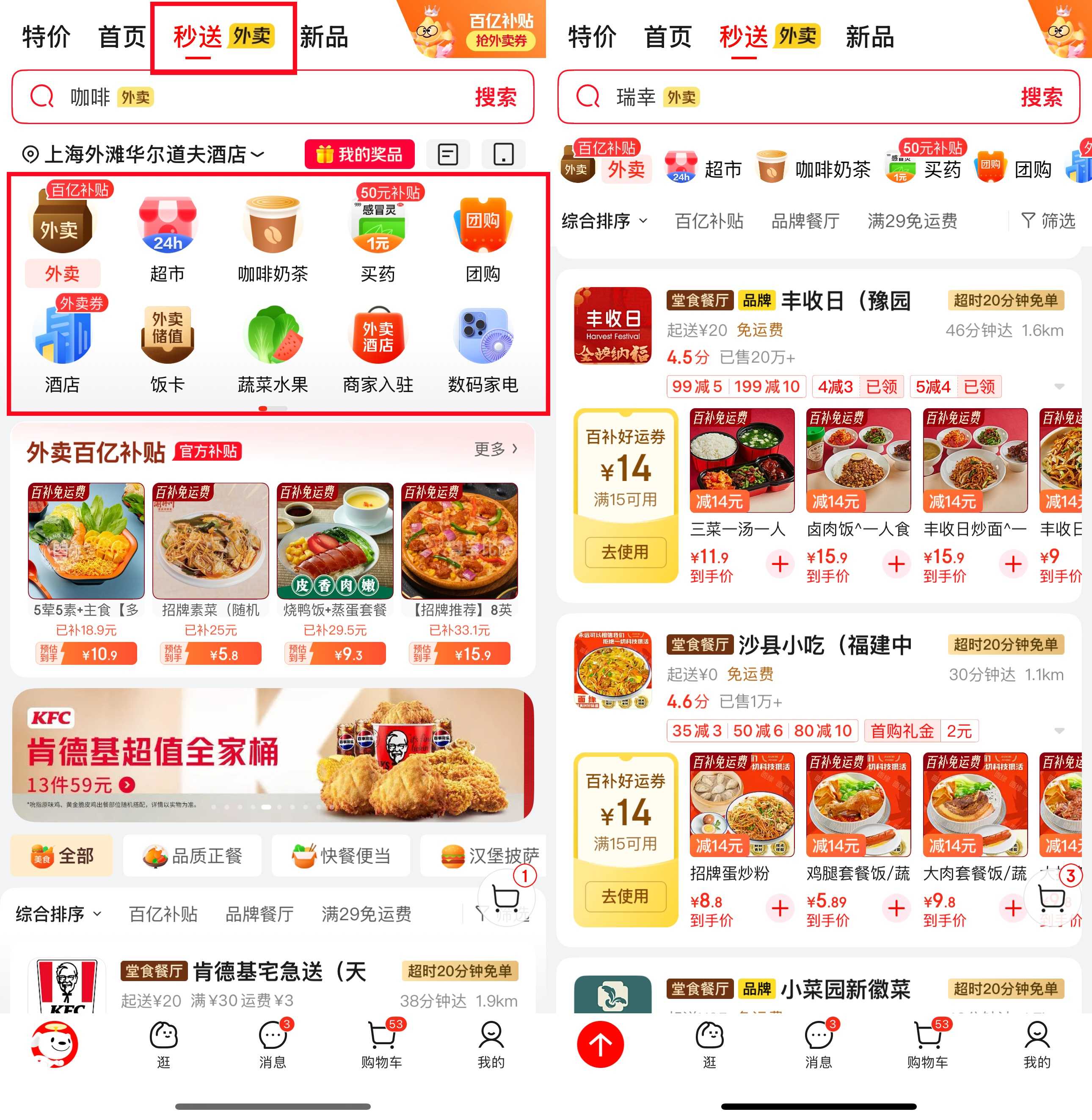
Open JD, and click "Instant Delivery" at the top.
2. Browse categories
You'll see options like "Food Delivery" (takeout), "Supermarket" (grocery items), "Coffee & Tea" (coffee and milk tea), and "Fruits & Vegetables" (fresh produce). Tap the category you need.
3. Search or scroll through the list
Use the search bar to find your favorites.
4. Select items
Click on the product list, browse the images, and then click "+" (Add to Cart) to select the dishes or snacks of your choice.
5. View your cart and apply discounts
Open your cart to view your items. JD.com often offers "Spend ¥30, Save ¥10" (Spend 30 yuan, save 10 yuan) or free delivery options. Select the ones that apply.
6. Place Order
Click to claim the coupon and proceed to checkout (checkout with the coupon), select your payment method, and confirm the order. You will see the estimated delivery time.

7. Track Order
Track your delivery person's location and receive notifications. If needed, you can also call or message them through the app.
8. Enjoy your order and leave a review
Once your order arrives, unwrap it and dig in! Don't forget to leave a rating or review. JD rewards reviews with coupons or extra points for future orders.
Chinese Food Delivery Apps: Taobao

What is Taobao (淘宝)?
Taobao is China's largest online shopping platform, owned by Alibaba. It's similar to Lazada or Shopee, but with a much wider variety of products and sellers. While most people use Taobao to buy clothes, electronics, and daily essentials, it also offers Taobao Flash food delivery services in some cities.
However, unlike Meituan and Ele.me, Taobao's food delivery service is limited and often integrated with Ele.me, as they belong to the same ecosystem. This means that if you’re already shopping on the Taobao app, you can order food delivery directly through it without needing to download the separate Ele.me app.
Discover the latest China travel deals on Trip.com!
How to Download and Set up Taobao?
1. Download the App
iPhone users: Download and install it from the App Store by searching for "Taobao" or "Taobao".
Android users: You can search for Taobao on the Google Play Store, or download it from an app store.
2. Register or log in
Register using your international mobile number and verify via SMS. If you already have a Taobao/Tmall or Alibaba account, you can use them to log in faster.

3. Set Payment Options
Taobao supports Alipay. Before placing an order, make sure your Alipay account is set up and linked to a credit or debit card.
4. Enable Location
Grant location permissions in the app.
How Do I Order Food on Taobao?
1. Open the app and look for Flash Sales
Click "Flash Sale" on the homepage to find the food delivery service.
2. Set your delivery address
Enter your address and save it. This ensures your order can be delivered to the correct location.
3. Browse or search for food
You'll see dining options provided by Ele.me. Browse by categories like Chinese food, snacks, or drinks. Use the search bar to find specific items.

4. View offers and promotions
Look for tags like "Spend & Save" (Spend X, Save Y) or "Red Packet" (Red Packet) to find discounts and free delivery offers.
5. Add items to cart
Click on a restaurant, select the dishes you want, and customize them if possible (e.g., spice level, add-ons).
6. View your cart and apply discounts
Open your cart to view your items. Select any available coupons or vouchers, and review the discount details before placing your order.
7. Checkout and Payment
Click checkout, confirm your order, and then make payment. You will receive an estimated delivery time.

8. Track your order
Track your courier's progress in real-time via the app.
9. Enjoy your meal and leave a rating
Once you've received your delicious meal, dig in and enjoy! After you're done, feel free to leave a star rating or a review to help out other customers.
Other Food Delivery Apps in China
Besides Meituan (美团外卖), Ele.me (饿了么), Jingdong Miaosong (京东秒送), and Taobao Flash Sale (淘宝闪购), you can also try these apps:
- Dingdong Maicai (叮咚买菜): Specializing in fresh groceries and select ready-to-eat meals, this is perfect for travelers staying for a longer period or those keen to experiment with local ingredients.
- Hema (盒马): Alibaba's fresh food supermarket, offering delivery of hot meals, sushi, and fruit, with delivery times ranging from 30 to 60 minutes.
- Yonghui Superstores (永辉超市): A well-known supermarket chain that, in addition to in-store shopping, offers delivery services for fruits, snacks, and ready-to-eat meals.
Easily Enjoy Chinese Cuisine
Ordering food in China is actually not complicated at all, even if you don't know Chinese. Whether you're visiting China for the first time or traveling from the UAE for business or leisure, using food delivery apps can save you time and effort while letting you enjoy authentic local dishes from some of the country's best restaurants.
For the smoothest experience, use WeChat and Alipay for payments, and don't forget to purchase a China eSIM before your trip so you can access these apps as soon as you arrive.
Also, check out our guides on:
FAQs About Food Delivery Apps in China
-
How to order food in China as a foreigner?
-
What apps does China use for delivery?
-
Can foreigners use the Meituan app?
-
What is the best food delivery app in China?
-
What food delivery is used in China?
-
How to order food delivery in China without local number?
Disclaimer: This article has been provided by an individual contributor or third party platform. If there is any discrepancy regarding the copyright, please contact us directly and we will delete the content immediately.