How to Book China Train Tickets Online: A Complete Guide for Foreigners

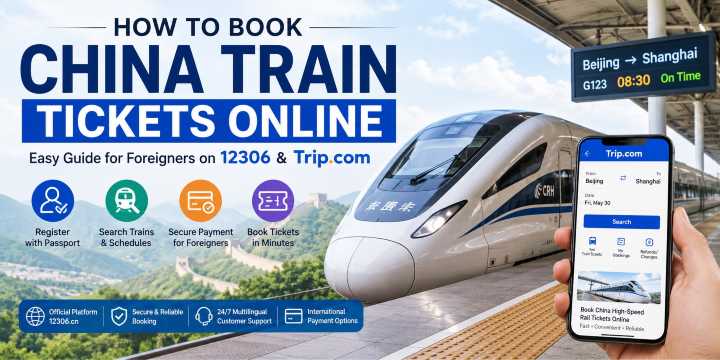
China train tickets for foreigners are available through the official China Railway 12306 platform or Trip.com. If you want to know how to buy train tickets in China online, this guide explains registration, passport verification, payment, booking, and refunds on both platforms.
Trip.com is usually easier for UAE travelers because it offers an English interface, international payment methods, and 24/7 multilingual support.
China High-Speed Rail: Network, Speeds & Facilities
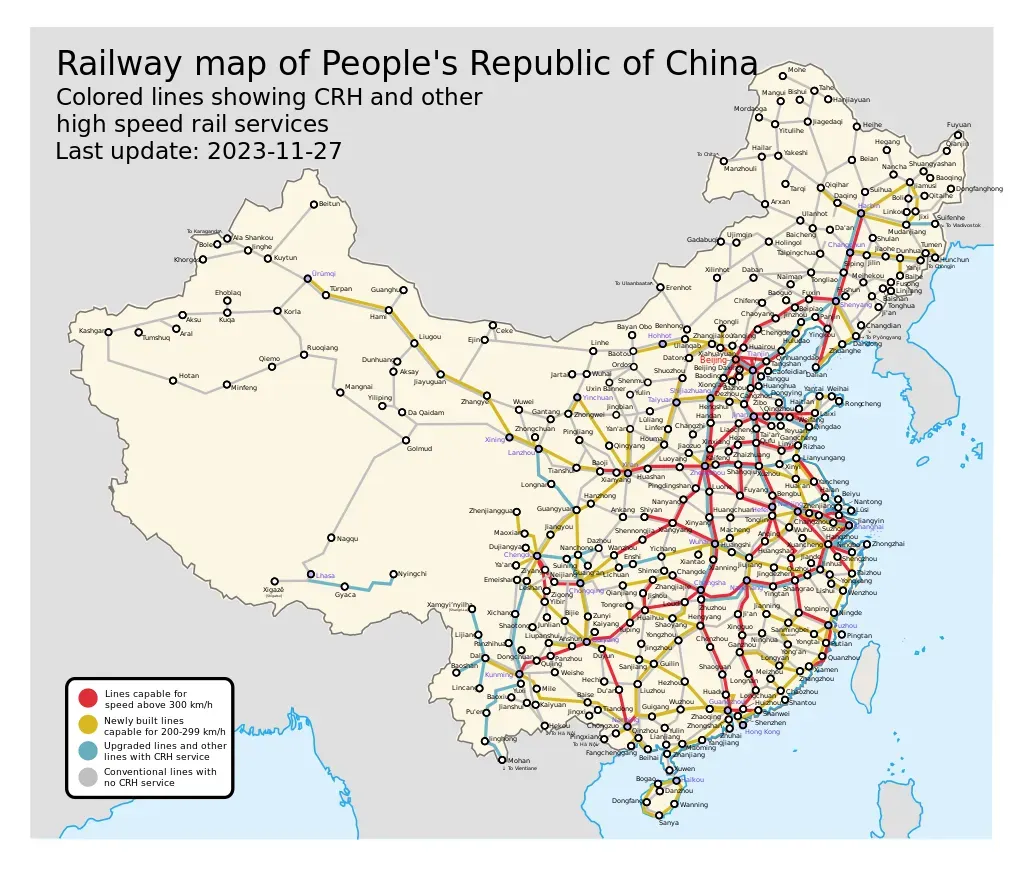
Source: Wikipedia, China Railway network map
China has the world’s largest high-speed rail network. By the end of 2025, it covered more than 50,000 km and reached 97% of Chinese cities with an urban population above 500,000.
Here are the key facts for passengers:
- Network length: More than 50,000 km as of the end of 2025.
- Speed: G-category trains generally reach maximum operating speeds of 300–350 km/h, while D- and C-category services may operate at lower speeds.
- Travel time: The fastest Beijing–Shanghai services complete the journey in around 4.5 hours.
- Facilities: Amenities vary by train. Most high-speed trains provide power outlets and restrooms, while Wi-Fi and meal services are available only on selected services.
Shanghai - Hangzhou
- DepartureShanghai Hongqiao
- ArrivalHangzhou East
- Duration~45m
- Price (2nd Class)From $8.00
Shanghai - Beijing
- DepartureShanghai Hongqiao
- ArrivalBeijing South
- Duration~6h
- Price (2nd Class)From $79.40
Shanghai - Shenzhen
- DepartureShanghai Hongqiao
- ArrivalShenzhen North
- Duration~7h
- Price (2nd Class)From $81.46
Guangzhou - Shenzhen
- DepartureGuangzhou East
- ArrivalShenzhen
- Duration~1h
- Price (2nd Class)From $10.00
Shenzhen - Guangzhou
- DepartureShenzhen North
- ArrivalGuangzhou South
- Duration~1h
- Price (2nd Class)From $10.34
Guangzhou - Hongkong
- DepartureGuangzhou South
- ArrivalHongkong West Kowloon
- Duration~1h
- Price (2nd Class)From 29.85
Popular High-Speed Train Routes in China on 12306
The China high-speed rail tickets price depends on the route, train, seat class, and travel date.
Below is a list of popular high-speed train routes across China.
Popular routes | Travel time | Price |
4.5-6 hours | From AED 280 | |
45 min - 1 hr | From AED 37 | |
25-40 min | From AED 15 | |
7-8 hours | From AED 402 | |
0.5-1 hr | From AED 40 | |
1.5-2 hours | From AED 49 |
*Prices depend on exchange rates and date of booking.
How to Book China Train Tickets Online with 12306
What is China Train 12306?
China Train 12306 is the official website operated by the China State Railway Group (there's also a China Train booking app version). It allows passengers to search schedules, check live availability, purchase tickets, change bookings, and request refunds.
The website and app offer an English interface and support eligible foreign passports.
How to Register on the 12306 Website
- Step 1. Head over to the official 12306 website and click the button in the top right corner to switch the language to English.
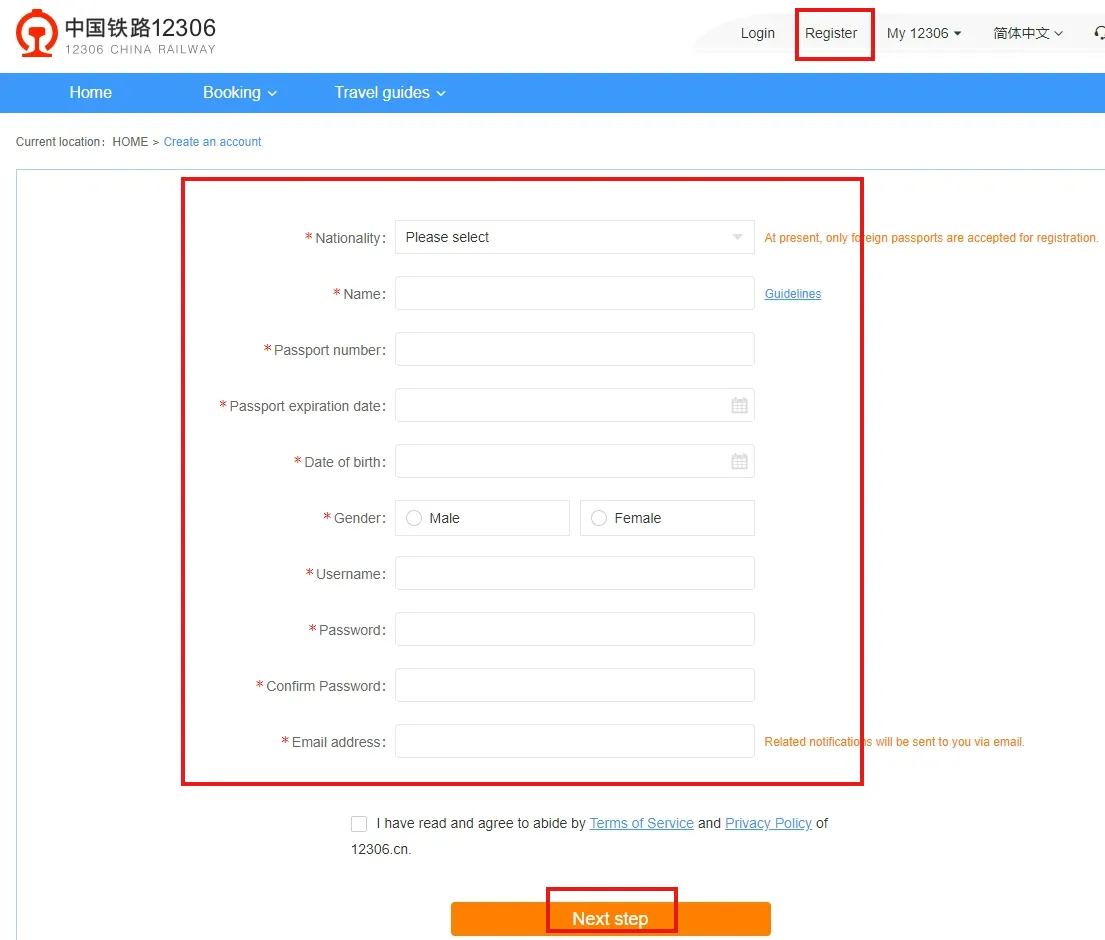
- Step 2: Then click "Register" to go to the registration page and fill in the passenger information, including nationality, first and last name, passport number, email address, etc. After that, click "Next" to complete the process.

How to Register for the 12306 App
- Step 1. By default, the mobile app is set to Simplified Chinese. To change the language, tap the "我的" icon in the bottom right corner of the app.
- Step 2: Tap the "Settings" icon in the top right corner to head over to the settings page.
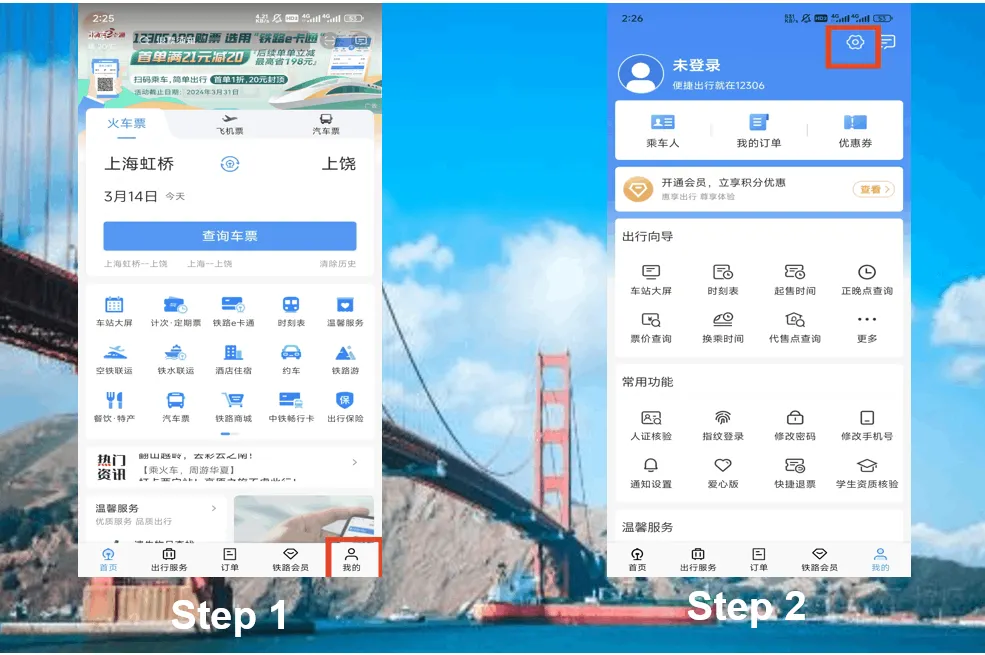
- Step 3. Find "Language settings" on the details page.
- Step 4. Select "English" and click "确定" to continue.
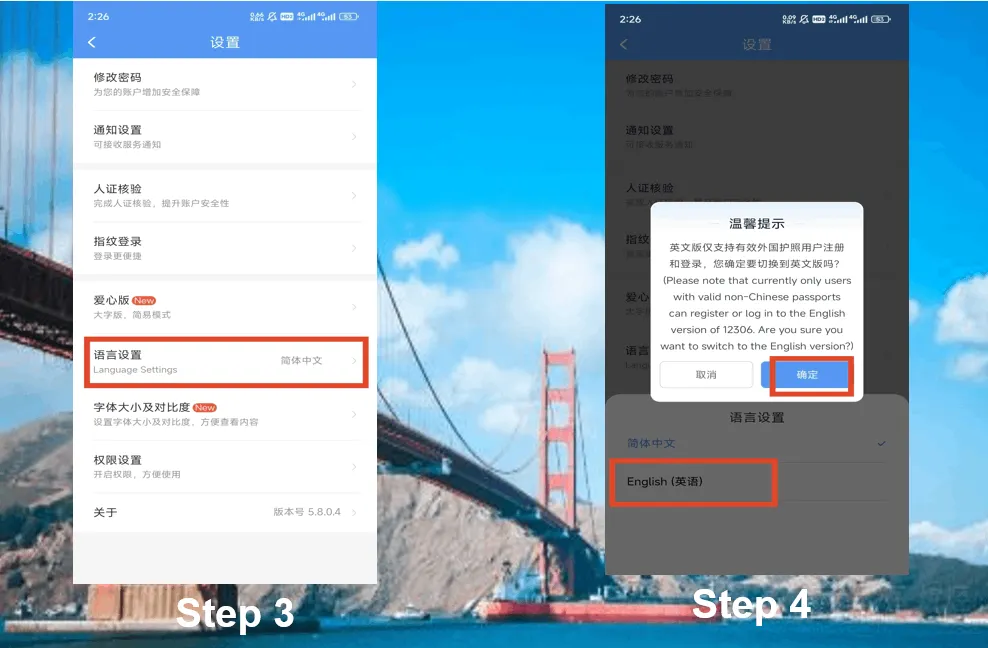
- Step 5. In the 12306 mobile app, tap "My" in the bottom right corner.
- Step 6. Then click the "Register" button to continue.
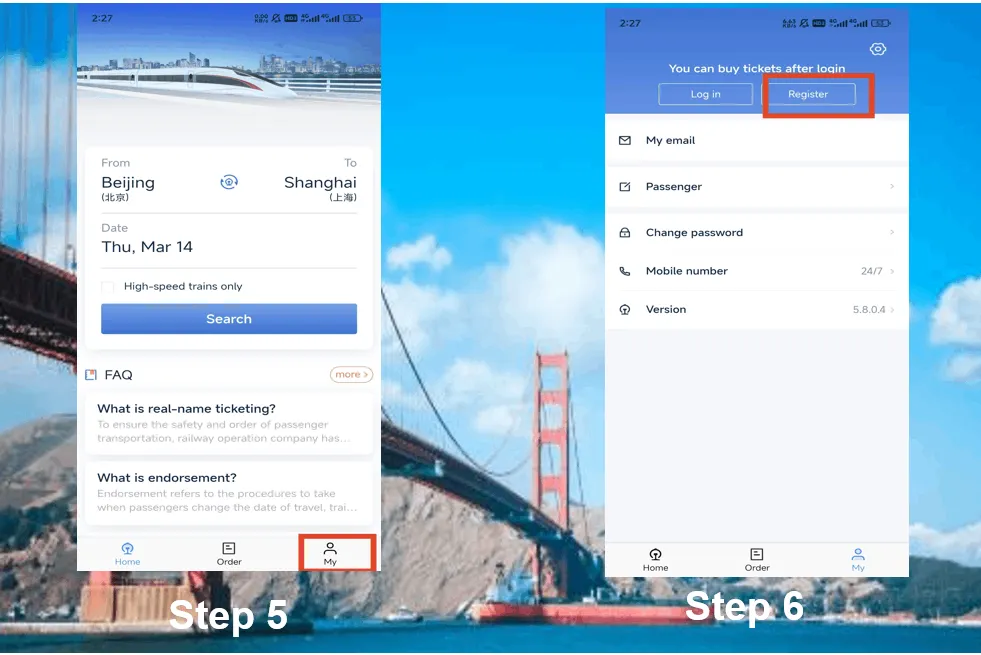
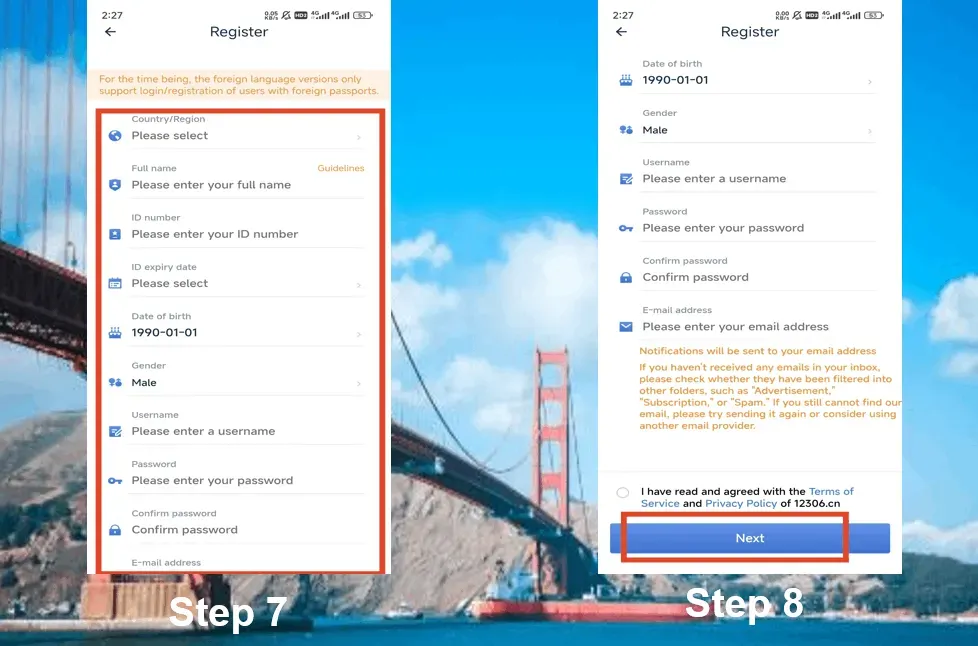
- Step 7. Enter your contact information, including your first and last name, document number, date of birth, username, password, etc.
- Step 8. Check the box "I have read and agree to the 12306.cn Terms of Service and Privacy Policy" and click "Next" to register.
- Step 9: Once registration is complete, the system will send you a reminder. An activation email will be sent to the email address you provided. You'll only be able to purchase tickets after activating your account via email.
- Step 10: Once you click the activation link in your email, you'll be taken to the 12306 homepage. This means your account has been successfully activated!
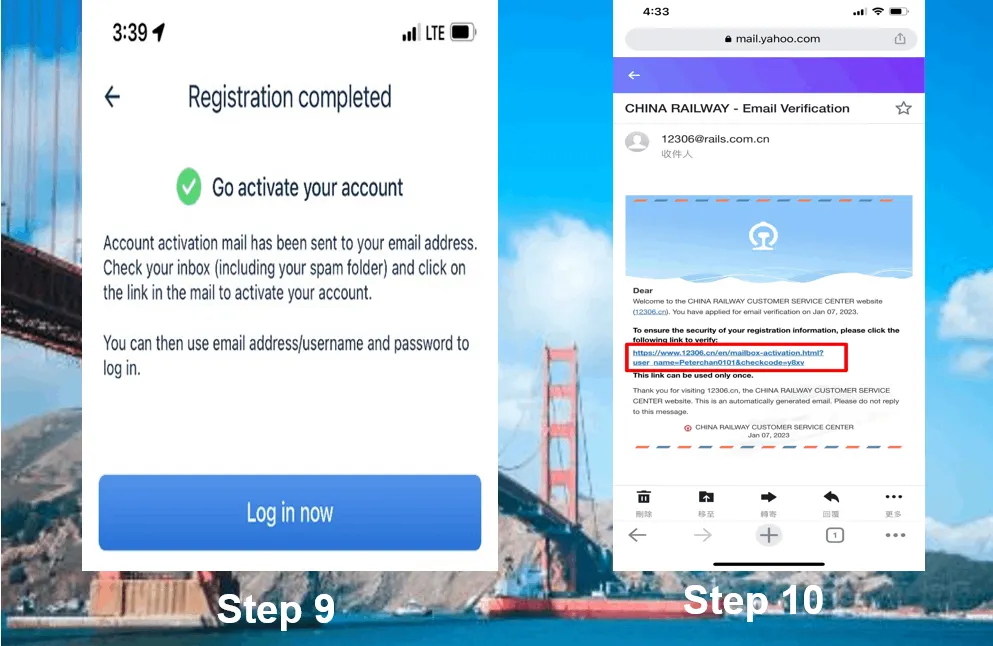
How to book a Train Ticket in China via 12306?
How to Buy Tickets on the 12306 Website
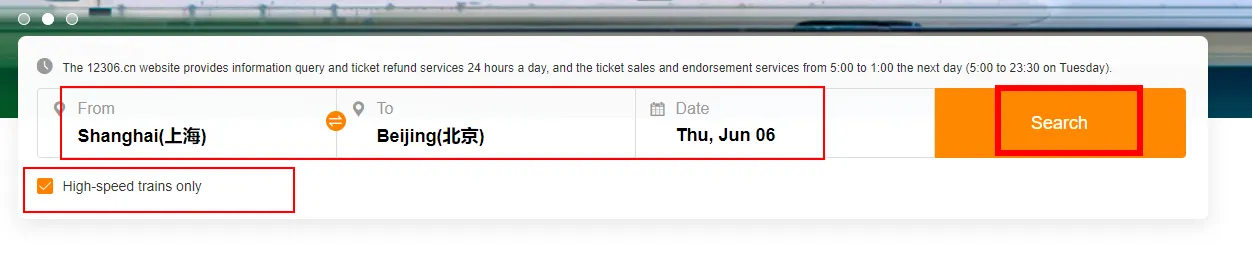
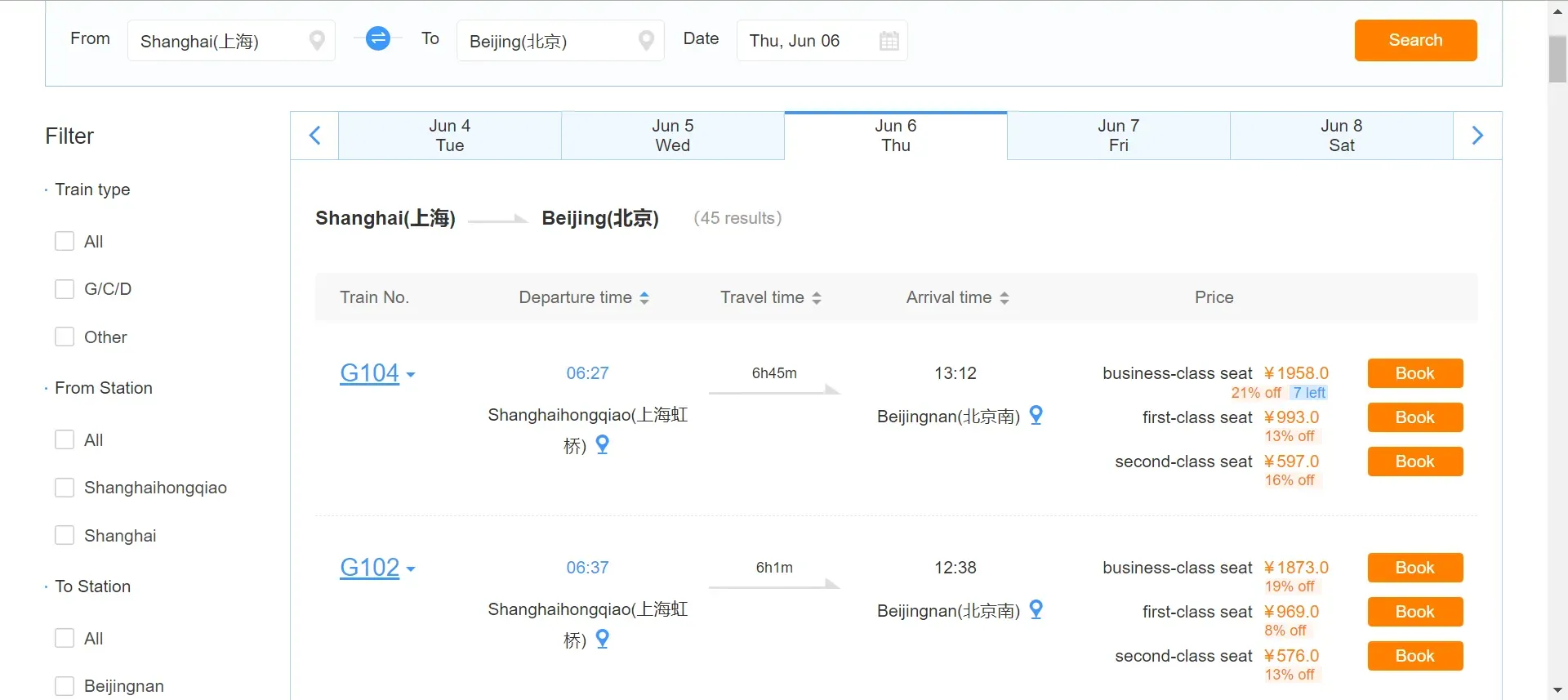
How to Buy Tickets on the 12306 App
Step 1: Choose the right high-speed train in China
- Select your departure station, destination station, and travel date, then click "Search" to see a list of available trains. Choose the train that works best for you and click "Book".
Step 2: add the passenger list
- Your information has already been added to the "My Passenger" list. If you would like to purchase tickets for other passengers, please add them to this list in advance. Each user can add up to 15 passengers, with no more than 5 having the "To be verified" status.
- Passengers must complete identity verification. Email addresses and mobile phone numbers from mainland China, Hong Kong, Macau, and Taiwan are accepted as contact details. A maximum of 5 passengers from the list can be registered using the same mobile phone number.
- Select "My Passenger" in the "My 12306" section, then click "Add New Passenger". Enter your personal details and mobile phone number, then proceed to the next step.
Step 3. Select and confirm your ticket details
- Select the passenger(s) in the "Passenger Information" column, then choose your ticket type and seat. Double-check your selection before submitting your order.
Please note:
- Each passenger can purchase only one ticket for the same train on the same day
- You can purchase up to 5 one-way tickets or 5 round-trip tickets per order
- Please note that the system will assign seats randomly.
Step 4. Payment
- Once you've reached the payment page, please complete the transaction within the specified time. Carefully review your ticket details and click "Pay".
Note: International passengers can select "International Card" or China UnionPay as their payment method.
Step 5. Complete your payment
- Once the transaction is complete, click "Payment Completed". You will then be redirected to the "Transaction Completed" page.
See all attractions
 155769 booked




How do I Get a Refund on 12306?
Passengers can process a refund online via the 12306 website or mobile app or by visiting a railway station ticket counter. The refund fee typically depends on how far in advance of the train's departure you cancel your ticket.
Below is some general information regarding refunds:
Return period | Refund fee |
At least 8 days before departure | No fees |
48 hours - 15 days | 5% of the ticket fare |
24-48 hours | 10% of the ticket fare |
Less than 24 hours | 20% of the ticket fare |
Refund deadline: If your departure station is Hong Kong West Kowloon, you must make changes to your ticket or process a refund no later than 45 minutes before the train's departure.
For tickets on trains departing from mainland China, this can be done no later than 30 minutes before departure.
How international tourists can book train tickets in China on Trip.com
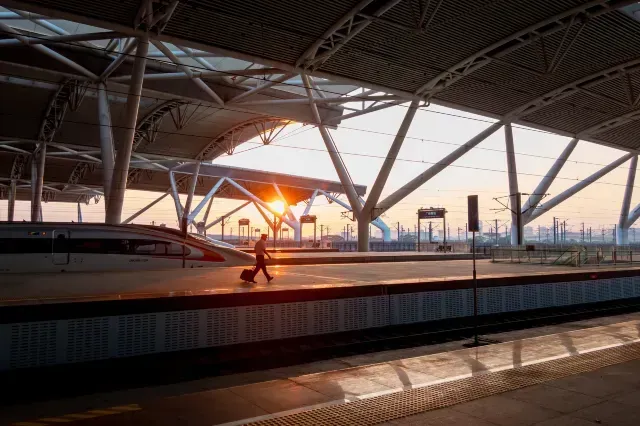
Book Train Tickets in China on Trip.com
Why Book High-Speed Train Tickets in China on Trip.com?
Booking high-speed train tickets in China on Trip.com offers several advantages for passengers, including:
Highlights | Details |
Convenience | A convenient online platform for booking train tickets, flights, and hotels. |
Language support | Available in English, French, Japanese, Korean, and more. |
Various payment methods | International credit cards, Alipay, and WeChat Pay are accepted for payment. |
Issuing e-tickets | An electronic ticket is provided for passing through the turnstile. |
24/7 customer support | It can be a huge help if you run into any issues with your booking or while you're traveling. |
Loyalty points | Earn points on train ticket bookings that you can redeem for discounts on future trips. |
How to Book High-speed Train Tickets in China on Trip.com
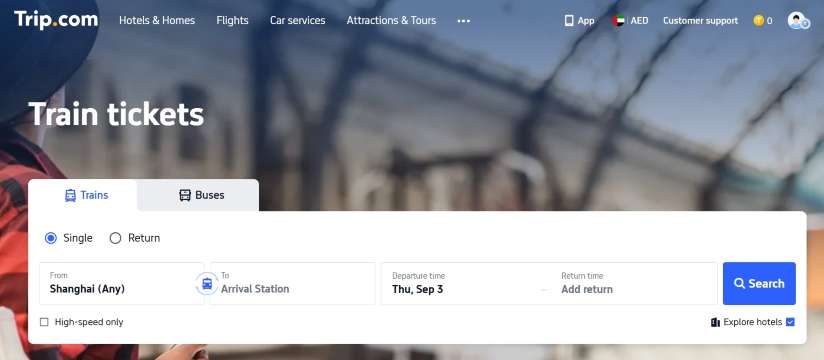
- Step 1. Log in to the Trip.com website. Then, select your departure city, destination, and departure date to head to the details page. *If you can't find your city in the list, simply type it into the search bar.
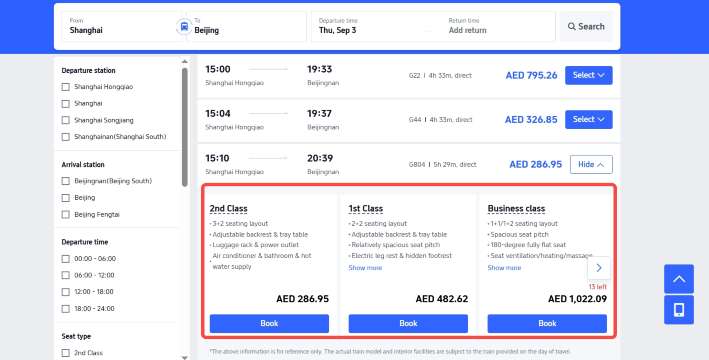
- Step 2: Choose your carriage class. High-speed trains in China offer three classes of service: Second Class, First Class, and Business Class. Travelers can select the option that suits them best and click the "Book" button to continue.
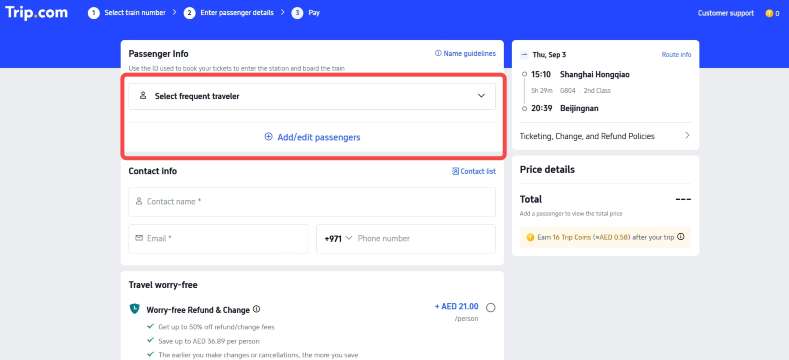
- Step 3: Fill in the information. To buy train tickets in China, passengers need to provide passenger and contact information, including full name, email address, and phone number.
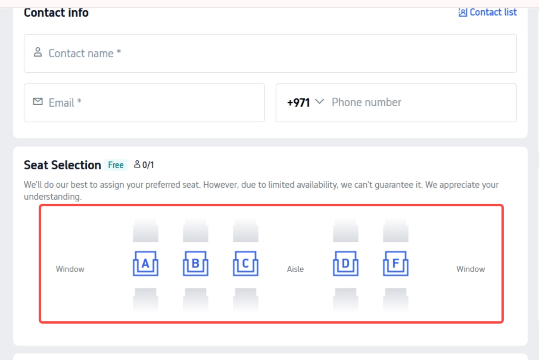
- Step 4. Choose your preferred seat. You can select a window, aisle, or middle seat (A, B, C, D, and F). Once you've decided, click the "Book" button to head to the payment page.
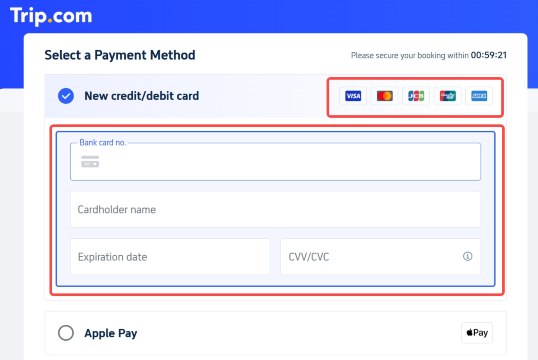
- Step 5. Choose your payment method. Passengers can pay for train tickets in China using a MIR credit/debit card, as well as the Faster Payments System.
How to Book High-speed Train Tickets in China on the Trip.com App
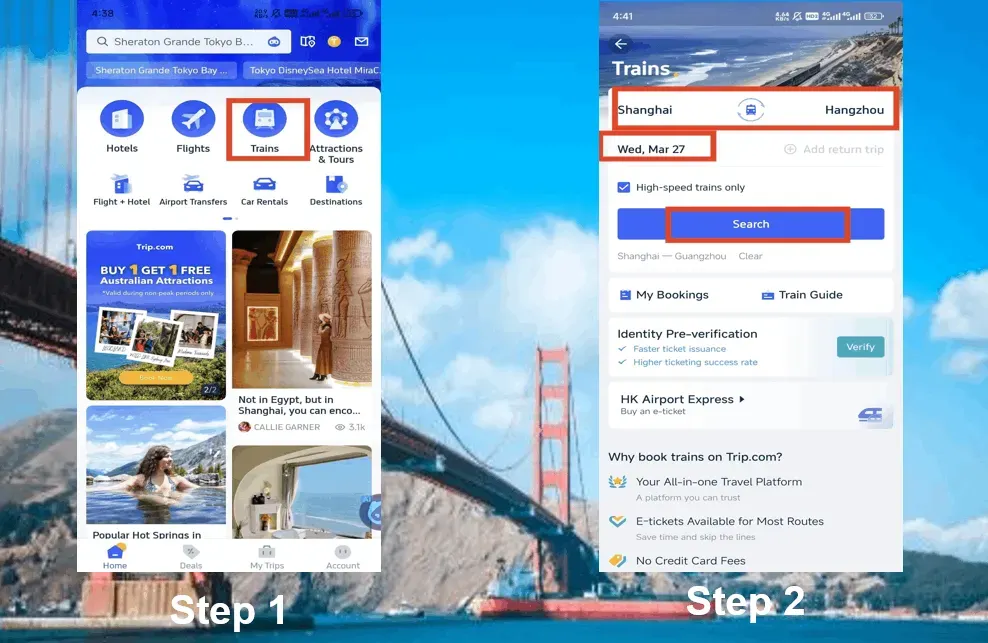
- Step 1: Log in to your Trip.com account on your mobile phone and head over to the "Train Tickets" section.
- Step 2. Select your departure point, destination, and travel date, then click "Search" to see a list of available trains.
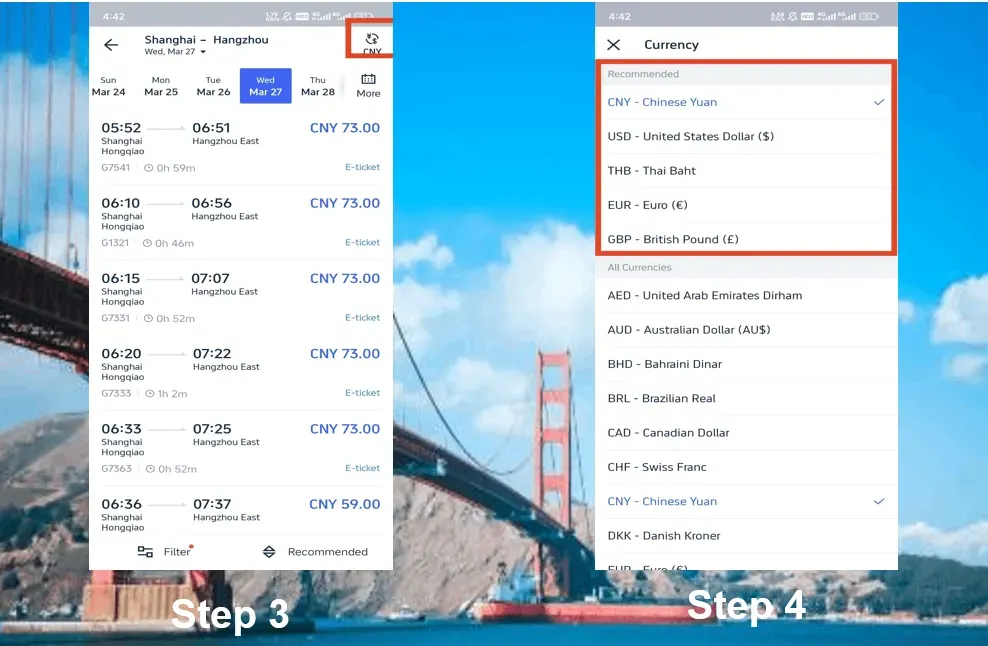
- Step 3: If you need to change the currency, just tap the button in the top right corner.
- Step 4: On the details page, you can select your preferred currency.
- Step 5: Choose the train that works best for you and click on it. Typically, there are three classes of service available at different price points: Second Class, First Class, and Business Class.
- Step 6: Click "Book" to purchase a ticket for the high-speed train in China that you like.
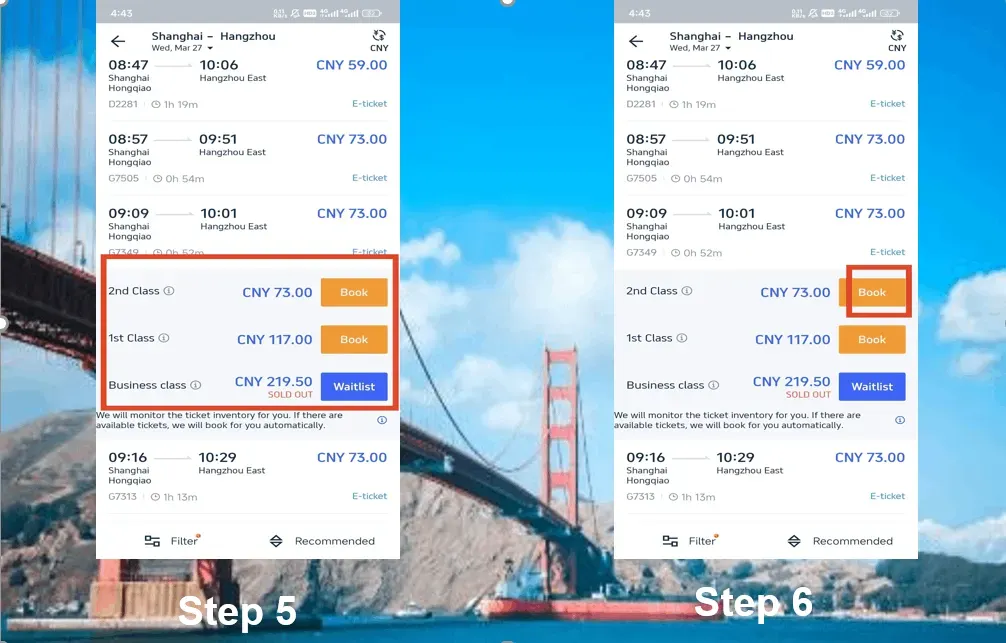
- Step 7. Add the passenger list and provide contact details (first and last name, email address, and phone number).
- Step 8: Next, select your preferred seat. To speed up your booking, you can choose the "Priority Booking" service. The cost is 15 CNY per person.
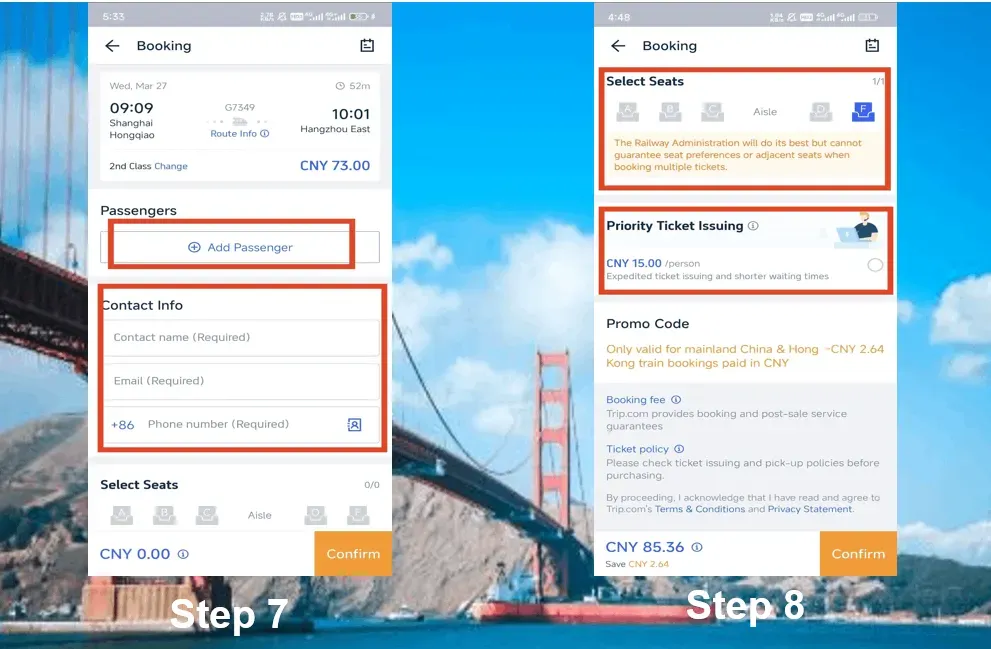
- Step 9: Review the price details and tap "Confirm" to proceed to the payment page. Please note that Trip.com charges a booking fee for each ticket.
- Step 10. Choose your preferred payment method and tap "Pay" to book your tickets for China's high-speed trains. International credit cards, MIR cards, and the Faster Payments System are accepted.
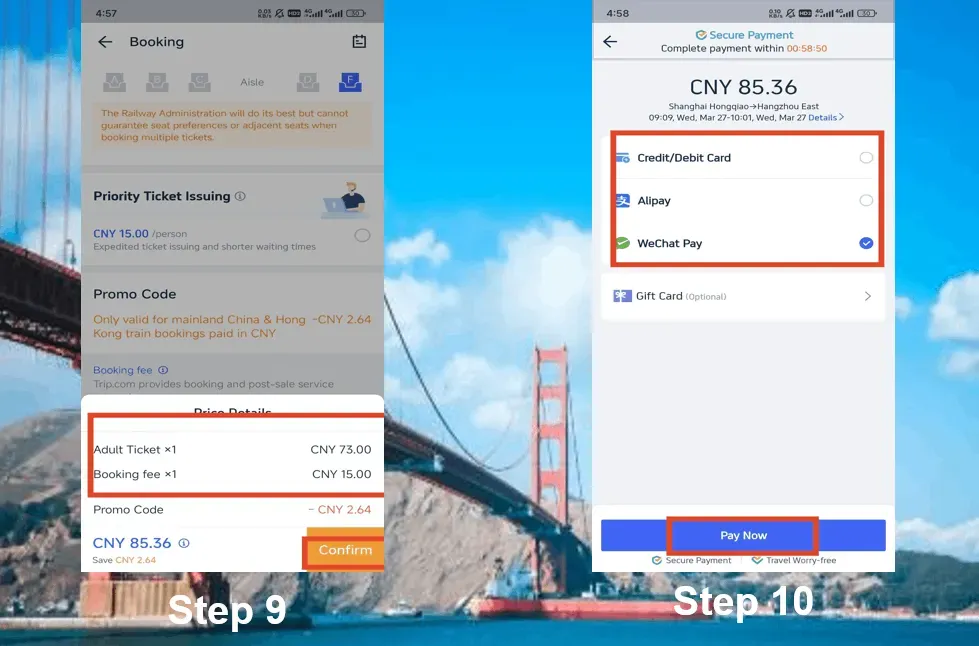
How to Pay for Train Tickets in China on Trip.com?
When booking train tickets for travel in China on Trip.com, you will generally need to provide a valid form of identification. For international travelers, this document is typically a passport.
- Chinese ID card
- Home Return Permit (for residents of Hong Kong, Macau, and Taiwan)
- Mainland Travel Permit (for residents of Hong Kong, Macau, and Taiwan traveling to mainland China)
- Permanent Resident Card for a Foreigner
- Valid passports in accordance with the regulations of the People's Republic of China
Safety Precautions
- Be sure to book your tickets in advance, especially during peak travel periods like Chinese New Year, National Day, or other holidays.
- As a general rule, passengers are allowed to carry up to 20 kg of luggage free of charge, provided that the total dimensions of each piece do not exceed 130 cm. Your carry-on baggage must fit in the overhead bin or under your seat.
- China's high-speed trains have a list of prohibited items that you cannot bring on board, including flammable, explosive, or corrosive substances, as well as weapons and dangerous objects.
- Arrive at the station at least 30–60 minutes before departure to give yourself plenty of time to get through security and find your platform.
- If you're in a quiet carriage, please remember to keep things peaceful. Keep your voice low and be sure to use headphones for all your electronic devices.
How Do I Get a Refund for a Train Ticket on Trip.com?
- Step 1. Log in to your Trip.com account, open the "Train Tickets" section, and then go to "My Bookings" to open the details page.
- Step 2. Select the high-speed train booking in China that you need to cancel, and tap on it to view your booking details.
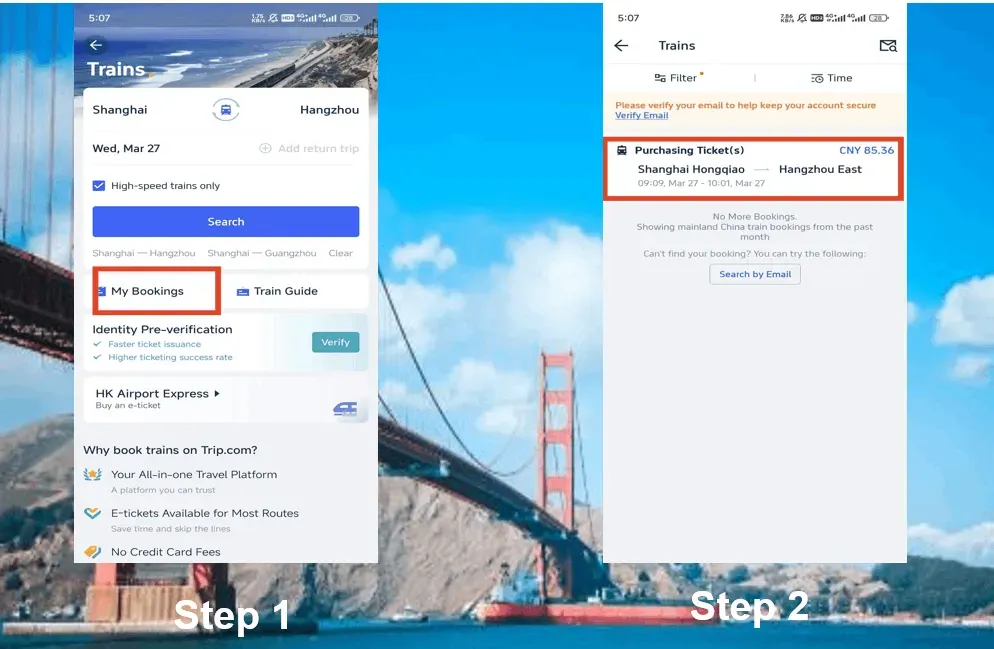
- Step 3: Click the "Refund" button to cancel your high-speed train booking in China.
- Step 4. Provide the front and back of your ID document and verify the refund details. Then, click the "Refund" button to complete the process.
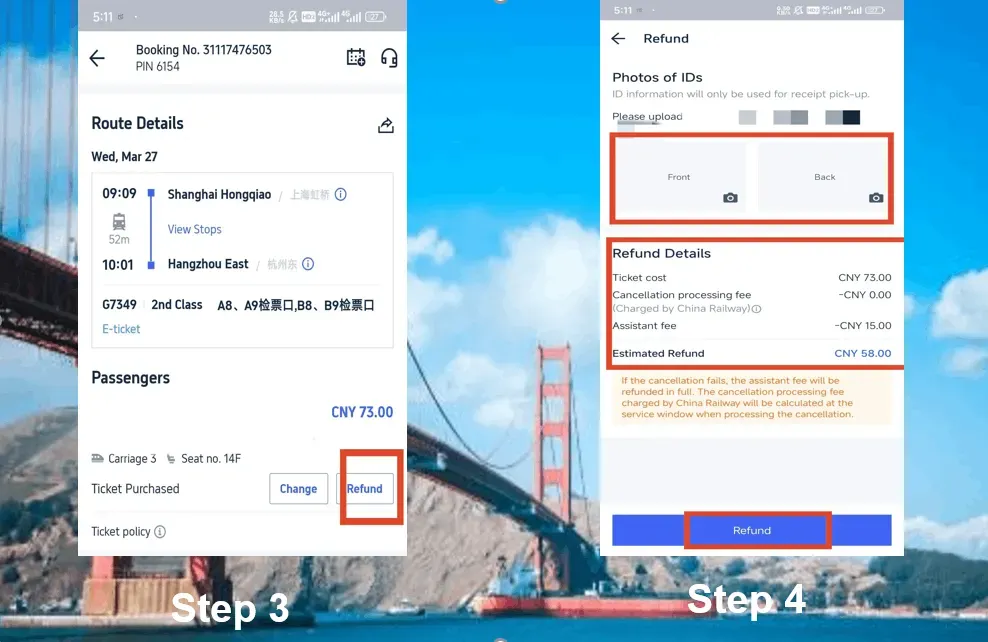
Special note: refunds will be processed via the original payment method within 7–15 business days.
Shanghai Tickets
Beijing Tickets
Guangzhou Tickets
See all attractions







![Beihai Park in Beijing Trip Moments [8 chain stores in Beijing · Hanfu + makeup and styling/multiple packages optional]](https://ak-d.tripcdn.com/images//0586012000rf58x2mFB8B_C_568_320.jpg)




![Mutianyu Great Wal Tour[Small Group of 9 | Private Tour Optional | Multiple Packages]](https://ak-d.tripcdn.com/images/0355l12000qpsc3klD145_C_568_320.jpg)


![[This Week's Special Offer] 1-day tour to Qingyuan Gulong Gorge full rafting attraction|Optional roundtrip transfer/Attraction Combo Tickets Available / Cliff Ride/ Glass Skywalk](https://ak-d.tripcdn.com/images/0352j12000slosn3qBFD4_C_568_320.jpg)





Trip.com China Train Tickets vs. 12306 China Railway Tickets
The 2 main online options are Trip.com China train tickets and 12306 China Railway tickets.
The China train tickets official website is China Railway 12306, which now offers an English interface.
Trip.com is often more convenient for UAE travellers because it provides multilingual support and allows you to book flights, trains, hotels, and other travel services in one place.
How to Book China Train Tickets Online: Important Safety Precautions
- Be sure to purchase your tickets in advance, especially during peak travel periods like Chinese New Year, National Day, or other holidays.
- As a general rule, passengers are allowed to carry up to 20 kg of luggage free of charge, provided that the total dimensions of each piece do not exceed 130 cm. Your carry-on baggage should fit comfortably in the overhead bin or under your seat.
- China's high-speed trains have a list of prohibited items that you can't bring on board, including flammable, explosive, or corrosive substances, as well as weapons and dangerous goods.
- Arrive at the station at least 30-60 minutes before departure to give yourself plenty of time to get through security and find your platform.
- If you're in a quiet carriage, please remember to keep things peaceful. Keep your voice low and be sure to use headphones for all your electronic devices.
- Make sure to get an eSIM for China with VPN to stay connected.
China eSIM Recommendations
See all attractions

[10% off] Book the Best Hotels in China Now
Beijing Hotels
Shanghai Hotels
Guangzhou Hotels
Shenzhen Hotels
See All Hotels












FAQs: How to Book China Train Tickets Online
-
What is 12306?
-
Can I book train tickets for someone else using 12306?
-
When do China train tickets go on sale?
-
How can I collect my train tickets after booking on the 12306 website?
-
Do I need to print my China train e-ticket, or can I use my phone?
Disclaimer: This article has been provided by an individual contributor or third party platform. If there is any discrepancy regarding the copyright, please contact us directly and we will delete the content immediately.
Trendings
-
More about China Trains
- China High Speed Train Seat Map
- China Train Luggage
- 1st class vs 2nd class on China high speed trains
- How to Take a Train in China
- Shenzhen to Hong Kong
- China Train Types
- China Train App
- China Sleeper Train
- What To Do If China Train Tickets Are Sold Out
- China Train Tickets Change Refund Cancellation
- Cheap Train Tickets China
- London to Bradford trains
- Ourense to Almeria trains
- Venice to Zurich trains
- Edinburgh to Dunbar trains
- UK bank holidays
- Ipswich to Colchester trains
- Seville to Valencia trains
- Chelmsford to London trains
- Barcelona-Sants to Almeria trains