Flight Seat Selection on Trip.com: Get the Best Seats

By Trip.com
April 16, 2026

Planning to fly soon? This article provides a detailed guide on how to select your seat on Trip.com, including how to choose or cancel your flight seat, and reasons why seat selection might not be available. Pick your preferred seat and embark on an unforgettable journey today!
How Can You Select Your Flight Seat on Trip.com?
Step 1: Visit the Trip.com website to purchase your flight ticket
- Log in to your Trip.com flight page, enter your departure city, arrival city, and departure date, then click "Search" to head to the details page.
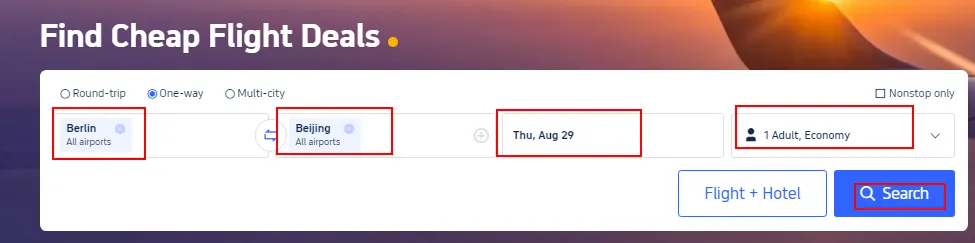
Step 2: Choose the flight you'd like to book
- Select the flight you'd like to book from the search results, tap "Select," and then click "Book" to head to the booking page.
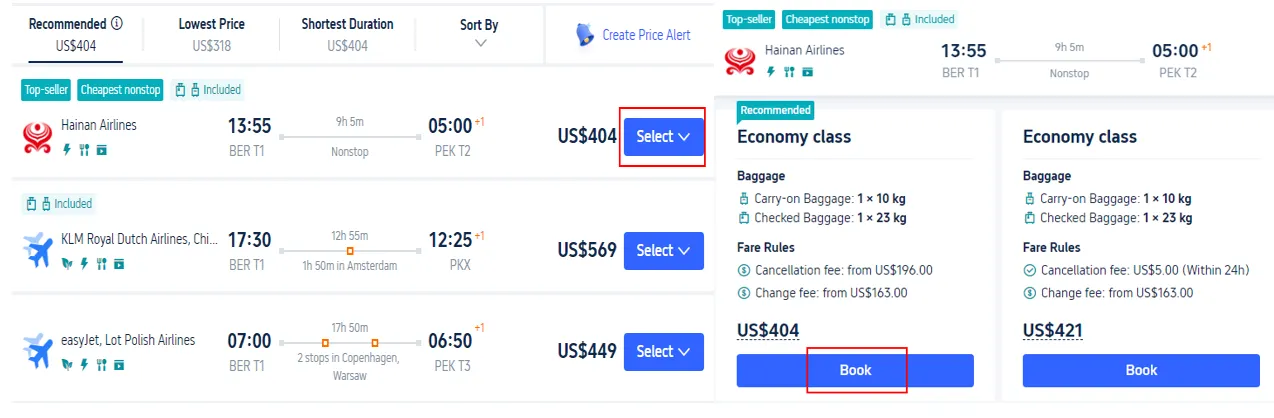
Step 3: Enter your personal details to select your seat on Trip.com
- Fill in your name, gender, nationality, and passport number, then tap "Next" to select your flight seat.
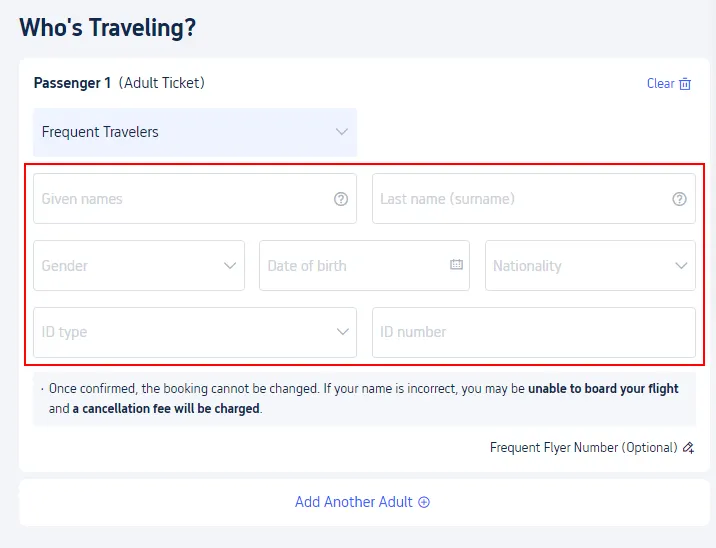
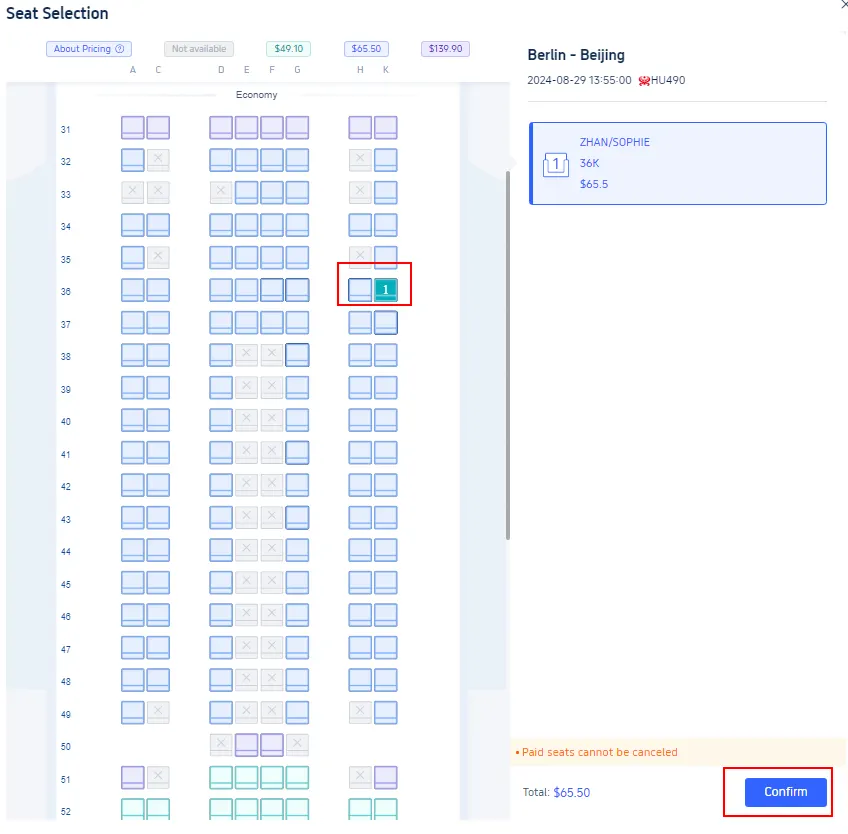
Step 4: Access the seat selection page on Trip.com
- Tap "Select" to choose your preferred flight seat.
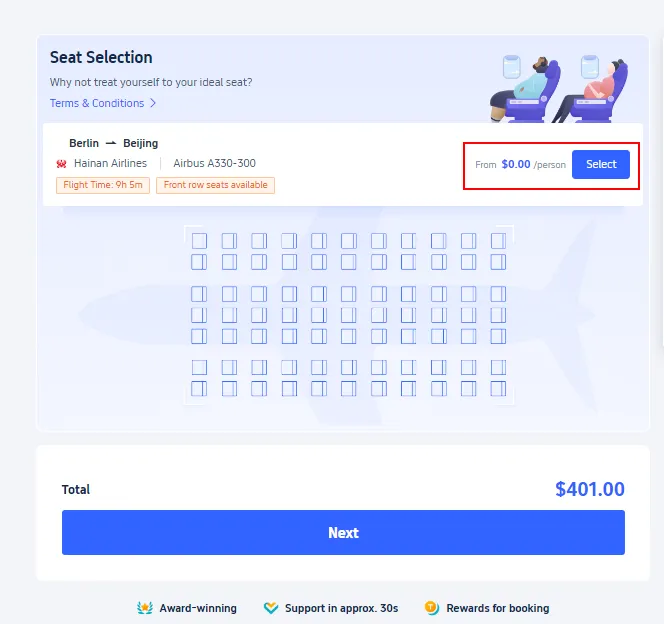
Step 5: Finalize your seat selection on Trip.com
- Generally, there are many types of seats for travelers to choose from. Simply select the seat you need and tap "Confirm" to finalize your flight seat selection.


Why Can't I Select My Flight Seats on Trip.com?
There are many reasons why you might not be able to select a flight seat on Trip.com. Here are a few possible explanations:
Reasons | Details |
Airline Policy | Some airlines don't allow seat selection during booking when you use third-party websites. They often reserve this option exclusively for travelers who book directly through their own official websites. |
Booking Time | Sometimes, seat selection is only available after you've completed your booking and the airline has processed it. |
Seat Type | If you've booked an Economy Basic or similar restricted fare, keep in mind that the airline might not offer free seat selection. |
Seat Availability | If your flight is nearly full, there may be limited or no seats available for advance selection, and seat assignment might take place at the airport during check-in. |
Group Bookings | If you're booking for a group, some systems might not let you select seats until you've provided the details for each individual traveler. |
How Can I Cancel a Flight Seat I've Already Selected on Trip.com?
Canceling a flight seat you've selected on Trip.com is super easy—just follow these few simple steps:
- Step 1. Log in to your Trip.com account and find the booking for which you'd like to cancel your seat selection.
- Step 2. Select "Select Seat" > "Deselect Seat" to enter the details screen.
- Step 3. Select the seat you'd like to cancel, confirm your selection, and submit your request.
Start Your Journey with Trip.com!
Trip.com is a global online travel agency that offers 24/7 customer service in multiple languages. We make booking flights, hotels, tours, and activities a breeze. Plus, our Platinum and Diamond members enjoy exclusive perks like free airport lounge access, extra Trip Coins, deeper hotel discounts, reduced train booking refund fees, and so much more!
Save 10% OFF on Hotel Booking on Trip.com

Best Offer to Asia: Up to 50% OFF on Trip.com

Learn more about our mission.
*This content is written by the Trip.com team. We have 15 years of experience in travel. All information comes from real traveler stories and real data. We are experts in helping you find the best hotels.
Popular Searches
-
Top flight destinations
-
Top flight routes
-
Most booked airlines
-
Popular eSIM/SIM card
-
Top Car Rental Picks
-
Popular Hotel Destinations
- Flights to Manila
- Flights to Mumbai
- Flights to Kochi
- Flights to Chennai
- Flights to Kozhikode
- Flights to Delhi
- Flights to Thiruvananthapuram
- Flights to Hyderabad
- Flights to Cairo
- Flights to Islamabad
- Flights to Jeddah
- Flights to Lahore
- Flights to London
- Flights to Dubai
- Flights to Mangalore
- Flights to Karachi
- Flights to Abu Dhabi
- Flights to Riyadh
- Flights to Colombo
- Flights to Amman
- Flights to Bengaluru
- Flights to Dhaka
- Flights to Tiruchirapalli
- Flights to Kathmandu
- Flights to Kannur
- Flights from Dubai to Manila
- Flights from Dubai to Mumbai
- Flights from Dubai to Kochi
- Flights from Dubai to Chennai
- Flights from Abu Dhabi to Kochi
- Flights from Dubai to Kozhikode
- Flights from Dubai to Delhi
- Flights from Abu Dhabi to Kozhikode
- Flights from Abu Dhabi to Thiruvananthapuram
- Flights from Dubai to Hyderabad
- Flights from Abu Dhabi to Cairo
- Flights from Dubai to Islamabad
- Flights from Dubai to Jeddah
- Flights from Dubai to Lahore
- Flights from Abu Dhabi to Mumbai
- Flights from Abu Dhabi to Chennai
- Flights from Dubai to London
- Flights from Dubai to Thiruvananthapuram
- Flights from Mumbai to Dubai
- Flights from Dubai to Cairo
- Flights from Kochi to Dubai
- Flights from Dubai to Mangalore
- Flights from Sharjah to Cairo
- Flights from Dubai to Karachi
- Flights from Kochi to Abu Dhabi
- Car rentals in Hazebrouck
- Car rentals in Fukuma Station
- Rome Car rental
- Car rentals in Lublin Railway Station
- Osaka Itami Airport Car rental
- Car rentals in Yeongcheon-Yeog
- Car rentals in Innsbruck Station Congress
- Gabes–Matmata International Airport Car rental
- Car rentals in Newtown Station
- Valley International Airport Car rental
- Car rentals in Guangzhou Xintang Railway Station
- Car rentals in Aguascalientes
- CS1318 car rentals in Johor Bahru
- Car rentals in Abha
- Car rentals in Esbjerg
- Car rentals in Aranjuez
- Car rentals in Sinaloa
- Car rentals in Madera
- Car rentals in Aysen
- Car rentals in Kota Bharu
- Car rentals in Osimo Castelfidardo
- Car rentals in Mazovia
- BUDGET car rentals
- Hail International Airport Car rental
- Richmond Airport Car rental
- Car rentals in Winchester Railway Station
- John Glenn Columbus International Airport Car rental
- Car rentals in Bentembashi Station
- Car rentals in Queens Village
- Car rentals in Imamiya Station
- Hotels in Dubai
- Hotels in Sharjah
- Hotels in Abu Dhabi
- Hotels in London
- Hotels in Riyadh
- Hotels in Jeddah
- Hotels in Cairo
- Hotels in Medina
- Hotels in Makkah
- Hotels in Paris
- Hotels in Milan
- Hotels in Bangkok
- Hotels in Istanbul
- Hotels in Manila
- Hotels in Mumbai
- Hotels in Karachi
- Hotels in Tokyo
- Hotels in New York
- Hotels in Rome