How to Track Flight Prices on Trip.com and Get Notified When Fares Drop

By Iris
November 19, 2026
Ever wondered when the best time to book flight tickets is? Finding cheap flight tickets actually takes time and constant monitoring because prices fluctuate so often.
With this feature, you'll get notified the moment there's a discounted flight ticket, without having to regularly check prices.
Here is our easy guide on how to use Trip.com Price Alerts. We'll explain what they are, how to activate them, and share some extra tips so you can book the cheapest flight tickets from the UAE!
We'll show you the steps to find the lowest-price flights on Trip.com.


Trip.com Price Alerts | The Basics
Trip.com Price Alerts are a super convenient way for travelers in the UAE to stay on top of flight price changes.
Simply set your preferred destination, travel dates, and budget range, and Trip.com will take care of the rest.
The Trip.com Price Alert feature supports email notifications and app notifications, so you're not limited to just one type of alert.


How to Use Trip.com Price Alerts
1. Search for Flights

- Go to the Trip.com website or app
- Navigate to flight booking
- Enter your departure city, destination, travel dates, and other required information
- Click on ‘Search’
2. Choose the Lowest Price from Search Results
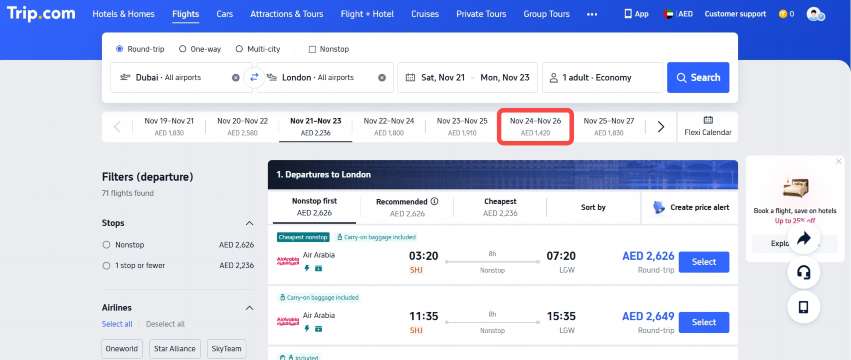
Click on the 'lowest price' option in your Trip.com flight search results. You’ll get flights that match your search criteria, sorted from the lowest price.
3. Check the price list for nearby dates
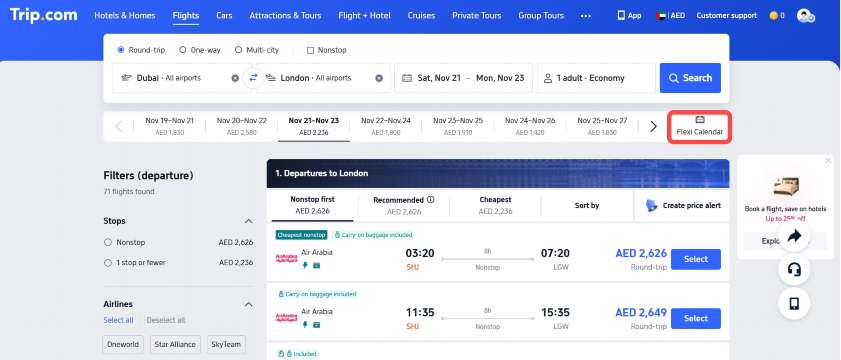
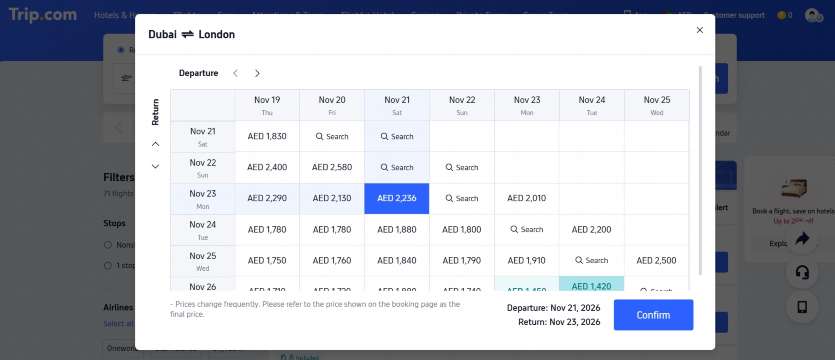
If you find the ticket prices for your selected dates a bit too steep, just click the ‘Price Graph’ button on the right to explore fares for nearby dates.
4. Take advantage of the price alert feature
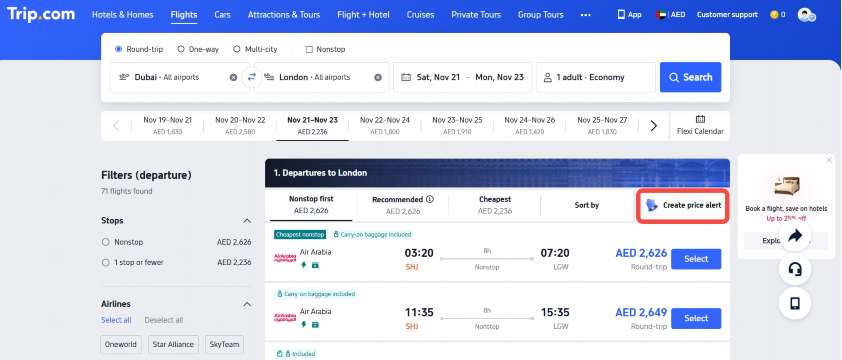
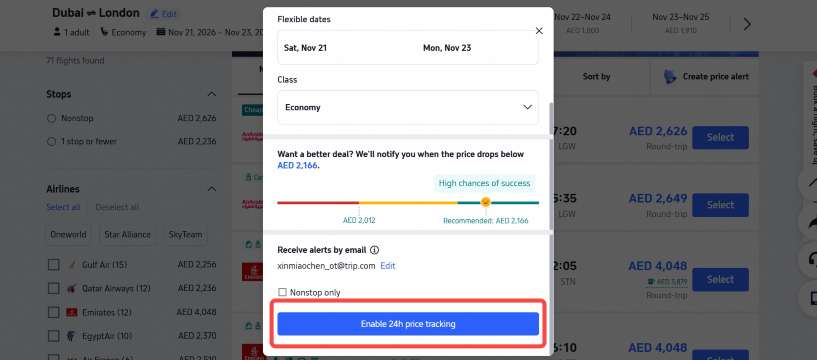
If you find the ticket prices during your search a bit too high, you can use Trip.com's Price Alert feature. Simply click ‘Set Price Alert’ on the right to set your desired price. If the ticket price drops below your set amount, you'll receive a notification.
Trip.com Price Alerts | How to Get Cheapest Flight Tickets

Step 1 – Book at the Right Time
When it comes to snagging the best flight deals, timing is everything! For international flights, the cheapest fares usually pop up around 3 months in advance.
Recent industry studies from Google Flights show that the best time to book flight tickets varies and doesn't always fall on a Tuesday.
Airline pricing systems today are dynamic and algorithm-based, so relying on patterns based on the day of the week just doesn't cut it anymore. While some studies suggest that Sundays or mid-week might offer slightly lower prices, the difference is generally insignificant.
Step 2 – Avoid Peak Holiday Seasons
Flight prices tend to rise during school holidays, festive seasons (such as the UAE National Day, Eid, or Christmas), and weekends. To save more, plan your trips during off-peak periods like the shoulder seasons (fall and spring), when airlines often run seasonal promotions and prices are lower.
Step 3 – Track Prices with Trip.com Price Alerts
Use the Trip.com Price Alerts feature to monitor price changes for your chosen route and travel dates. Simply set your budget, and you'll get notified when the price drops to your desired range; no need to keep checking manually!
Step 4 – Subscribe to Trip.com Special Offers
On the Price Alerts page, don't forget to subscribe to the latest promo notifications from Trip.com. You'll get timely updates on the best discounts and offers, so you'll never miss out on exciting deals!
 NO.1

























Trip.com Price Alerts Summary
Always remember that flight ticket prices can change at any time due to demand, promotions, and seat availability. However, with the help of Trip.com's price alert feature, combined with smart booking strategies, travelers from the UAE can easily secure the best ticket deals.
Don't wait any longer; activate Trip.com price alerts now on the Trip.com App and start saving on your next trip!






Trendings
-
Top flight destinations
-
Top flight routes
-
Most booked airlines
-
Popular eSIM/SIM card
-
Top Car Rental Picks
-
Popular Hotel Destinations
- Flights to Manila
- Flights to Mumbai
- Flights to Kochi
- Flights to Chennai
- Flights to Kozhikode
- Flights to Delhi
- Flights to Thiruvananthapuram
- Flights to Hyderabad
- Flights to Cairo
- Flights to Islamabad
- Flights to Jeddah
- Flights to Lahore
- Flights to London
- Flights to Dubai
- Flights to Mangalore
- Flights to Karachi
- Flights to Abu Dhabi
- Flights to Riyadh
- Flights to Colombo
- Flights to Amman
- Flights to Bengaluru
- Flights to Dhaka
- Flights to Tiruchirapalli
- Flights to Kathmandu
- Flights to Kannur
- Flights from Dubai to Manila
- Flights from Dubai to Mumbai
- Flights from Dubai to Kochi
- Flights from Dubai to Chennai
- Flights from Abu Dhabi to Kochi
- Flights from Dubai to Kozhikode
- Flights from Dubai to Delhi
- Flights from Abu Dhabi to Kozhikode
- Flights from Abu Dhabi to Thiruvananthapuram
- Flights from Dubai to Hyderabad
- Flights from Abu Dhabi to Cairo
- Flights from Dubai to Islamabad
- Flights from Dubai to Jeddah
- Flights from Dubai to Lahore
- Flights from Abu Dhabi to Mumbai
- Flights from Abu Dhabi to Chennai
- Flights from Dubai to London
- Flights from Dubai to Thiruvananthapuram
- Flights from Mumbai to Dubai
- Flights from Dubai to Cairo
- Flights from Kochi to Dubai
- Flights from Dubai to Mangalore
- Flights from Sharjah to Cairo
- Flights from Dubai to Karachi
- Flights from Kochi to Abu Dhabi
- SURIA CAR RENTAL & TOUR SDN BHD car rentals in Kuala Lumpur International Airport
- Hertz car rentals in Hilo International Airport
- Green Motion car rentals
- Alamo car rentals in Manchester Airport
- Hertz car rentals in San Francisco International Airport
- Blue Rental car rentals
- Chic Car Rent car rentals in Khon Kaen International Airport
- KS Rent A Car car rentals
- LOTTE rent-a-car car rentals
- Avis car rentals in Perth Airport
- Hertz car rentals in Suvarnabhumi Airport
- Alamo car rentals in Zurich Airport
- CING CYUAN GANG CAR RENTAL LTD. car rentals in Kaohsiung International Airport
- Travel.Car car rentals in Chubu Centrair International Airport
- Bizcar Rental car rentals
- Europcar car rentals in Auckland Airport
- Enterprise car rentals in Brussels Airport
- R&R Rent a Car car rentals in Senai International Airport
- YH Rent A Car car rentals in Naha International Airport
- Budget car rentals in Mae Fah Luang - Chiang Rai International Airport
- Nanshan Rental car rentals
- Dollar car rentals in Christchurch International Airport
- Hertz car rentals in Dallas Fort Worth International Airport
- EZU car rentals in Queenstown Airport
- CarPlus car rentals
- Dollar TH car rentals in Don Mueang International Airport
- Hertz car rentals in Geneva Airport
- Times car rentals in Hakodate Airport
- Thrifty car rentals in Boston Logan International Airport
- Hertz car rentals in Kahului Airport
- Hotels in Dubai
- Hotels in Sharjah
- Hotels in Abu Dhabi
- Hotels in London
- Hotels in Riyadh
- Hotels in Jeddah
- Hotels in Cairo
- Hotels in Medina
- Hotels in Makkah
- Hotels in Paris
- Hotels in Milan
- Hotels in Bangkok
- Hotels in Istanbul
- Hotels in Manila
- Hotels in Mumbai
- Hotels in Karachi
- Hotels in Tokyo
- Hotels in New York
- Hotels in Rome