Trip.com Cancellation Policy: A Simple Guide to Booking Changes

By Trip.com
April 28, 2026
Planning a vacation is always exciting, but sometimes unexpected situations can change your travel plans. If you've booked flights, hotels, or train tickets on Trip.com and need to cancel, you'll want to know all about Trip.com's Cancellation Policy. This article provides a comprehensive guide to our cancellation terms, along with step-by-step instructions and important tips to help you protect your travel plans effectively!
Unlock More Savings with Trip.com Travel Deals
Make every journey more affordable with exclusive discounts on flights, hotels, car rentals, and eSIM services, all in one convenient platform.
Discover Great Savings on Flight Tickets Worldwide
Find unbeatable deals on global and domestic flights, helping you plan your trips with maximum savings and flexibility.


Save Instantly with 10% Off Hotel Reservations
Book your ideal stay and enjoy 10% off across a wide range of hotels, from budget-friendly options to premium luxury stays.
 NO.1
NO.1
























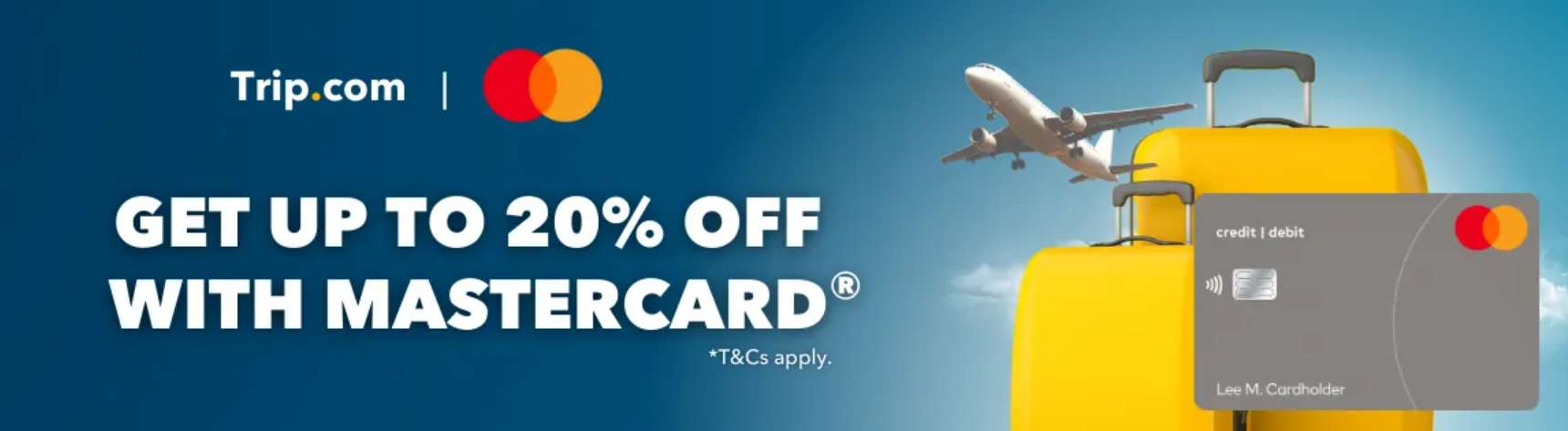
Unlock Up to 20% Off Flights & Hotels with Mastercard on Trip.com
Enjoy exclusive savings when you pay with Mastercard on Trip.com—get up to 20% off return flights and hotel bookings through the app.
Enjoy 8% Discount on Convenient Car Rentals
Rent a car with ease and get 8% off, giving you the freedom to travel comfortably and explore more at your own pace.
Stay Online Anywhere with Affordable Travel eSIM
Keep connected wherever you travel with cost-effective eSIM plans that provide fast and reliable data on the go.






Hotel Cancellation Policies: Everything You Need to Know
Cancellation policies on Trip.com vary depending on the hotel, room type, and rate you've selected. Understanding these policies is key to avoiding any unexpected fees.
Common Cancellation Policies
- Free Cancellation: This is the most flexible option. You can cancel your booking for free within a specified timeframe before your check-in date (e.g., 2-3 days prior). Once cancelled, you'll receive a full refund to your original account or payment method.
- Non-refundable/Non-cancellable: These bookings often come with special discounted rates. However, please keep in mind that if you cancel, you won't be eligible for a refund, or you may only receive a very small partial refund (if any).
- Cancellation Fee Applies: You can cancel your booking, but a cancellation fee will apply according to the hotel's policy. The amount refunded will be the total room rate minus this fee.
Important Things to Keep in Mind When Canceling Your Hotel Booking
To ensure a smooth cancellation and refund process, keep these tips in mind:
- Read the terms carefully before booking: Always check the "Cancellation Policy" on the booking page. This is the most important step.
- Timing is everything: Any changes or cancellations must be made before the specified deadline. The closer you get to your travel date, the higher the chance of incurring fees.
- Save your confirmation emails: Your booking and cancellation confirmation emails from Trip.com are essential proof should any disputes arise.
How to Cancel Your Flight on Trip.com
Step 1: Open the Trip.com App to Cancel Your Flight Booking
- Log in to your Trip.com account on your mobile device.
Step 2: Find and Book Your Flight
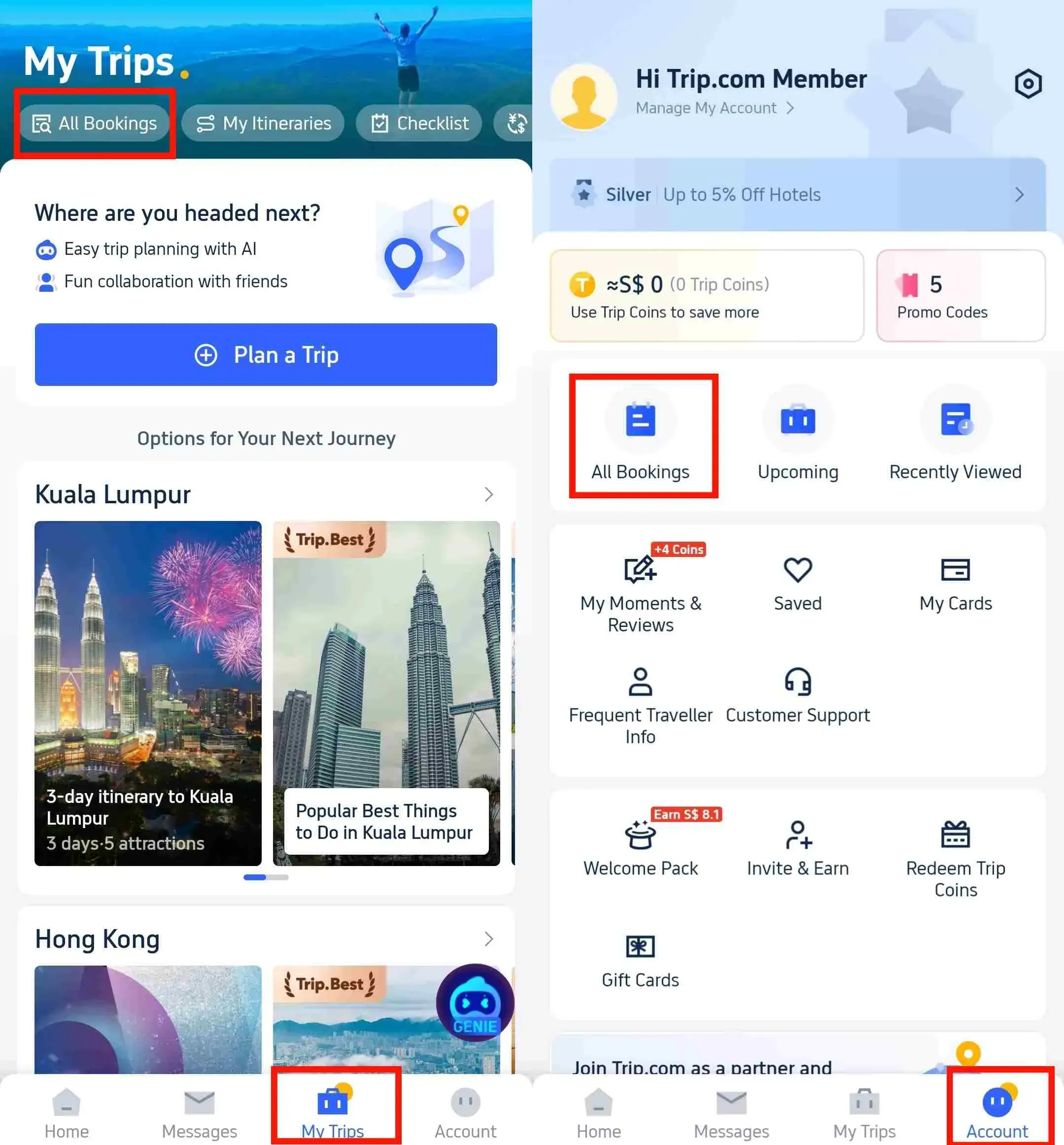
- Once you've logged in to the Trip.com app, head over to "My Trips -> All Bookings" or "Account -> All Bookings" to view your travel details.
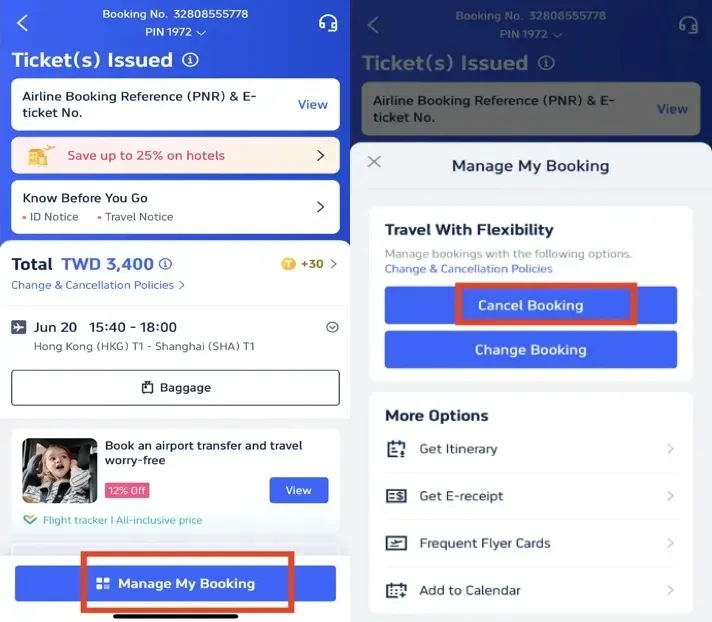
Step 3: Requesting a Flight Cancellation on Trip.com
- Tap on "Manage My Bookings" and hit the "Cancel Booking" button to cancel your flight reservation. Please note that according to Trip.com's Flight Cancellation Policy, cancellation and service fees may apply when you cancel your flight.
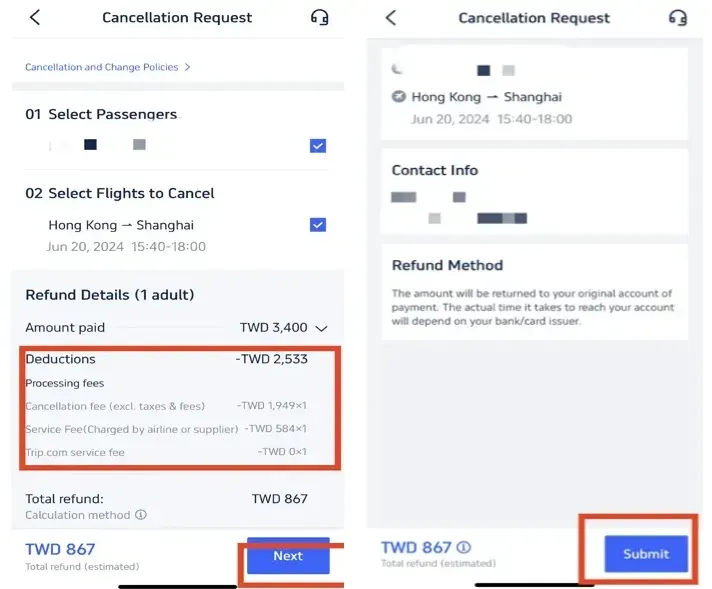
Step 4: Confirming Your Flight Cancellation on Trip.com
- Check your refund details and confirm any processing fees incurred for your flight cancellation, then click the "Next" button to proceed to the details page.
Step 5: Submit Your Flight Cancellation Request on Trip.com
- Review your refund details and information, then tap "Submit" to complete the process.
How to Cancel Your Hotel Booking on Trip.com:
Step 1: Open the Trip.com app to cancel your hotel booking
- Log in to your Trip.com account on your mobile device.
Step 2: Find and Book Your Hotel
- Head over to "My Trips -> All Bookings" or "Account -> All Bookings" on the Trip.com app to find your hotel booking details.
Step 3: Request a refund for your hotel booking on Trip.com
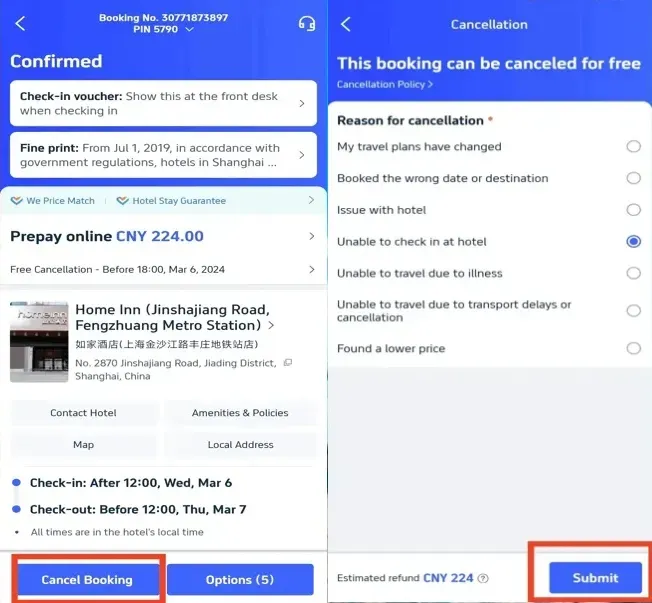
- Click "Cancel Booking" to cancel your hotel reservation. Please note that some hotels have non-refundable policies, while others may offer a full or partial refund if you cancel before a specific date.
Step 4: Provide a reason for cancellation
- Provide the reason for your hotel cancellation and tap the "Submit" button to confirm.
Step 5: Confirm your hotel refund on Trip.com
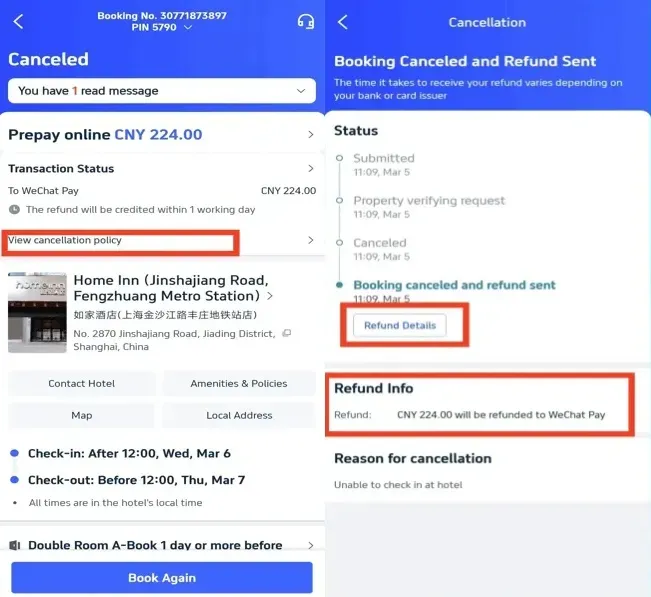
- After submitting your request, click "View Cancellation Policy" to see your refund details.
Step 6: Check the status of your hotel refund on Trip.com
- Check your refund details and information to complete the process.
How to Cancel Your Train Ticket on Trip.com
Step 1: Open the Trip.com app to cancel your train ticket
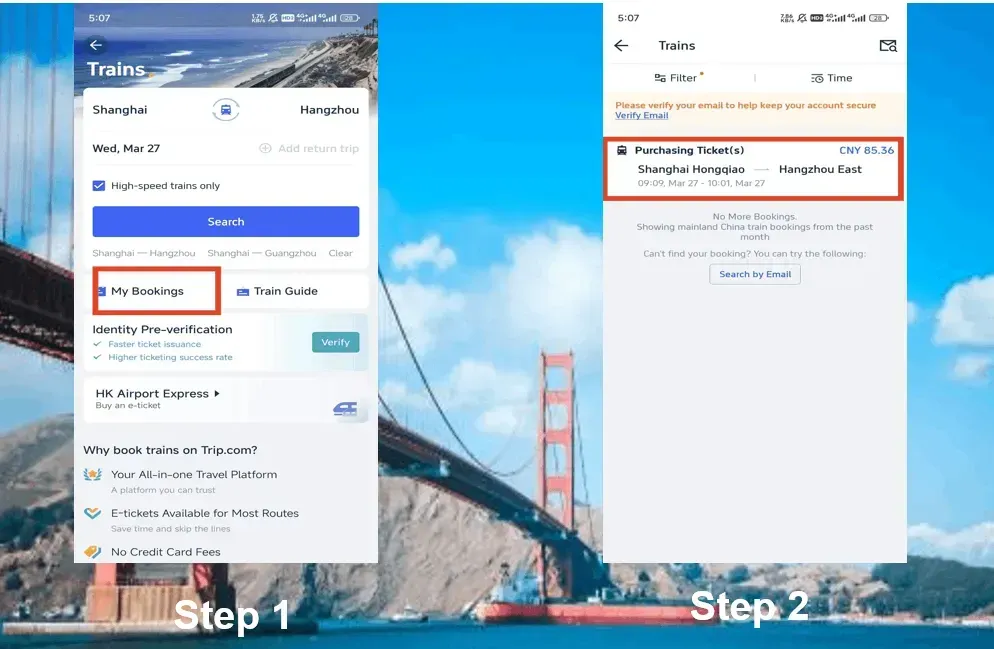
- Once you've logged into your Trip.com account, simply tap on "Trains" and then head to "My Bookings" to cancel your train ticket.
Step 2: Select the train trip you need to cancel
- Select the train trip you'd like to cancel and click on it to head over to the booking page.
Step 3: Requesting a Train Ticket Cancellation on Trip.com
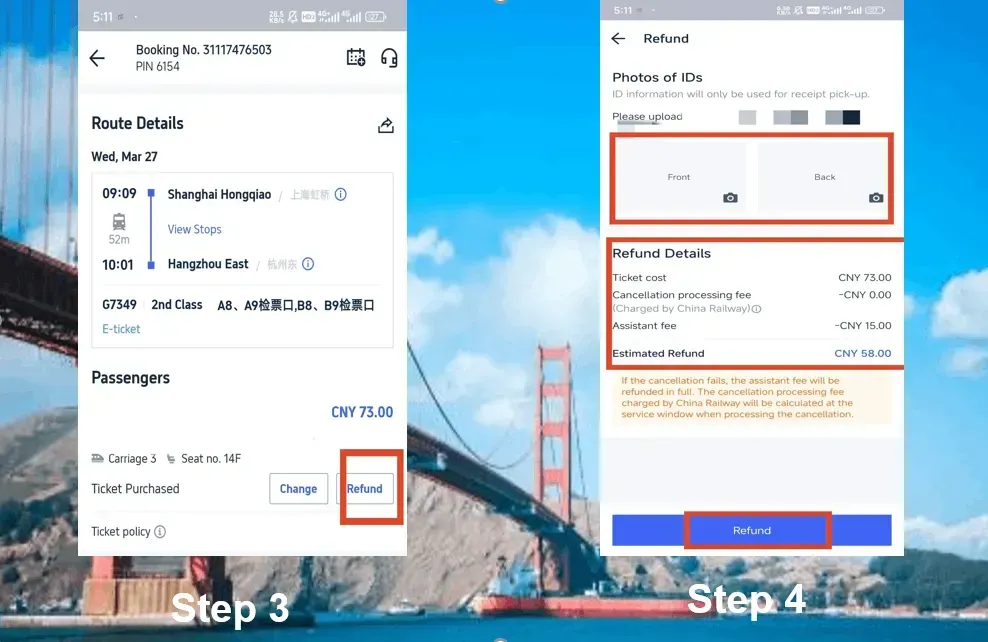
- Click the "Refund" button to cancel your train ticket booking. Please keep in mind that a service fee will apply when requesting a train ticket refund.
Step 4: Finalizing Your Train Cancellation on Trip.com
- Provide photos of both sides of your ID, then review your refund details. Finally, tap the "Refund" button to complete the process.
Train Ticket Refund Fees
Train ticket refund fees often vary depending on how far in advance you cancel before the departure time. Here is an overview of the refund fees:
Refund Processing Time | Refund Fee |
More than 8 days | Free |
48 hours-7 days | 5% off ticket price |
24-48 hours | 10% off ticket price |
Under 24 hours | 20% off ticket price |
Start Your Journey with Trip.com
Trip.com is a global online travel agency offering 24/7 customer support in multiple languages. We make booking flights, hotels, trains, tours, and activities a breeze. With 3+ bookings, travelers can enjoy complimentary airport lounge access, earn extra Trip Coins, save more on hotel stays, reduce train ticket refund fees, and much more. If you have any questions, don't hesitate to reach out to Trip.com's customer service team for direct assistance. Wishing you smooth bookings and unforgettable journeys!
FAQs About Trip.com Cancellation Policy
-
Is there a fee for canceling a booking on Trip.com?
-
How long will it take to receive my refund?
-
Can I cancel a reservation or ticket on behalf of someone else?
-
What happens if I cancel part of my booking (for example, 3 out of 5 nights)?
Popular Searches
-
Top flight destinations
-
Top flight routes
-
Most booked airlines
-
Popular eSIM/SIM card
-
Top Car Rental Picks
-
Popular Hotel Destinations
- Flights to Manila
- Flights to Mumbai
- Flights to Kochi
- Flights to Chennai
- Flights to Kozhikode
- Flights to Delhi
- Flights to Thiruvananthapuram
- Flights to Hyderabad
- Flights to Cairo
- Flights to Islamabad
- Flights to Jeddah
- Flights to Lahore
- Flights to London
- Flights to Dubai
- Flights to Mangalore
- Flights to Karachi
- Flights to Abu Dhabi
- Flights to Riyadh
- Flights to Colombo
- Flights to Amman
- Flights to Bengaluru
- Flights to Dhaka
- Flights to Tiruchirapalli
- Flights to Kathmandu
- Flights to Kannur
- Flights from Dubai to Manila
- Flights from Dubai to Mumbai
- Flights from Dubai to Kochi
- Flights from Dubai to Chennai
- Flights from Abu Dhabi to Kochi
- Flights from Dubai to Kozhikode
- Flights from Dubai to Delhi
- Flights from Abu Dhabi to Kozhikode
- Flights from Abu Dhabi to Thiruvananthapuram
- Flights from Dubai to Hyderabad
- Flights from Abu Dhabi to Cairo
- Flights from Dubai to Islamabad
- Flights from Dubai to Jeddah
- Flights from Dubai to Lahore
- Flights from Abu Dhabi to Mumbai
- Flights from Abu Dhabi to Chennai
- Flights from Dubai to London
- Flights from Dubai to Thiruvananthapuram
- Flights from Mumbai to Dubai
- Flights from Dubai to Cairo
- Flights from Kochi to Dubai
- Flights from Dubai to Mangalore
- Flights from Sharjah to Cairo
- Flights from Dubai to Karachi
- Flights from Kochi to Abu Dhabi
- Car rentals in Kashiwa Station
- Surat Thani International Airport Car rental
- Legaspi Airport Car rental
- Votuporanga Car rental
- Car rentals in Nuremberg
- Kincardine Car rental
- Car rentals in Takayama Station
- Car rentals in Aiken
- Jeonju Car rental
- Car rentals in Shin-Sapporo Station
- Car rentals in Kita-Matsumoto Station
- Car rentals in Auvergne-Rhone-Alpes
- Car rentals in Cusco
- real rental car car rentals in Osaka
- UZHGOROD AIRPORT Car rental
- Car rentals in Los Rios
- Car rentals in Weimar
- Avis car rentals in Takamatsu
- Tokunoshima Airport Car rental
- Tacoma Industrial Apt Car rental
- Car rentals in Limburg
- Car rentals in Thal
- Car rentals in Bamako
- Car rentals in New Caledonia
- Goa Dabolim International Airport Car rental
- Car rentals in Tàrrega
- Car rentals in Pau
- Car rentals in Nordjylland
- La Porte Car rental
- Car rentals in Kami-Shakujii Station
- Hotels in Dubai
- Hotels in Sharjah
- Hotels in Abu Dhabi
- Hotels in London
- Hotels in Riyadh
- Hotels in Jeddah
- Hotels in Cairo
- Hotels in Medina
- Hotels in Makkah
- Hotels in Paris
- Hotels in Milan
- Hotels in Bangkok
- Hotels in Istanbul
- Hotels in Manila
- Hotels in Mumbai
- Hotels in Karachi
- Hotels in Tokyo
- Hotels in New York
- Hotels in Rome