Trip.com E-Receipt: How to Download Your Electronic Receipt

By Trip.com
June 12, 2026
Save More on Your Bookings with Trip.com Deals
When booking flights, hotels, car rentals, and travel services through Trip.com, you can not only download a Trip.com E-Receipt for your records but also enjoy exclusive discounts and special promotions.
Flight Discounts and Promo Codes
Explore the latest flight deals and promo codes on Trip.com to save on domestic and international travel while receiving an electronic receipt after booking.


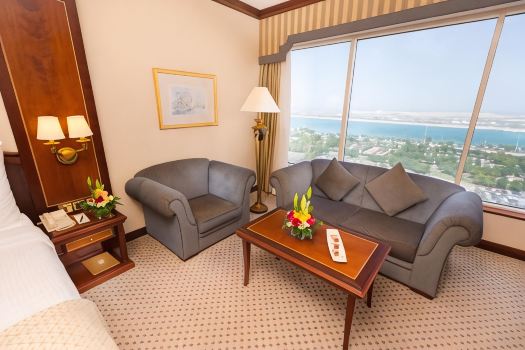
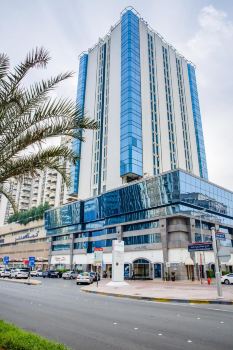
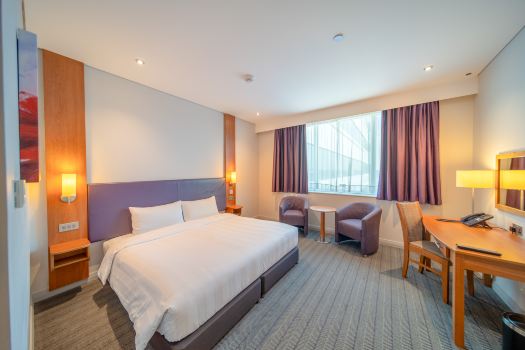
Up to 10% Off Selected Hotels
Book eligible hotels through Trip.com and enjoy up to 10% off, with convenient access to your booking details and E-Receipt in one place.
 NO.1
NO.1





















Mastercard Exclusive: Up to 20% Off
Use an eligible Mastercard at checkout to unlock discounts of up to 20% on selected Trip.com travel products.
Save Up to 8% on Car Rentals
Reserve a rental car through Trip.com and enjoy up to 8% off while keeping all your travel documents and receipts organized online.
Convenient Travel with eSIM Deals
Stay connected abroad with Trip.com eSIM offers, providing affordable mobile data and easy digital access to your travel information.






What is a Trip.com E-Receipt?
When you book flights, hotels, or travel packages with Trip.com, you'll receive a detailed e-receipt to help you keep track of your travel expenses. Your Trip.com e-receipt includes all your booking details, a summary of costs, and payment information—all of which you can view or print whenever you need. At Trip.com, we’re committed to providing fast, reliable service that makes every booking transparent and easy to manage.
How to Get Your Trip.com E-Receipt
This article walks you through how to get your Trip.com e-receipt, using a flight booking as an example.
Step | Action |
Sign In | Open the Trip.com app and sign in. |
Find Your Booking | Head to "All Bookings and choose your order". |
Order | Find "More options" and select Trip.com E-receipt". |
Pick-up | Enter your email address and click on "Submit". |
Get Trip.com E-Receipt | Step 1: Manage My Bookings
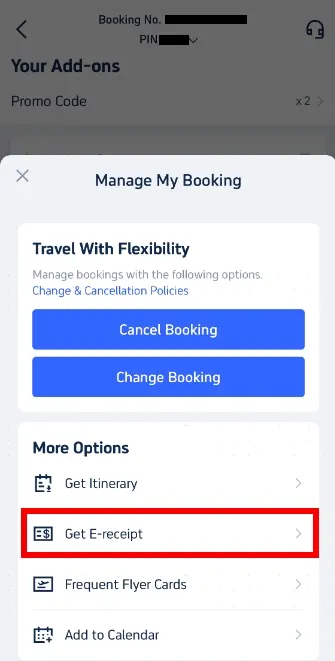
Open the Trip.com app and sign in to your account. Simply tap on "My Bookings" to find the reservation you're looking for.
Head over to "Manage my bookings." Under the "More options" section, find and click the "Get receipt" button.
Your Trip.com E-Receipt | Step 2: Select Your E-Receipts
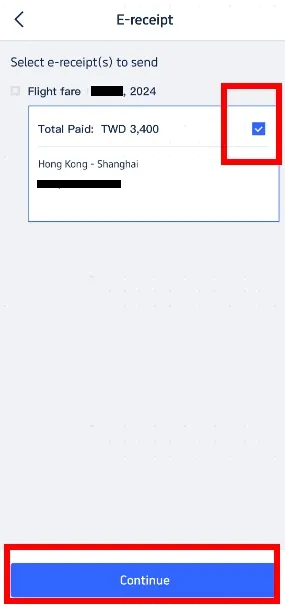
On the receipt page, choose the flight e-tickets you'd like a receipt for. Simply select the relevant e-tickets and click "Continue" to proceed.
Get Trip.com E-Receipt | Step 3: Enter Receipt Details
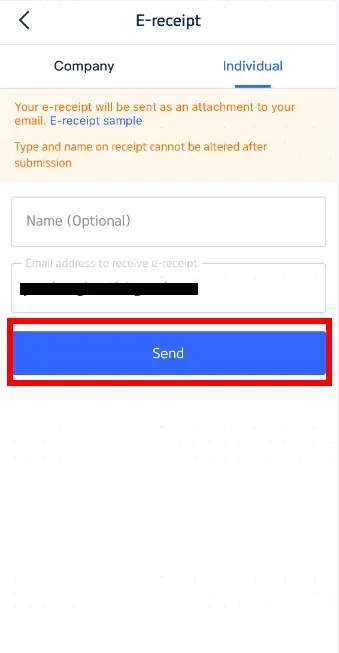
If you're booking as an individual, simply select "Individual." Enter your name (optional) and the email address where you'd like your e-receipt delivered. Just a heads-up: the receipt type and name cannot be changed once it's sent, so please double-check your details! Click "Send" to proceed.
Get Trip.com E-Receipt | Step 4: Confirm and Receive Your E-Receipt
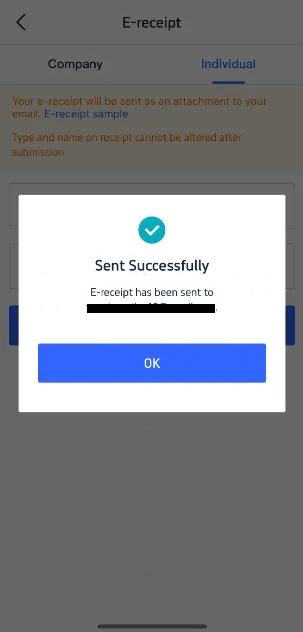
You'll receive a confirmation message letting you know that your e-receipt has been sent successfully. Simply click "OK" and check your inbox to download your e-receipt. This Trip.com e-receipt serves as your official record. Feel free to print it out if you'd like, though keeping a digital copy is always a great way to stay organized!
Handy Tips for Your Trip.com E-Receipts
- Check your spam folder: If your Trip.com e-receipt hasn't landed in your inbox, be sure to take a peek in your spam or junk folder.
- Keep your email address up to date: Make sure your email is current in your Trip.com account so you can receive all your travel updates and receipts right away.
- Go Digital: Save your e-receipts directly on your device for easy access and future reference. It’s a smart way to stay on top of your travel expenses and track them effortlessly!
And there you have it—that’s how you get your Trip.com e-receipt. Trip.com is your go-to platform for booking affordable flights and getting your e-receipts with ease!
Popular Searches
-
Top flight destinations
-
Top flight routes
-
Most booked airlines
-
Popular eSIM/SIM card
-
Top Car Rental Picks
-
Popular Hotel Destinations
- Flights to Manila
- Flights to Mumbai
- Flights to Kochi
- Flights to Chennai
- Flights to Kozhikode
- Flights to Delhi
- Flights to Thiruvananthapuram
- Flights to Hyderabad
- Flights to Cairo
- Flights to Islamabad
- Flights to Jeddah
- Flights to Lahore
- Flights to London
- Flights to Dubai
- Flights to Mangalore
- Flights to Karachi
- Flights to Abu Dhabi
- Flights to Riyadh
- Flights to Colombo
- Flights to Amman
- Flights to Bengaluru
- Flights to Dhaka
- Flights to Tiruchirapalli
- Flights to Kathmandu
- Flights to Kannur
- Flights from Dubai to Manila
- Flights from Dubai to Mumbai
- Flights from Dubai to Kochi
- Flights from Dubai to Chennai
- Flights from Abu Dhabi to Kochi
- Flights from Dubai to Kozhikode
- Flights from Dubai to Delhi
- Flights from Abu Dhabi to Kozhikode
- Flights from Abu Dhabi to Thiruvananthapuram
- Flights from Dubai to Hyderabad
- Flights from Abu Dhabi to Cairo
- Flights from Dubai to Islamabad
- Flights from Dubai to Jeddah
- Flights from Dubai to Lahore
- Flights from Abu Dhabi to Mumbai
- Flights from Abu Dhabi to Chennai
- Flights from Dubai to London
- Flights from Dubai to Thiruvananthapuram
- Flights from Mumbai to Dubai
- Flights from Dubai to Cairo
- Flights from Kochi to Dubai
- Flights from Dubai to Mangalore
- Flights from Sharjah to Cairo
- Flights from Dubai to Karachi
- Flights from Kochi to Abu Dhabi
- Car rentals in Aoi Station
- Car rentals in Goryōkaku Station
- Clermont Car rental
- Car rentals in Milwaukee
- Car rentals in Rogaland
- Car rentals in Secaucus Junction
- Car rentals in Opelousas
- Car rentals in Santiago de Compostela Railway Station
- Oneonta Car rental
- Car rentals in Esbjerg
- Car rentals in Utica
- Northampton Car rental
- Car rentals in Pompei Santuario
- Car rentals in Higashi-Asahikawa Station
- ATHENS AIRPORT Car rental
- Car rentals in Beijing Railway Station
- GOGO RENTAL car rentals in Fukuoka
- Car rentals in Donegal
- Buzios Car rental
- Car rentals in Shenzhen
- Car rentals in Kota Bharu
- Car rentals in Yamaguchi Station
- Car rentals in Salerno
- Car rentals in Mazovia
- YAMATO CAR RENTAL car rentals
- Car rentals in Dordrecht Zuid
- Olgii Airport Car rental
- Car rentals in Rovigo Railway Station
- Car rentals in Kamegawa Station
- Car rentals in Wharton
- Hotels in Dubai
- Hotels in Sharjah
- Hotels in Abu Dhabi
- Hotels in London
- Hotels in Riyadh
- Hotels in Jeddah
- Hotels in Cairo
- Hotels in Medina
- Hotels in Makkah
- Hotels in Paris
- Hotels in Milan
- Hotels in Bangkok
- Hotels in Istanbul
- Hotels in Manila
- Hotels in Mumbai
- Hotels in Karachi
- Hotels in Tokyo
- Hotels in New York
- Hotels in Rome