Trip.com Refund Policy: How to Get a Refund in the UAE

By Trip.com
July 15, 2026
Learn about Trip.com refund policy for flights, hotels, and trains, including free cancellation options, detailed cancellation steps, how to check your refund status, and FAQs. Travel with total flexibility with Trip.com!

Save More on Your Trip with Exclusive Trip.com Offers
After learning about the Trip.com refund policy, discover exclusive Trip.com deals that help UAE travelers save more on flights, hotels, and travel services.
Book Flights with Exclusive Trip.com Flight Deals
Enjoy competitive flight fares on Trip.com and make your next journey more affordable with exclusive offers.


Enjoy 10% Off on Hotels for Your Next Stay
Book your ideal accommodation on Trip.com and enjoy up to 10% off selected hotels for a more rewarding stay.
 NO.1
NO.1
























Get 20% Off with Mastercard Travel Offers
Save more on your travel bookings by paying with eligible Mastercard cards and enjoying exclusive discounts.

Save 8% on Car Rentals with Trip.com Deals
Explore your destination with ease and enjoy up to 8% off selected car rental bookings on Trip.com.
Stay Connected Abroad with Trip.com eSIM
Stay connected while traveling with convenient eSIM options available through Trip.com.






Trip.com Refund Policy and Cancellation Policy
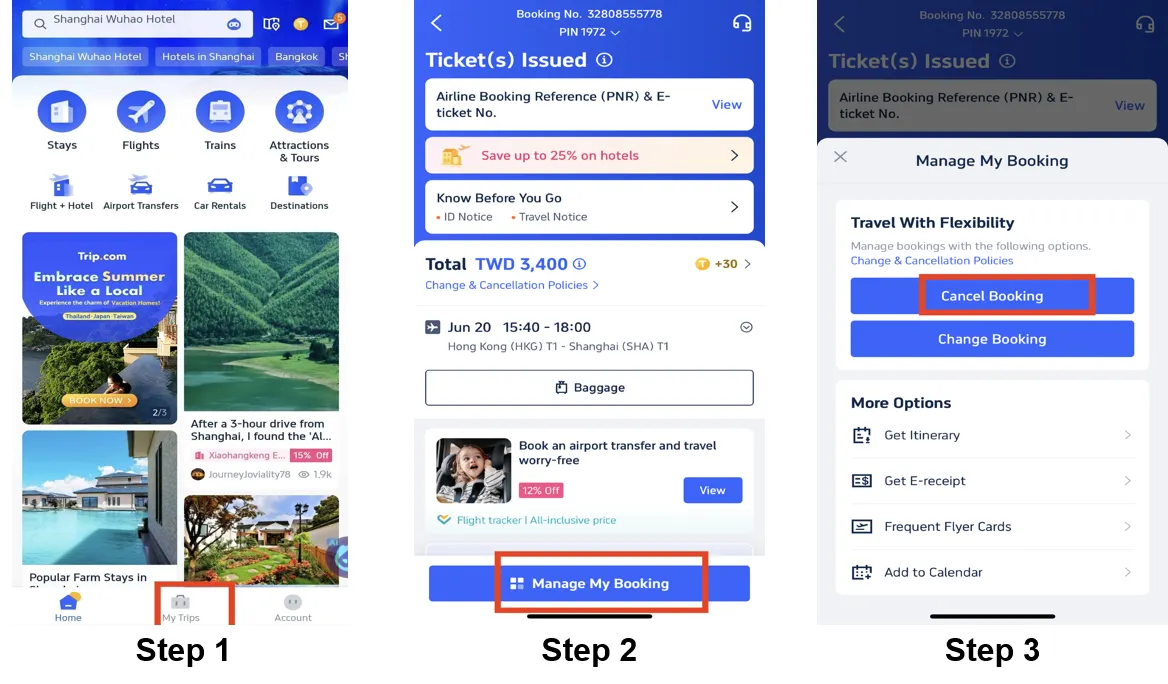
Flight refund rules on Trip.com depend on the ticket type, airline policies, and the timing of the cancellation. Here are the key points you need to know:
Trip.com Refund Policy and Flight Refund Policies
- Refundable tickets: You may receive a partial or full refund, but airlines or Trip.com may deduct cancellation or service fees. The exact amounts vary depending on the airline, fare type, and the number of days remaining before departure.
- Non-refundable tickets: The ticket price itself is non-refundable, but you may be able to get a refund on taxes, airport fees, or service charges (this varies depending on the airline and destination).
- Discounted Fares/Promotional Offers: These tickets are subject to strict non-refundable rules. In some cases, limited refunds may be available (such as airport taxes) — though flexibility is extremely limited.
- 24-hour free cancellation: Some airlines allow free cancellation within 24 hours of booking (please check the airline's fare rules to confirm).
How to Cancel a Flight and Get a Refund (Cancellation Steps)
- Log in to your Trip.com account via the app or website.
- Go to "My Trips" ← "All Bookings" or "Account" ← "All Bookings".
- Find your flight booking, click on "Manage My Booking," and then select "Cancel Booking."
- Review the refund details (including deductions like cancellation fees) and then click "Next".
- Provide the reason for cancellation (if requested), then click "Submit" to confirm.
Flight refund processing time
- Credit/Debit Card: 7–15 business days
- PayPal/E-wallets: 3–7 business days
- Bank transfer: up to 30 business days
Note: Some delays may occur due to airline procedures; please contact customer service if your refund is delayed.
Trip.com's Flexible Flight Add-on: Flight Flexibility
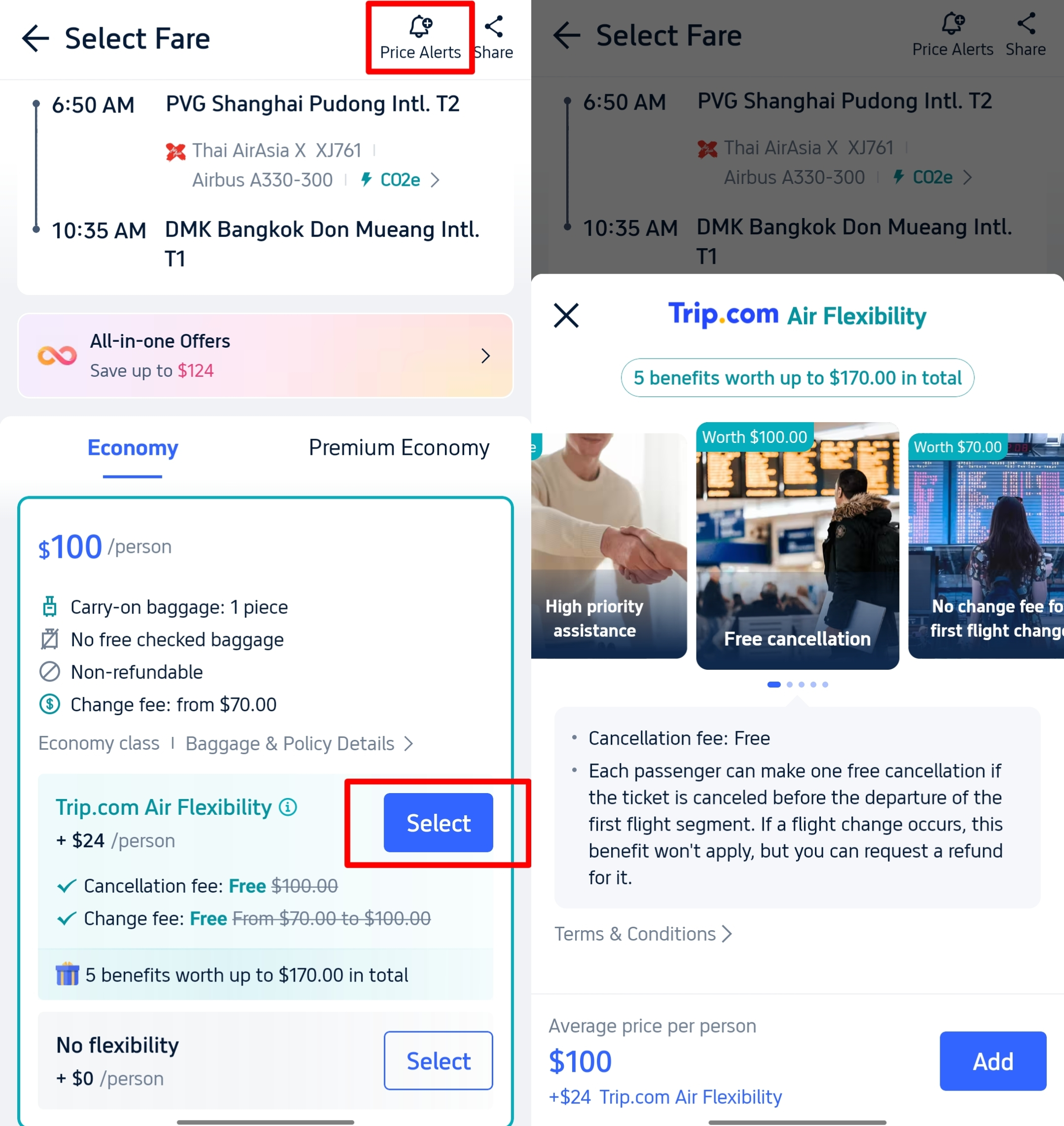
If your travel plans are uncertain, adding Trip.com's "Flight Flexibility" (available on select flights) can help you get a refund; it may help waive or reduce cancellation fees, allow you to change travel dates without incurring hefty penalties, or even guarantee a higher refund percentage.
Trip.com Refund Policy: Hotel Refund and Cancellation Steps
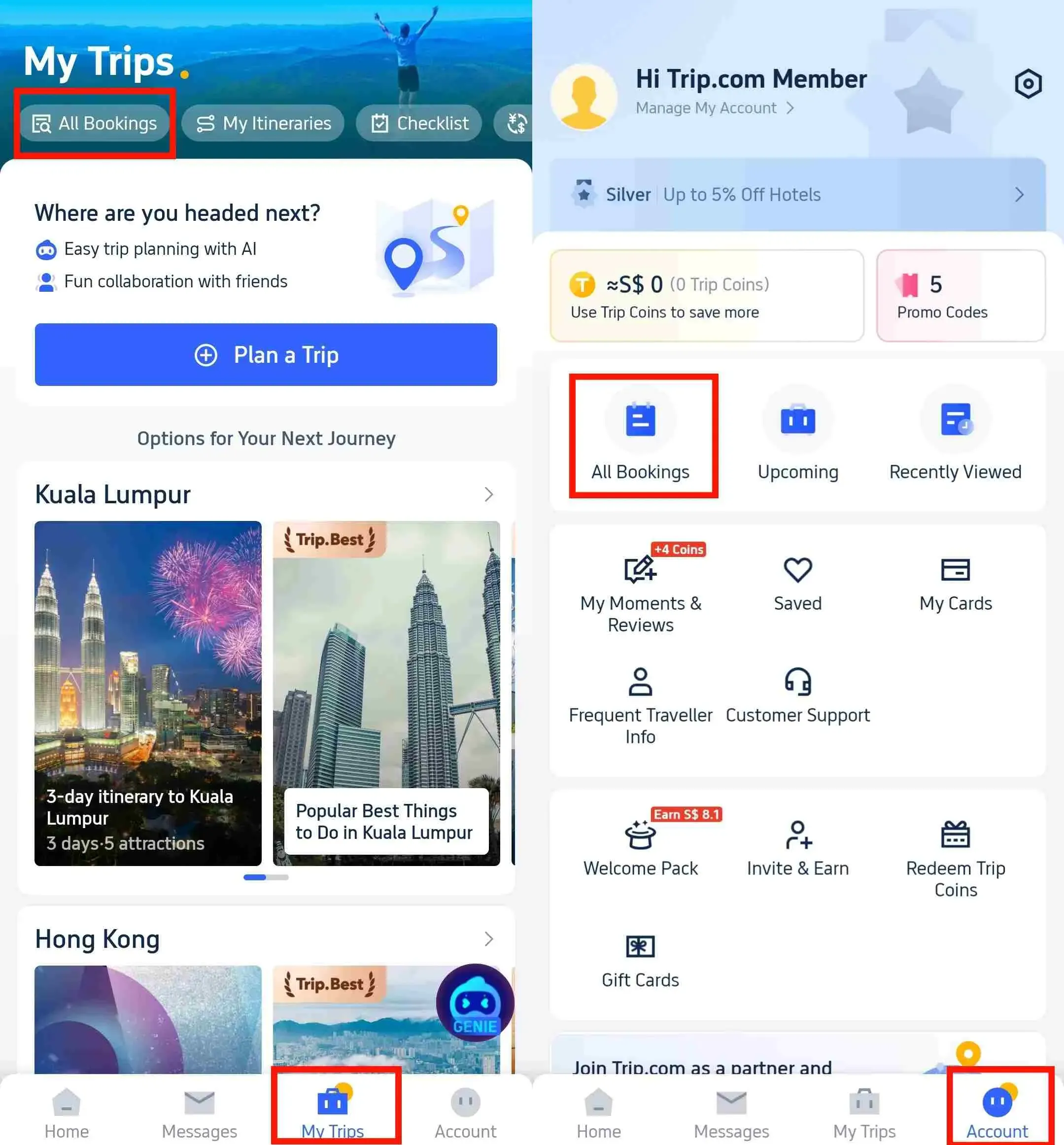
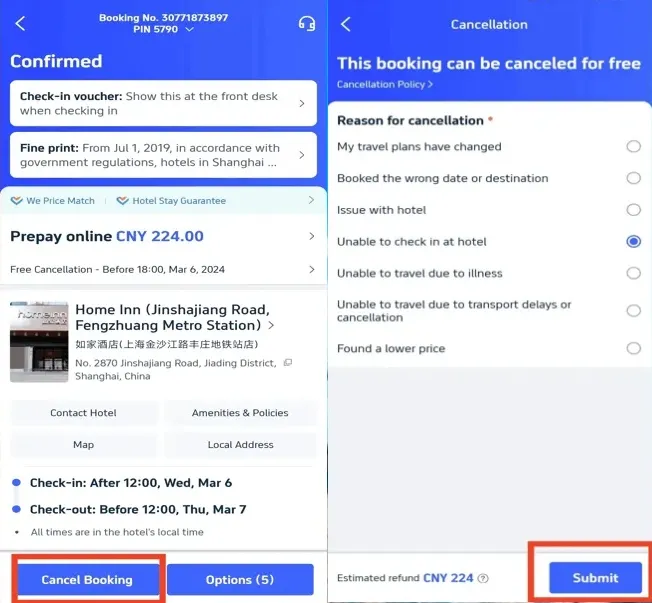
Hotel refund policies depend on cancellation deadlines and room type. The "Free Cancellation" tag makes it easy for you to find flexible options:
Trip.com Refund Policy for Your Hotel Booking
- Hotels with free cancellation: You'll find them marked with a "Free Cancellation" tag on Trip.com. Most of these hotels require you to cancel 24 to 48 hours before your check-in time (with some offering a grace period of one to two days) to receive a full refund. Some hotels also offer the option of free cancellation up to 24 hours before check-in (please check the specific hotel listing details).
- Non-refundable rooms: Discounted rates with no options for cancellation or refunds; this means you'll lose the full amount paid if you're unable to stay.
- No-show policy: If you don't check in and haven't cancelled in advance, the full cost of the stay will be charged and you will not receive a refund.
How to Cancel a Hotel Booking and Get a Refund (Cancellation Steps)
- Log in to your Trip.com account (via the app or website).
- Go to "My Trips" ← "All Bookings" to find your hotel booking.
- Select the booking and click "Cancel Booking".
- Select the reason for cancellation from the list (e.g., change of plans, illness, wrong date).
- Click "Submit" to confirm the cancellation.
- Optional: Click "View Cancellation Policy" to check refund details (full/partial refund).
Hotel Booking Refund Processing Time
Refunds are returned to your original payment method within one business day (e.g. WeChat Pay and Alipay). Bank transfers or credit cards may take an additional 1 to 3 days due to the issuer's processing procedures.
[10% OFF] Hotel Recommendations Around the World






Trip.com Refund Policy: Train Ticket Policy
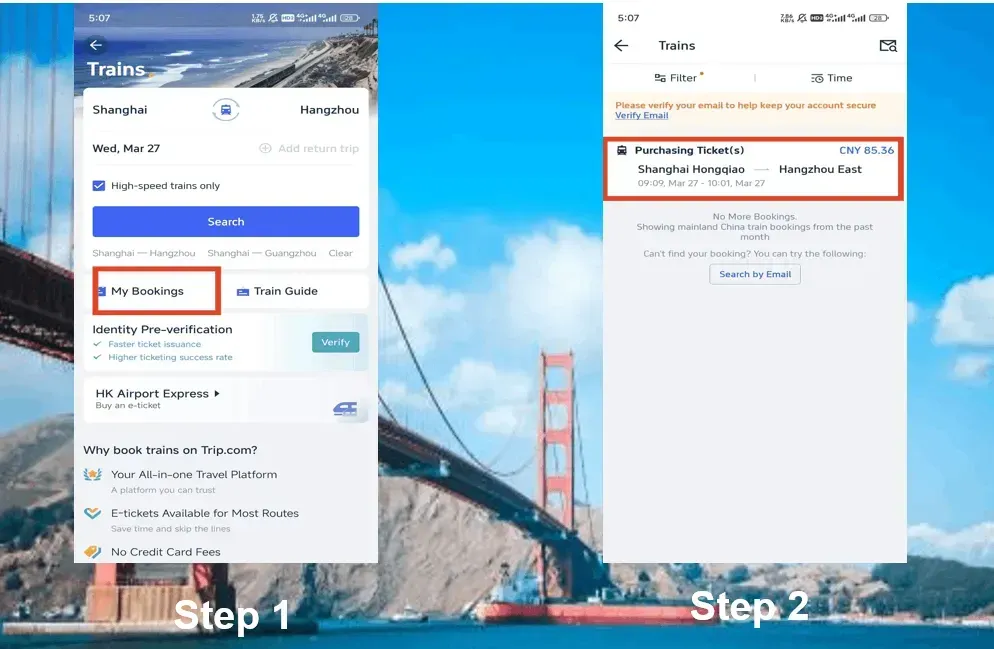
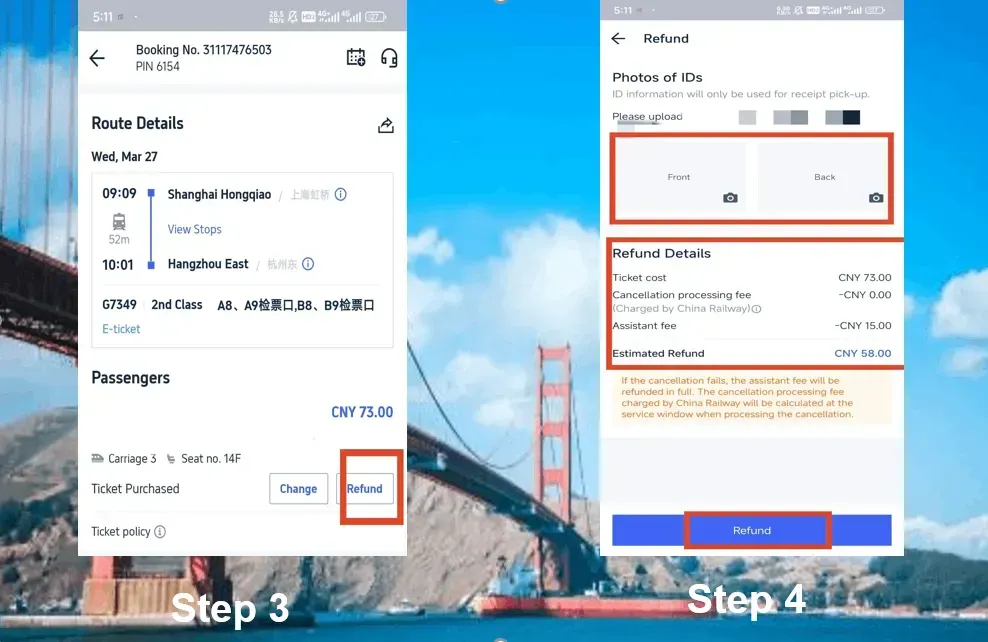
Train ticket refund policies vary depending on the railway company (such as China's high-speed trains or international trains) and the ticket type. Here is the essential information you need to know:
Trip.com Refund Policy and Train Ticket Refund
- Local trains (such as China's high-speed trains): Free cancellation is allowed up to a certain number of days before the departure date (this varies by railway company). Cancellations made closer to the departure time are subject to fees (for example, 10% of the ticket price if cancelled 24-48 hours before departure).
- International trains: Policies depend on the operating railway company; some allow free changes or cancellations, while others charge additional fees or prohibit any modifications.
- Refundable components: Eligible cancellations refund the full ticket price (minus fees); taxes/fees are usually refunded in full.
How to Cancel a Train Ticket and Get a Refund (Cancellation Steps)
- Log in to your Trip.com account and head over to the trains section.
- Click on "My Bookings" to find your train booking.
- Select the booking and then click on "Refund".
- Please provide the required proof of identity (a photo of both the front and back of your ID card for domestic train travel).
- Review the refund details (such as deducted fees) and confirm the process by clicking "Refund" again.
Train Ticket Refund Processing Time
Refunds are processed within 7-15 business days:
- Credit Cards: 7–14 business days
- E-wallets/Bank transfers: 3–7 business days
- Note: A small service fee may be deducted when refunding train tickets (fees vary by railway company).
Can a Trip.com Booking be 100% Refunded?

- Flights: Only with refundable tickets or the 24-hour free cancellation option (if the airline's policy allows it).
- Hotels: Yes, you can, provided you book a room with a "Free Cancellation" feature and cancel before the specified deadline (24 to 48 hours before your check-in time).
- Trains: Yes, you can, provided you cancel within the railway company's free cancellation window (this period varies by service provider).
How Long Does the Refund Process Take with Trip.com?

- Flights: 3-7 days (PayPal/e-wallets), 7-15 days (credit/debit cards), and up to 30 days (bank transfers).
- Hotels: About 1 business day (e-wallets/WeChat Pay/Alipay); add 1-3 days for credit cards/bank transfers.
- Trains: 3-7 days (e-wallets/bank transfers), 7-14 days (credit cards) — total processing time is up to 15 business days.
Some delays may occur due to processing procedures by airlines, railways, or hotels, or because of payment provider timelines.






How to Check Your Refund Status on Trip.com
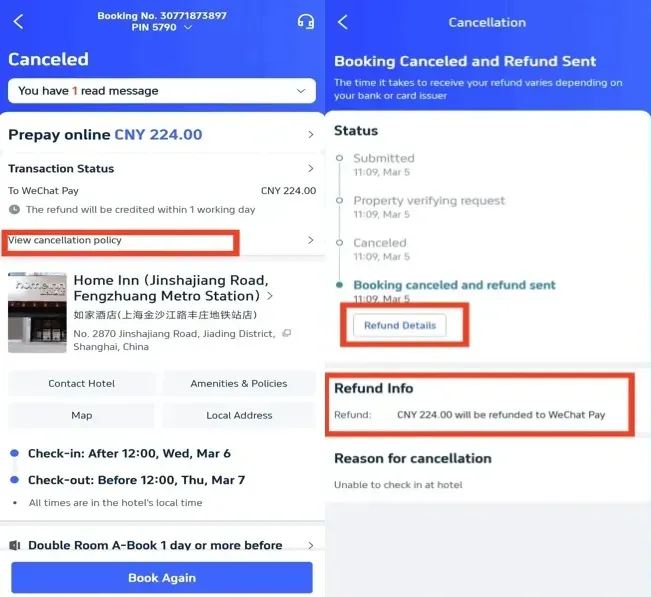
To track your refund status:
- Log in to your Trip.com account (via the app or website).
- Go to "My Trips" ← "All Bookings".
- Find your canceled booking (flight, hotel, or train) and check the status of your refund.
- You'll see updates like:
- "Submitted": Your refund request has been received.
- "Processing": Trip.com/railway/hotel is verifying your order.
- "Refund sent": The funds have been deposited into your payment method.
- "Completed": Your refund has been fully processed.
If your order status remains "Processing" for longer than the specified time, please contact Trip.com customer service.
How Can I Contact Trip.com for a Refund?

Use these channels to contact Trip.com:
- Live Chat (Trip.com App: 24/7 support).
- A dedicated hotline for each country, available 24/7 (listed under the "Customer Service" section in the app).
FAQs About Trip.com Refund Policy
-
Can I cancel the trip and get a refund on Trip.com?
-
Does Trip.com have a cancellation policy?
-
Can I get a refund if I cancel my trip on Trip.com?
-
How can I get a 100% refund when cancelling the trip?
Popular Searches
-
Top flight destinations
-
Top flight routes
-
Most booked airlines
-
Popular eSIM/SIM card
-
Top Car Rental Picks
-
Popular Hotel Destinations
- Flights to Manila
- Flights to Mumbai
- Flights to Kochi
- Flights to Chennai
- Flights to Kozhikode
- Flights to Delhi
- Flights to Thiruvananthapuram
- Flights to Hyderabad
- Flights to Cairo
- Flights to Islamabad
- Flights to Jeddah
- Flights to Lahore
- Flights to London
- Flights to Dubai
- Flights to Mangalore
- Flights to Karachi
- Flights to Abu Dhabi
- Flights to Riyadh
- Flights to Colombo
- Flights to Amman
- Flights to Bengaluru
- Flights to Dhaka
- Flights to Tiruchirapalli
- Flights to Kathmandu
- Flights to Kannur
- Flights from Dubai to Manila
- Flights from Dubai to Mumbai
- Flights from Dubai to Kochi
- Flights from Dubai to Chennai
- Flights from Abu Dhabi to Kochi
- Flights from Dubai to Kozhikode
- Flights from Dubai to Delhi
- Flights from Abu Dhabi to Kozhikode
- Flights from Abu Dhabi to Thiruvananthapuram
- Flights from Dubai to Hyderabad
- Flights from Abu Dhabi to Cairo
- Flights from Dubai to Islamabad
- Flights from Dubai to Jeddah
- Flights from Dubai to Lahore
- Flights from Abu Dhabi to Mumbai
- Flights from Abu Dhabi to Chennai
- Flights from Dubai to London
- Flights from Dubai to Thiruvananthapuram
- Flights from Mumbai to Dubai
- Flights from Dubai to Cairo
- Flights from Kochi to Dubai
- Flights from Dubai to Mangalore
- Flights from Sharjah to Cairo
- Flights from Dubai to Karachi
- Flights from Kochi to Abu Dhabi
- Car rentals in Shinano-Ōmachi Station
- Car rentals in Breda Railway Station
- Car rentals in Aguascalientes
- Car rentals in Squamish
- Car rentals in Surbiton
- Car rentals in Katsutadai Station
- Car rentals in Esbjerg
- Northampton Car rental
- Car rentals in Marion
- Car rentals in Iasi
- Car rentals in Gillette
- Car rentals in Pittsburgh Union Station
- Car rentals in Ageo Station
- Calais/Dunkerque Car rental
- Car rentals in Jakarta
- Car rentals in Tsudanuma Station
- Car rentals in Shenzhen
- Car rentals in Aysen
- Car rentals in Yamaguchi Station
- Car rentals in Sinaia
- Car rentals in Spain
- Bardstown Car rental
- Car rentals in Centre
- Car rentals in Daqing
- Car rentals in Oxford
- Statesboro Car rental
- West Bend Car rental
- Car rentals in Mayaguez
- Suzuki Rent a Car car rentals in Fukuoka
- Car rentals in Imamiya Station
- Hotels in Dubai
- Hotels in Sharjah
- Hotels in Abu Dhabi
- Hotels in London
- Hotels in Riyadh
- Hotels in Jeddah
- Hotels in Cairo
- Hotels in Medina
- Hotels in Makkah
- Hotels in Paris
- Hotels in Milan
- Hotels in Bangkok
- Hotels in Istanbul
- Hotels in Manila
- Hotels in Mumbai
- Hotels in Karachi
- Hotels in Tokyo
- Hotels in New York
- Hotels in Rome