
Hot Springs Hotels in Kaafu Atoll, Maldives
Enter your dates for the latest hotel rates and availability.
Swipe down to view more
Filter by:
Hotel Star Rating
≤2345
Guest Rating
9+8+7+6+Top Hot Springs Hotels - Kaafu Atoll
Choose your travel dates to see the latest prices
Most Booked
Lowest price
Closest to downtown
Highest Rated




99+
Hotels in Maafushi
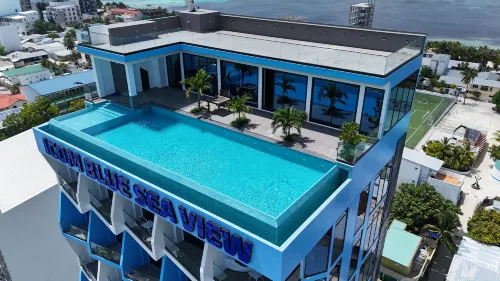
When you stay at iCom Blue Sea View in Maafushi, you'll be near the beach, just steps from Maafushi Harbor and Sandbank Picnic Spot. This family-friendly hotel is 0.1 mi (0.2 km) from Water Sports Beach and 0.1 mi (0.2 km) from Maafushi Mosque.
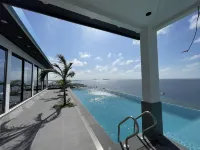
Take advantage of recreational opportunities offered, including an outdoor pool, an indoor pool, and a fitness center. This hotel also features complimentary wireless internet access, concierge services, and babysitting (surcharge). Getting to the surf and sand is a breeze with the complimentary beach shuttle.
Grab a bite to eat at one of the hotel's many dining establishments, which include 2 restaurants and 2 coffee shops/cafes. Relax with a refreshing drink at one of the 2 bars/lounges. A complimentary buffet breakfast is served daily from 7:30 AM to 9:30 AM.
Featured amenities include dry cleaning/laundry services, a 24-hour front desk, and multilingual staff. Event facilities at this hotel consist of a conference center and meeting rooms.
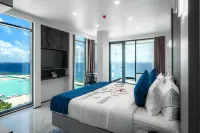
Make yourself at home in one of the 50 guestrooms. Rooms have private balconies. Complimentary wireless internet access keeps you connected, and cable programming is available for your entertainment. Private bathrooms with showers feature complimentary toiletries and hair dryers.
"Excellent room! This is the best hotel I've stayed at in Mafushi. The air conditioning was strong, there were no mosquitoes, and it was very clean. The room was spacious and had a balcony. I highly recommend the drinks at the downstairs restaurant; the ambiance was fantastic. The rooftop infinity pool was also beautiful, and the service was superb! Everyone was attentive to our needs."
Great
69 reviews
9.1/10
1 night
From IDR 1,468,205
Frequently Asked Questions
What are the popular Hot spring hotels in Kaafu Atoll?
Whether you are traveling to Kaafu Atoll for business or tourism, iCom Blue Sea View (price from IDR 1,949,583) is a preferred hotel.
How much is the average rate for Hot spring hotels in Kaafu Atoll?
For Hot spring hotels in Kaafu Atoll, the average price on weekdays is IDR 6,741,976, and the average price on weekends (Friday–Saturday) is IDR 6,827,554.
Which Hot spring hotels in Kaafu Atoll provide swimming pools?
There are many Hot spring hotels in Kaafu Atoll with swimming pools. iCom Blue Sea View (price from IDR 1,949,583) is very popular.
Which Hot spring hotels in Kaafu Atoll provide fitness facilities?
Get used to exercising? iCom Blue Sea View (price from IDR 1,949,583) provides fitness facilities. .
Which Hot spring hotels in Kaafu Atoll provide spa services?
Tired from traveling? iCom Blue Sea View (price from IDR 1,949,583) provides highly rated spa services.
Which Hot spring hotels in Kaafu Atoll offer hot springs?
iCom Blue Sea View (price from IDR 1,949,583) is a good choice for hotels with hot springs.
Which Hot spring hotels in Kaafu Atoll provide breakfast?
iCom Blue Sea View (price from IDR 1,949,583) provides delicious breakfast.
Which Family-friendly hotels in Kaafu Atoll are popular for family travelers?
Want to enjoy your holiday with family members? Grand Park Kodhipparu Maldives (price from IDR 6,667,094), RAH GILI MALDIVES (price from IDR 16,741,280) and Ozen Reserve Bolifushi - Luxury All Inclusive (price from IDR 25,259,008) are very suitable.
What deals are available for Hot spring hotels in Kaafu Atoll?
Trip.com provides various promotions and discounts for Hot spring hotels. You can check the promotions page to see available promotions on Trip.com.
Property Information for Tourists
| Total Properties | 1 |
|---|---|
| Number of Reviews | 69 |
| Weekday Avg. Price | IDR 6,741,976 |
| Weekend Avg. Price | IDR 6,827,554 |
Top Recommendations
Find More Themes
Romantic Hotels in ChinaPet friendly Hotels in MaldivesPet friendly Hotels in IcelandPet friendly Hotels in NorwayPet friendly Hotels in ArubaFamily-friendly Hotels in Saudi ArabiaFamily-friendly Hotels in South KoreaFamily-friendly Hotels in IcelandFamily-friendly Hotels in SwedenFamily-friendly Hotels in MauritiusPet friendly Hotels in DelhiPet friendly Hotels in ChandigarhFamily-friendly Hotels in Prince Edward IslandRomantic Hotels in OregonRomantic Hotels in YunnanRomantic Hotels in Jeju-doRomantic Hotels in Chungcheongnam-doRomantic Hotels in ShimaneRomantic Hotels in Ash Sharqiyah SouthPet friendly Hotels in HubeiBeach Hotels in Huntington BeachBeach Hotels in PattayaLuxury Hotels in MadridLuxury Hotels in VeniceLuxury Hotels in HanoiLuxury Hotels in MauritiusLuxury Hotels in Mexico CityLuxury Hotels in ShanghaiLuxury Hotels in CairoLuxury Hotels in Lanzarote
Trip.com latest trends
Romantic Hotels in ChinaPet friendly Hotels in MaldivesPet friendly Hotels in IcelandPet friendly Hotels in NorwayPet friendly Hotels in ArubaFamily-friendly Hotels in Saudi ArabiaFamily-friendly Hotels in South KoreaFamily-friendly Hotels in IcelandFamily-friendly Hotels in SwedenFamily-friendly Hotels in MauritiusPet friendly Hotels in DelhiPet friendly Hotels in ChandigarhFamily-friendly Hotels in Prince Edward IslandRomantic Hotels in OregonPet friendly Hotels in ClujPet friendly Hotels in TulceaPet friendly Hotels in NarokPet friendly Hotels in VermontPet friendly Hotels in TovHot spring Hotels in CearaBeach Hotels in Huntington BeachBeach Hotels in PattayaLuxury Hotels in MadridLuxury Hotels in VeniceLuxury Hotels in HanoiLuxury Hotels in MauritiusLuxury Hotels in Mexico CityLuxury Hotels in ShanghaiLuxury Hotels in CairoLuxury Hotels in Lanzarote