Trip.com Baggage Allowance: How to Add or Change Baggage Online

By Trip.com
May 19, 2026

After booking your flight on Trip.com, one of the most important steps is to make sure your baggage allowance meets all your travel needs.
Whether you need to check your Trip.com baggage allowance or add extra bags, Trip.com makes it easy.
I'll walk you through how to check or add baggage allowance in the Trip.com app, step by step.


Step 1: Find Your Upcoming Trips
- Open the Trip.com app: To get started, simply launch the Trip.com app on your phone.
- Tap the "Account" icon: You'll see an icon labeled "Account" at the bottom of your screen. Simply tap it to head over to your account page.
- Find the "Upcoming" section: on your account page, you'll see an "Upcoming" button right in the middle. Just click it to view all your exciting future trips!
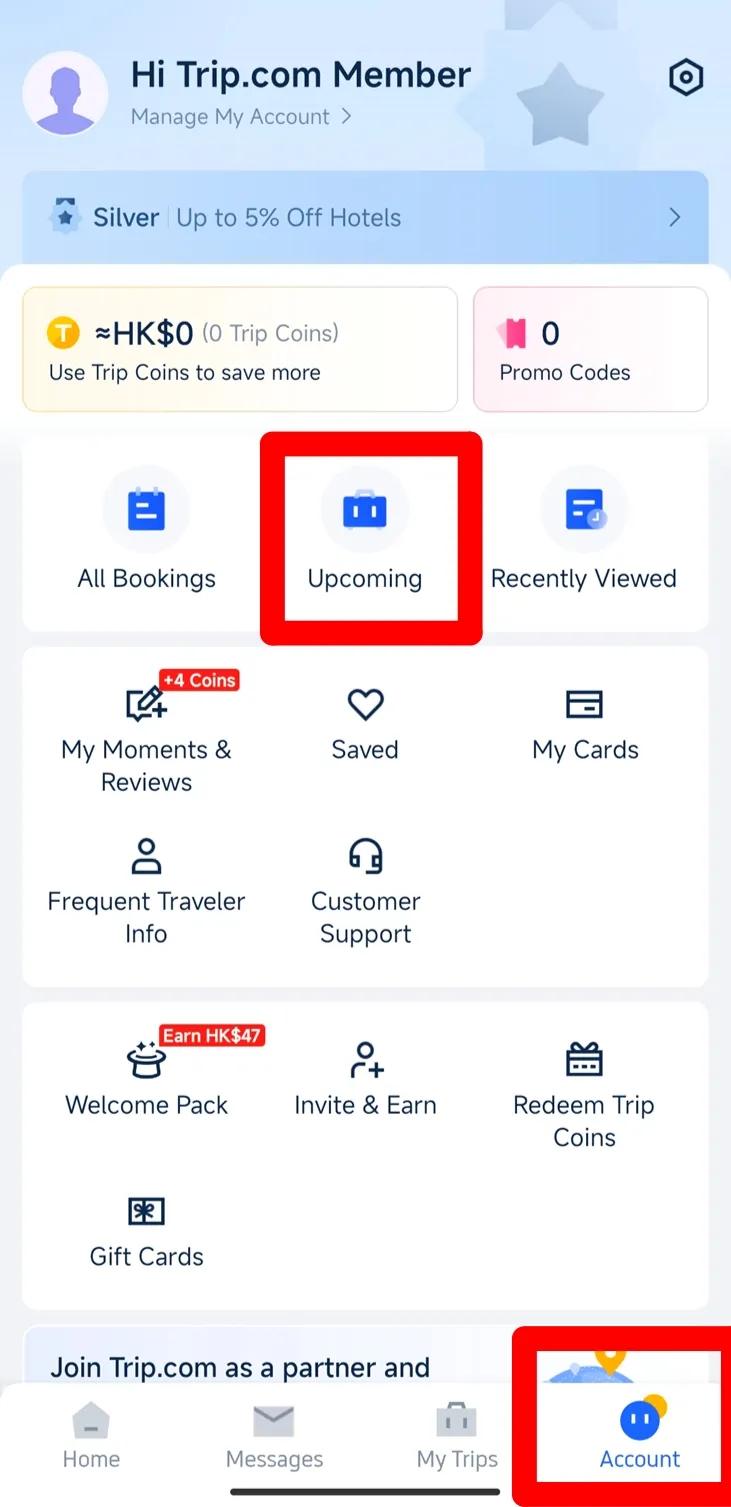
Step 2. Find Your Flight Status
- Select your flight: you'll see a list of your booked trips. Simply find the one you're looking for and click on it.
- View your ticket details: once you've selected your flight, you'll see all the essential information about your ticket.
- Tap "Flight Status": to see more details, just tap the "Flight Status" button.
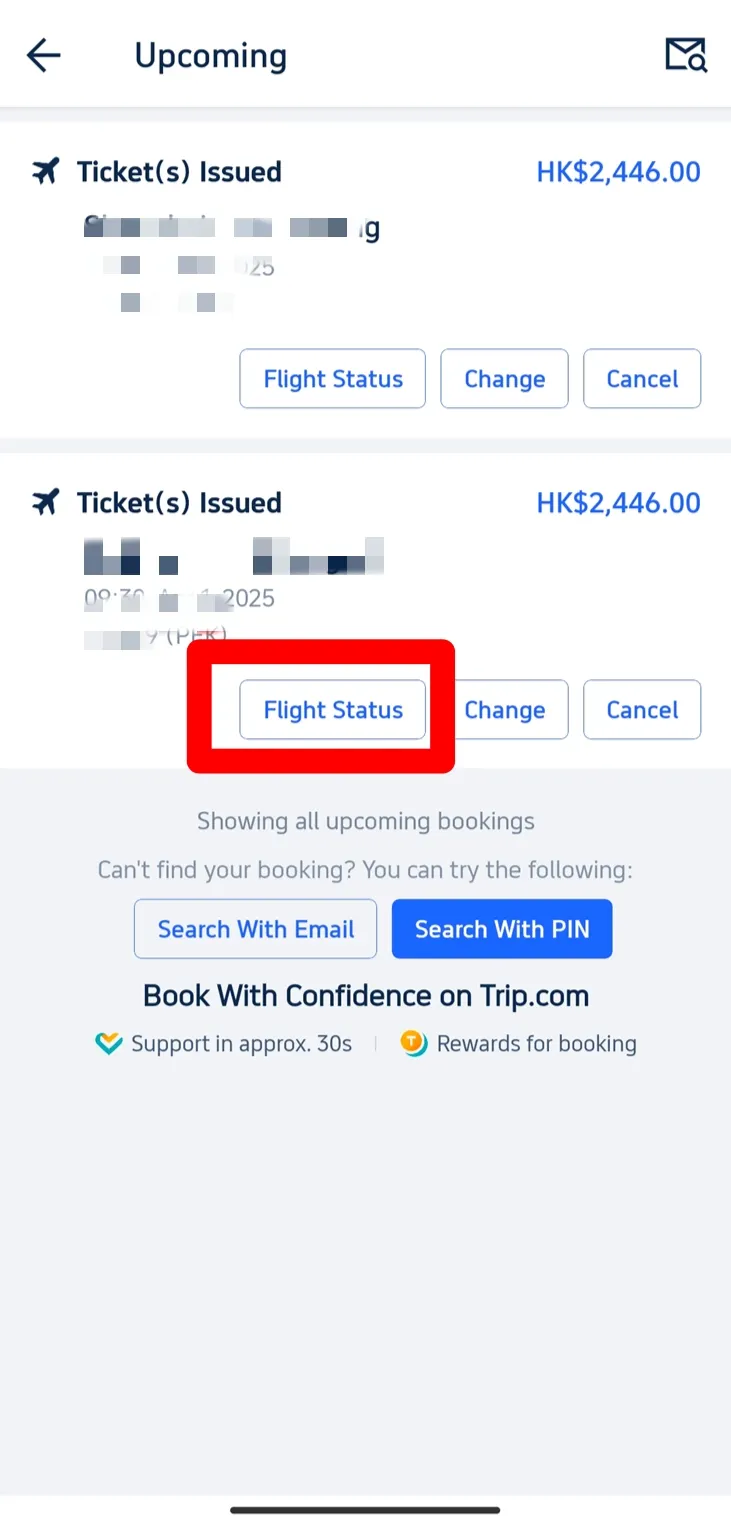
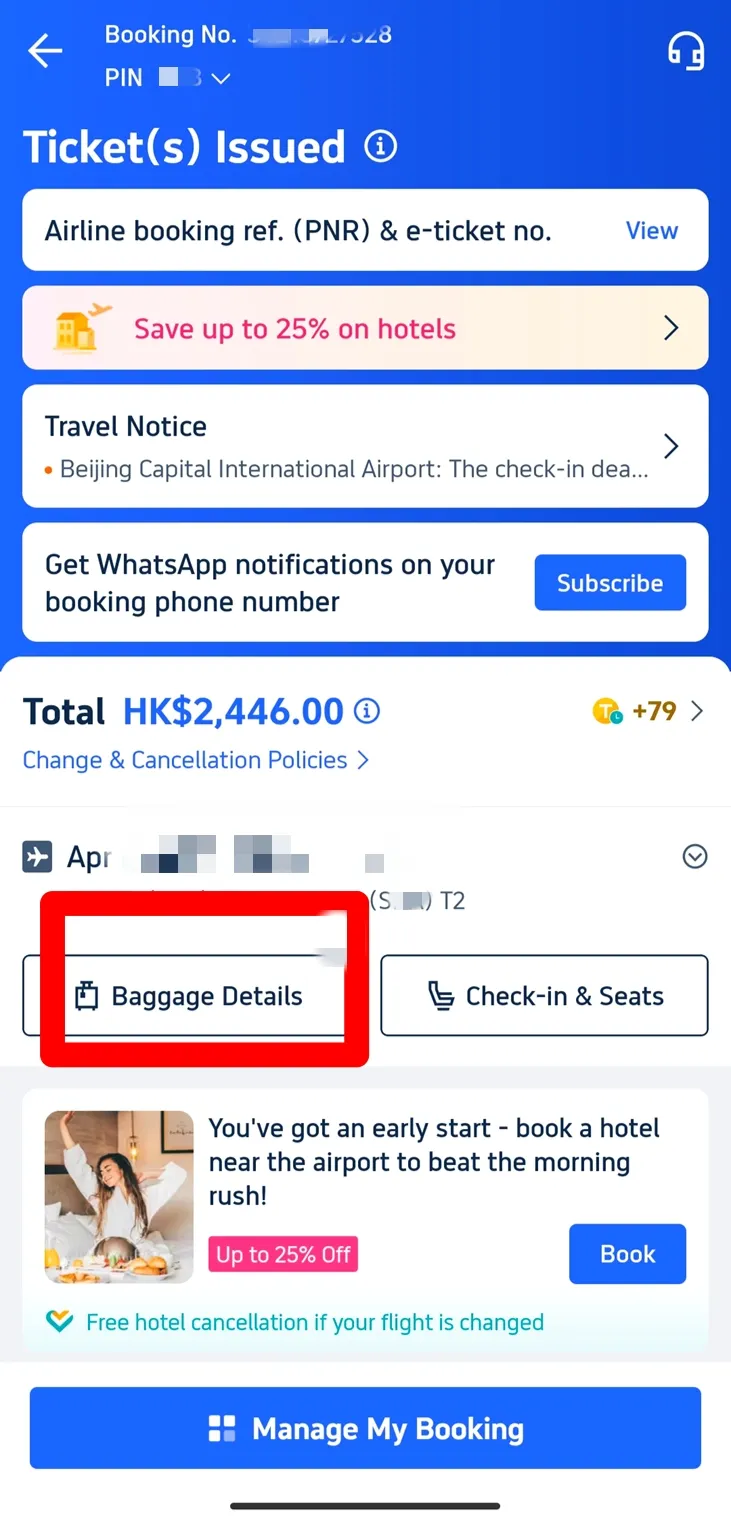
Step 3: Check Your Trip.com Baggage Allowance
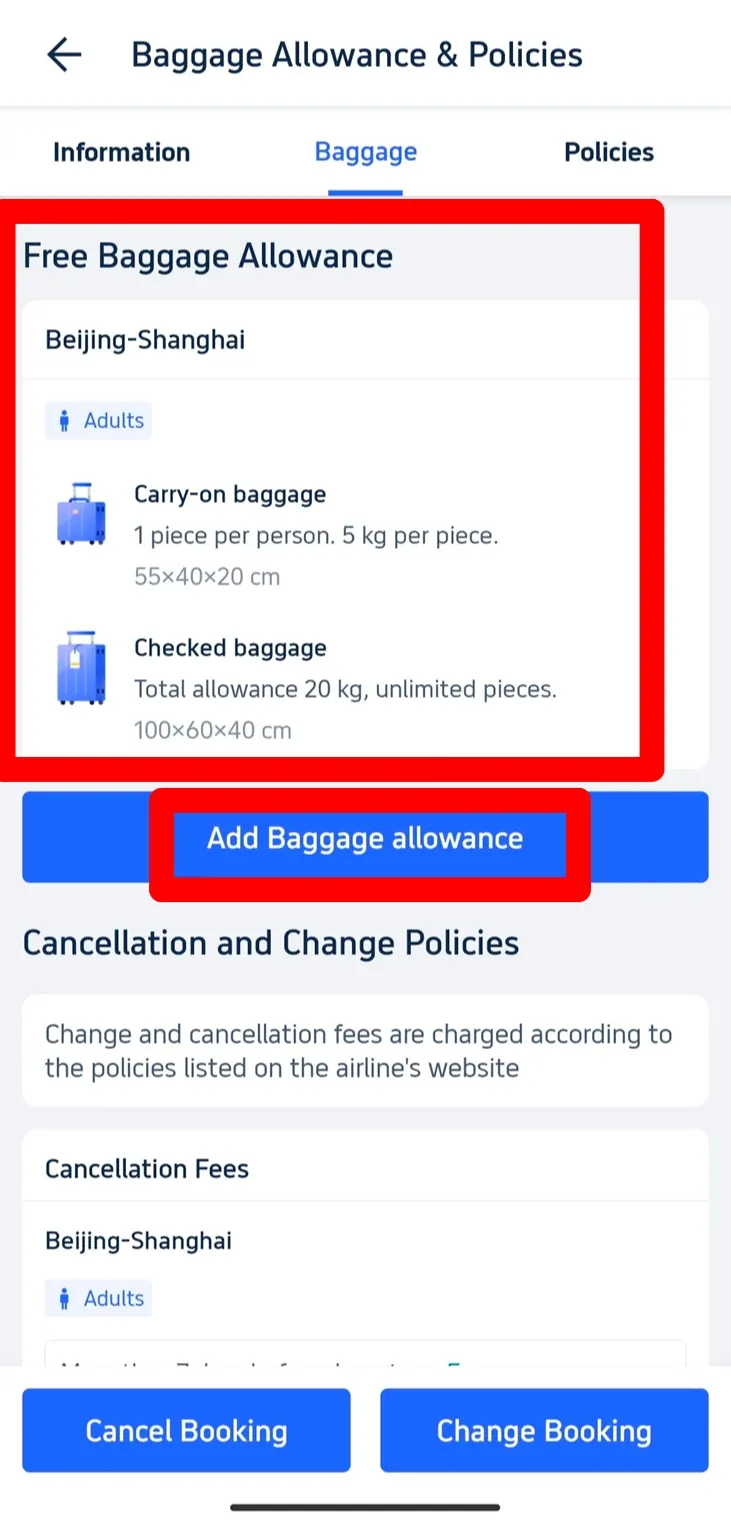
- Find your baggage details. On the next page with your ticket information, look for the "Baggage Details" button. Tap it to see your baggage allowance.
- What's included: On the baggage information page, you'll see the free baggage allowance included with your ticket. This will show you the limits for both carry-on and checked baggage, such as the number of pieces allowed and weight restrictions.
- Check your free baggage allowance: for example, it might specify that you're allowed one piece of carry-on luggage up to 5 kg and checked baggage up to 20 kg.
Step 4: Add Extra Baggage
Click "Add Baggage Allowance": If you need extra luggage, simply tap the "Add Baggage Allowance" button on the "Baggage Details" page.
Step 5: Select Your Extra Baggage Allowance
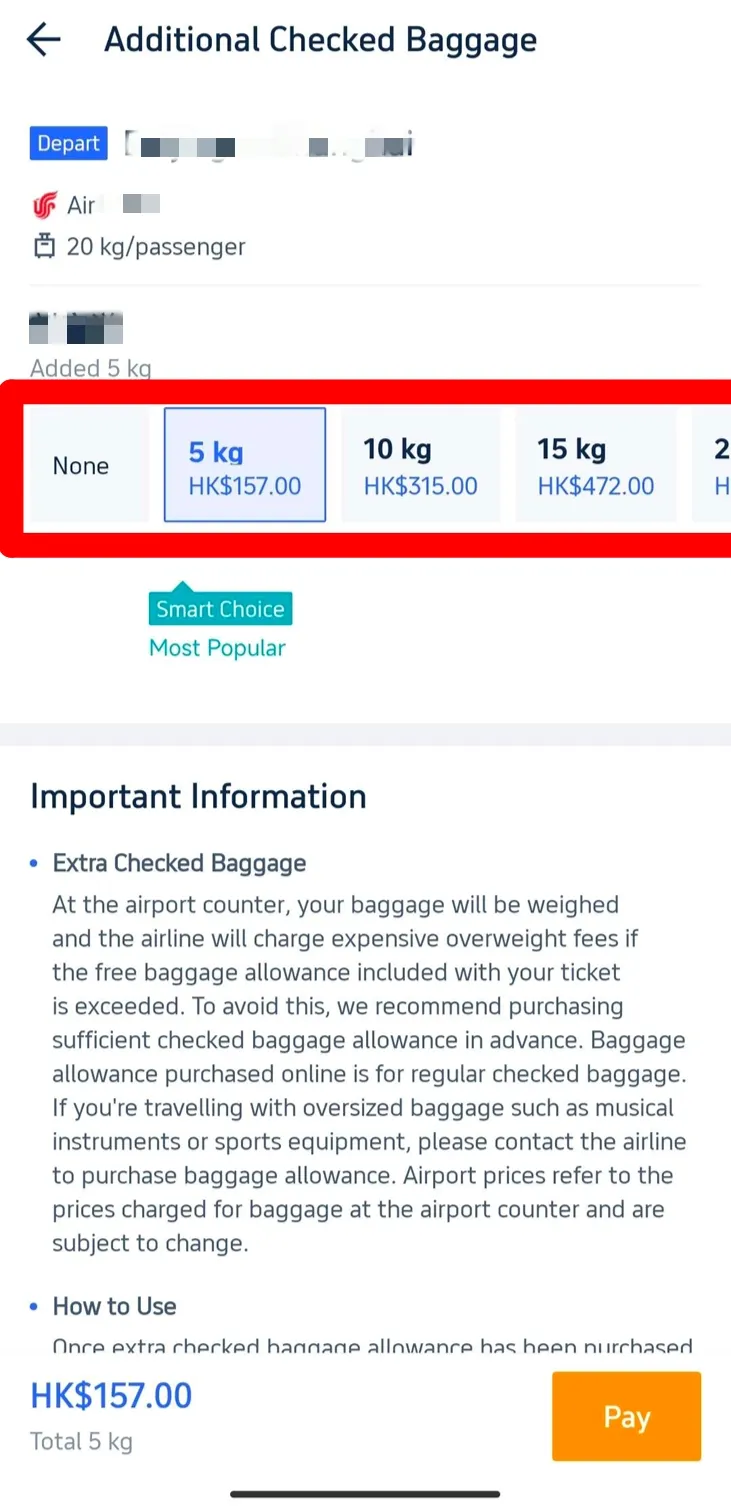
- Select additional baggage: You'll see a variety of options to add more. Simply choose how many extra kilograms you need, and the app will show you the cost for each option.
- Smart Choice option: The app may suggest a "Smart Choice" for you — a popular baggage allowance option that other travelers often select.
Tips on Trip.com Baggage Allowance
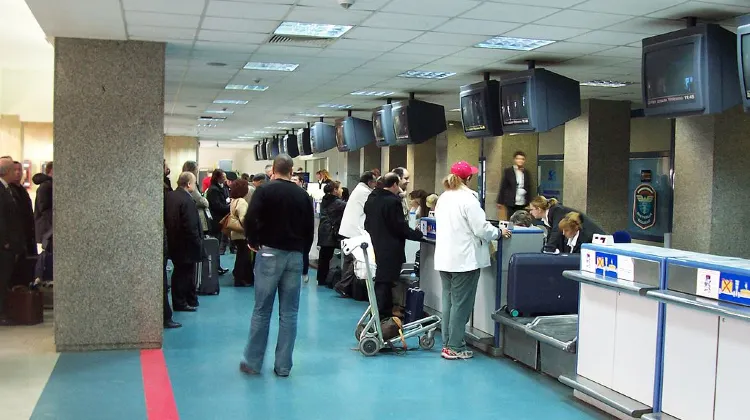
Luggage is weighed during passenger check-in at the airport. (from Wikipedia)
- Avoid extra fees: remember that your luggage will be weighed at the airport. If it exceeds the allowance included in your ticket, you may have to pay high excess baggage fees. To avoid this, it's best to purchase extra baggage in the app before your flight.
- Special baggage: If you are traveling with oversized items, such as musical instruments or sports equipment, please contact the airline directly. These items may require an additional Trip.com baggage allowance, and fees at the airport can be significantly higher.
 2369 booked






Start Your Journey with Trip.com
Trip.com is your go-to international online travel agency, offering 24/7 customer support in multiple languages. It’s never been easier to book flights, hotels, tours, and activities all in one place. Plus, our Platinum and Diamond members enjoy exclusive perks like complimentary airport lounge access, extra Trip Coins, special hotel savings, and so much more!
[10% Off] A Curated Selection of Hotels Worldwide























Popular Queries
-
Top flight destinations
-
Top flight routes
-
Most booked airlines
-
Popular eSIM/SIM card
-
Top Car Rental Picks
-
Popular Hotel Destinations
- Flights to Manila
- Flights to Mumbai
- Flights to Kochi
- Flights to Chennai
- Flights to Kozhikode
- Flights to Delhi
- Flights to Thiruvananthapuram
- Flights to Hyderabad
- Flights to Cairo
- Flights to Islamabad
- Flights to Jeddah
- Flights to Lahore
- Flights to London
- Flights to Dubai
- Flights to Mangalore
- Flights to Karachi
- Flights to Abu Dhabi
- Flights to Riyadh
- Flights to Colombo
- Flights to Amman
- Flights to Bengaluru
- Flights to Dhaka
- Flights to Tiruchirapalli
- Flights to Kathmandu
- Flights to Kannur
- Flights from Dubai to Manila
- Flights from Dubai to Mumbai
- Flights from Dubai to Kochi
- Flights from Dubai to Chennai
- Flights from Abu Dhabi to Kochi
- Flights from Dubai to Kozhikode
- Flights from Dubai to Delhi
- Flights from Abu Dhabi to Kozhikode
- Flights from Abu Dhabi to Thiruvananthapuram
- Flights from Dubai to Hyderabad
- Flights from Abu Dhabi to Cairo
- Flights from Dubai to Islamabad
- Flights from Dubai to Jeddah
- Flights from Dubai to Lahore
- Flights from Abu Dhabi to Mumbai
- Flights from Abu Dhabi to Chennai
- Flights from Dubai to London
- Flights from Dubai to Thiruvananthapuram
- Flights from Mumbai to Dubai
- Flights from Dubai to Cairo
- Flights from Kochi to Dubai
- Flights from Dubai to Mangalore
- Flights from Sharjah to Cairo
- Flights from Dubai to Karachi
- Flights from Kochi to Abu Dhabi
- Car rentals in Wellington
- Car rentals in Yotsukaidō Station
- Car rentals in Foley
- Car rentals in Nevada
- Denizli Çardak Airport Car rental
- Car rentals in Perito Moreno Glacier
- Car rentals in Manizales
- Car rentals in Tarneit
- Fort Worth Alliance Airport Car rental
- Car rentals in Toms River
- Al Wajh International Airport Car rental
- TSCL Rent-a-Car car rentals
- Car rentals in Pontedera - Casciana T.
- Car rentals in Penang
- Usiminas Airport Car rental
- WEEDON FIELD Car rental
- Joplin Regional Airport Car rental
- Juneau International Airport Car rental
- Daxing Car rental car rentals in Penghu
- Car rentals in Sandnessjoen
- Marshall Car rental
- Car rentals in Marine Drive Station
- Oranjemund Airport Car rental
- Car rentals in Demerara-Mahaica
- Vidalia Car rental
- Car rentals in Tàrrega
- Car rentals in Kemi Railway Station
- Car rentals in Jamaica
- Car rentals in Kayashima Station
- Car rentals in Dysart
- Car rentals in Shin-Imamiya Station
- Thai Rent a Car car rentals in Krabi Town
- Reykjavik Domestic Airport Car rental
- Car rentals in HSR Hsinchu Station
- Car rentals in Grevenbroich
- Dubai International Airport Car rental
- Car rentals in Marathon
- Car rentals in Balboa
- Car rentals in Frankston Station
- Wonderboom Airport Car rental
- Hotels in Dubai
- Hotels in Sharjah
- Hotels in Abu Dhabi
- Hotels in London
- Hotels in Riyadh
- Hotels in Jeddah
- Hotels in Cairo
- Hotels in Medina
- Hotels in Makkah
- Hotels in Paris
- Hotels in Milan
- Hotels in Bangkok
- Hotels in Istanbul
- Hotels in Manila
- Hotels in Mumbai
- Hotels in Karachi
- Hotels in Tokyo
- Hotels in New York
- Hotels in Rome